This website uses cookies. By continuing to browse the site, you confirm your consent to the use of these files.

  • Home
  • Questions and Answers

Questions and Answers

Answers to frequently asked questions on information security, biometrics, low-code development, fintech and other areas.

Information Security

314 questions

What is a VPN in simple words?

VPN (Virtual Private Network) is a technology that creates an encrypted tunnel between your device and the Internet. All traffic passes through this tunnel, protecting data from interception. It is like a secret corridor through which your data travels safely. VPN is used to protect personal data and access corporate resources. For government systems, a VPN must use certified CIPF. The installation service will help you deploy a VPN in your infrastructure.

How to choose a VPN for business?

For business, a VPN is chosen based on the network scale, the number of employees and regulatory requirements. Key criteria: support for certified CIPF, compliance with 187-FZ and 152-FZ, and the ability to integrate with existing infrastructure. It is recommended to use server VPN solutions (Site-to-Site) to unite branches and Remote Access for remote employees. The "Fintech" company offers installation and configuration of corporate VPN solutions with a guaranteed level of security.

How to set up a VPN for remote access for employees?

To organize remote access for employees to the corporate network via VPN, you need to: 1) deploy a VPN server at the network boundary, 2) configure PKI certificates for client authentication, 3) install VPN clients on work devices. For government systems, the use of certified CIPF is mandatory. The "Fintech" company offers installation and configuration of corporate VPN solutions.

What is the catch of a free VPN?

The catch of free VPN services is that they make money by selling user data to advertisers, limit speed and traffic, and may contain malware. Free VPNs do not guarantee confidentiality and do not use certified CIPF. For government and corporate systems, the use of free VPNs is unacceptable. The "Fintech" company offers reliable corporate VPN solutions with a security guarantee.

What happens if the VPN is on all the time?

An always-on VPN provides continuous protection of all data, but may slow down the Internet speed due to encryption and routing of traffic through remote servers. Problems with access to some local services are also possible. For corporate systems, it is recommended to use a VPN with certified CIPF and split tunneling settings to balance security and performance. The installation service will help you configure the optimal VPN configuration.

How does a VPN protect data on public Wi-Fi networks?

When connecting to public Wi-Fi networks, traffic can be intercepted by attackers. VPN encrypts all traffic, making it unreadable to interceptors. This is especially important for employees working remotely and when using mobile devices to access corporate resources. For organizations whose employees often work outside the office, a VPN is a mandatory element of protection. The installation service will help you configure a corporate VPN solution.

Is there a built-in VPN in my phone?

Android and iOS have built-in VPN clients, but they only support limited protocols (PPTP, L2TP/IPSec, IKEv2). For full functionality and the use of certified CIPF, it is recommended to install specialized VPN applications. For corporate systems, we offer the configuration of VPN clients using PKI certificates. The installation service will help you deploy a corporate VPN solution.

What is a firewall in simple words?

A firewall is a virtual checkpoint that filters incoming and outgoing traffic, letting only safe data through and blocking threats. It works like a security guard: checks data packets, verifies them against the rules and decides whether to allow or block. Integration with SIEM and SOC provides comprehensive protection. The installation service will help you deploy a firewall in your network.

What is a firewall?

A firewall is a computer network security system that restricts the passage of incoming, outgoing and intra-network traffic. It is a software or hardware-software tool that decides whether to allow or block a data packet. Modern firewalls integrate with SIEM and NGFW for deep traffic analysis. The installation service will help you configure a firewall.

Where is a firewall installed?

A firewall is installed at the boundary between the organization's internal network and external networks (usually the Internet). It can also be placed inside the corporate network in front of segments with confidential data. Firewalls can be hardware (installed in server racks) and software (on servers and workstations). The installation service will help you correctly place and configure a firewall in your infrastructure.

How does a firewall differ from a router?

A router forwards data between networks, directing packets in the right direction, but does not analyze their contents. A firewall filters traffic and prevents attacks, making decisions based on security rules. Modern firewalls integrate with NGFW and SIEM. The installation service will help you choose and configure the right solution.

What is another name for a firewall?

A firewall is also called an edge firewall, security firewall or network firewall. All these terms denote the same protection tool — a network traffic filtering system. Modern solutions include NGFW (next-generation firewalls) with extended functions. The installation service will help you deploy a firewall in your organization.

What are some examples of firewalls?

Examples of firewalls: hardware — Cisco ASA, FortiGate, Check Point; software — UserGate, pfSense, OPNSense; built-in — Windows Firewall, iptables in Linux. Modern NGFW solutions combine filtering with IPS, antivirus and application control. The installation service will help you choose and configure the optimal solution for your network.

What does a firewall protect against?

A firewall protects a computer network from unauthorized access, port scanning, network attacks and malware. It controls network traffic, blocks suspicious connections and prevents data leaks. Integration with SIEM and SOC provides comprehensive security monitoring. The installation service will help you properly configure protection. To study related concepts, we also recommend reading about Captcha, DDoS attack, Unauthorized access and Sandbox.

What is DLP in simple words?

DLP (Data Loss Prevention) is a system that prevents employees from accidentally or deliberately taking secret data outside the company. It controls correspondence in messengers and email, blocks sending files to flash drives and cloud storage, and also records suspicious actions. DLP helps comply with the requirements of 152-FZ on personal data. Read more about protection approaches in the technologies section.

What is a DLP system?

A DLP system (Data Loss Prevention) is software for protecting corporate information from leaks and unauthorized access. It controls all communication channels: email, messengers, social networks, cloud storage, USB flash drives and document printing. When confidential data is detected, the system blocks the transfer and notifies the security service. DLP systems integrate with SIEM and CIPF. Learn more about data protection in the technologies section.

What is the difference between DLP and SIEM?

DLP and SIEM are different classes of security systems. DLP prevents internal data leaks by controlling the transfer of confidential information. SIEM collects and analyzes security events from the entire IT infrastructure to detect cyber attacks. In a modern infrastructure, DLP and SIEM work in tandem: DLP blocks leaks, and SIEM records violation attempts. Both systems integrate with SOC for prompt response. Read more about protection in the technologies section.

What are some examples of DLP systems?

Popular on the Russian market are InfoWatch Traffic Monitor, Solar Dozor, SearchInform KIB, StaffCop Enterprise and Garda DLP. Among international solutions are Microsoft Purview, Forcepoint DLP and Symantec DLP. When choosing DLP, it is important to consider integration with SIEM and compliance with 152-FZ requirements. The design service will help you choose the optimal solution for your organization.

What types of DLP systems are there?

DLP systems are classified by architecture: network (control traffic at the network boundary), agent-based (installed on workstations) and hybrid. By analysis method they are divided into content-based (check file contents), contextual (analyze transfer conditions) and behavioral (track anomalies in user actions). Full-featured platforms integrate with SIEM and CIPF. Read more about the choice in the technologies section.

Is DLP software or hardware?

DLP is primarily software. It can be implemented as agent software on end devices (laptops, workstations) and as network sensors to intercept traffic at gateways. In some cases, hardware accelerators are used to process large amounts of data, but the basis of DLP is a software platform. To protect data, DLP integrates with CIPF and access control systems. Learn more in the technologies section.

What is the DLP process?

The DLP (Data Loss Prevention) process includes three stages: data collection (interception of traffic and user activity), analysis (content, contextual or behavioral) and response (blocking transfer, warning or recording an incident). Modern DLP systems use machine learning to identify anomalies. For comprehensive protection, DLP integrates with SIEM and SOC. Read more about implementation in the our services section.

What is SIEM in simple words?

SIEM is a system that collects all security events from the entire company's IT infrastructure (logs of servers, firewalls, antiviruses), analyzes them and alerts about suspicious activity. It is like a security control center that sees what is happening across the network. SIEM helps detect attacks that are individually unnoticeable. For comprehensive protection, SIEM integrates with SOC and DLP systems. Learn more about monitoring approaches in the technologies section.

What is the difference between DLP and SIEM?

DLP and SIEM are different classes of security systems. DLP prevents internal data leaks by controlling the transfer of confidential information (email, messengers, USB). SIEM collects and analyzes security events from the entire IT infrastructure to detect cyber attacks. DLP blocks data transfer, SIEM alerts analysts about threats. In a modern infrastructure they work in tandem: DLP sends data to SIEM for comprehensive analysis. Read more about protection in the technologies section.

What are SIEM and SOC?

SIEM (Security Information and Event Management) is a software platform for collecting and analyzing security events. SOC (Security Operations Center) is a monitoring and incident response center where analysts work using SIEM as their main tool. SIEM is a technology, SOC is a team and processes. For effective SOC operation, integration with SIEM and other systems is necessary. The design service will help you organize a SOC in your company.

Are SIEM systems free?

There are no fully free ready-made SIEM systems. However, there are powerful open source solutions: Wazuh, ELK Stack, Security Onion. They require self-configuration and do not have ready-made correlation rules. There are conditional free versions (for example, Splunk Free with a data volume limit). For government information systems and CII facilities, it is recommended to use commercial SIEM solutions. The design service will help you choose the optimal solution.

What is the essence of SIEM?

The essence of SIEM is the centralized collection, normalization and correlation of security events from all devices and systems of the company. SIEM aggregates logs, brings them to a unified format, analyzes relationships and identifies anomalies. When suspicious activity is detected, the system alerts SOC analysts. SIEM also provides long-term data storage for investigations and compliance with regulatory requirements. Read more about protection in the technologies section.

What are some examples of SIEM programs?

On the Russian market: MaxPatrol SIEM (Positive Technologies), Kaspersky Unified Monitoring and Analysis Platform, RuSIEM, Ankey SIEM, KOMRAD Enterprise SIEM. International solutions: Splunk Enterprise Security, IBM QRadar, ArcSight. When choosing SIEM, it is important to consider integration with SOC and compliance with 187-FZ requirements for CII facilities. The design service will help you choose the optimal solution.

Are SIEM and Splunk the same thing?

No. SIEM is a class of systems for managing security information and events. Splunk is a specific product that can be used as a SIEM platform (Splunk Enterprise Security). Splunk is one implementation of the SIEM approach, along with IBM QRadar, ArcSight and Russian solutions. For CII facilities in Russia, it is recommended to use domestic SIEM solutions. Read more about the choice in the technologies section.

What is a SOC in simple words?

SOC (Security Operations Center) is a security monitoring center that monitors the company's IT infrastructure around the clock, detects hacker attacks and protects data. It is like a security service, but in the digital world. A SOC uses SIEM systems to collect events and alerts analysts about threats. A SOC can be organized as an internal department or as an outsourced service. Learn more about protection in the technologies section.

What does SOC mean?

The SOC abbreviation has several meanings. In the field of information security and cybersecurity — Security Operations Center (a center for monitoring and responding to cyber incidents). In electronics — System on a Chip. In energy — State of Charge (battery charge level). In the context of our activities, a SOC is an information security monitoring center that uses SIEM and other tools. Read more about SOC in the technologies section.

What is SOC in a PC?

In the context of PCs and electronics, SOC (System-on-a-Chip) is a single microchip that combines a central processor, graphics processor, modem and controllers. Examples: Apple M-series chips, Snapdragon, MediaTek. In information security, SOC means Security Operations Center — a security monitoring center. In the context of our activities, a SOC is an information security center that uses SIEM to protect IT infrastructure. Learn more in the technologies section.

SOC and SIEM — what are they?

SOC (Security Operations Center) is a center for monitoring and responding to incidents where security analysts work. SIEM (Security Information and Event Management) is a software platform that collects and analyzes security events. SIEM is the main tool used by a SOC for monitoring. A SOC includes people, processes and technologies, and SIEM is one of the key technologies in a SOC. The technical support service helps organize a SOC.

What is a SOC in Russia?

In Russia, a SOC is a department responsible for 24/7 monitoring and protection of an organization's IT infrastructure. The main task of a SOC is proactive detection, analysis and response to cyber threats. For CII facilities and government information systems, the creation of a SOC is recommended by regulators. More than 90% of large organizations in Russia plan to create their own SOCs or use MSSP services. Read more about approaches in the technologies section.

What are SOC analysts of levels L1, L2, L3?

Analysts of three levels work in a SOC. L1 (first level) are primary triage operators who process alerts from SIEM and classify incidents. L2 (second level) are analysts for in-depth investigation and response. L3 (third level) are threat hunting, forensic analysis and correlation rule development experts. To train analysts, we offer training services.

How much does a SOC analyst earn?

The salary of a SOC analyst depends on the skill level and region. In Moscow and St. Petersburg, an L1 analyst can earn from 80,000 to 150,000 rubles, L2 — from 150,000 to 250,000 rubles, L3 — from 250,000 rubles and above. The demand for SOC analysts in Russia is constantly growing, especially in connection with the requirements of 187-FZ for CII facilities. The training service helps prepare specialists for working in a SOC.

What does PKI stand for?

PKI stands for Public Key Infrastructure. It is a set of technologies, processes and policies for managing digital certificates and cryptographic keys. PKI ensures secure data exchange and authentication in networks. In Russia, PKI must use certified CIPF. Read more about the components in our glossary.

What is PKI?

PKI (Public Key Infrastructure) is a set of policies, technologies and hardware tools for creating, managing, storing and revoking digital certificates. PKI is based on asymmetric encryption: the public key is available to everyone, the private key is only to the owner. A digital certificate connects the public key to a specific user. The design service helps implement PKI in your organization. Learn more about data protection in the technologies section.

What is a PKI certificate?

A PKI certificate (digital public key certificate) is a digital document that connects a public cryptographic key to a specific owner. It acts as a digital identity card. The certificate is signed by a certification authority (CA) that guarantees authenticity. In Russia, certificates must comply with CIPF requirements. Read more about security in the technologies section.

What is the difference between PKI and PSK?

PSK (Pre-Shared Key) uses a single common secret to authenticate all devices in a group. PKI assigns each device a unique digital identifier (a certificate from a trusted certification authority). PKI is more secure and scalable, but more complex to implement. In Russia, PKI must use certified CIPF. The design service will help choose the optimal approach.

Is PKI the same as SSL?

No, these are different concepts. SSL (Secure Sockets Layer) is an encryption protocol that uses a certificate to protect the connection between a client and a server. PKI is an infrastructure for managing certificates and keys that underlies SSL/TLS. PKI is broader in functionality: it includes certificate management, signatures, encryption and authentication. In Russia, PKI must use CIPF. Read more about security in the technologies section.

What are the 4 main principles of PKI?

The four main principles of PKI: secure storage of private keys (tokens); verification of the user's identity (registration authority); issuance and signing of certificates (certification authority); storage and revocation of certificates (certificate management system). These components ensure trust in the digital environment. In Russia, all PKI components must comply with CIPF requirements. The design service will help implement a full PKI infrastructure.

Why is a PKI infrastructure needed?

PKI provides the necessary tools for data encryption, authentication and protection against unauthorized access. It is used for SSL/TLS, electronic signatures, secure mail and VPN. In Russia, PKI must use certified CIPF and comply with the requirements of the FSB of Russia. The design service helps design and implement a reliable PKI infrastructure.

What is an NGFW (next-generation firewall)?

NGFW (Next-Generation Firewall) is a next-generation firewall that combines the functions of a traditional firewall with deep packet inspection (DPI), an intrusion prevention system (IPS) and application control. Unlike a classic firewall, it analyzes traffic at the application layer and can identify applications and block threats regardless of ports and protocols.

How does an NGFW (next-generation firewall) work?

An NGFW inspects traffic at all levels of the OSI model. In addition to traditional packet filtering, it performs deep packet inspection (DPI), identifies applications by signatures and behavioral analysis, detects and blocks attacks in real time with an intrusion prevention system (IPS), filters URLs and scans traffic for malware.

Where is an NGFW (next-generation firewall) applied?

NGFW is used to protect the network perimeter, segment internal networks and protect data centers. It is deployed at the boundary between the corporate network and the Internet, as well as in front of segments with confidential data. In government information systems, the use of NGFW must comply with the requirements of the FSTEC of Russia.

What advantages does an NGFW (next-generation firewall) provide?

NGFW provides a higher level of protection compared to classic firewalls: deep packet inspection (DPI), an intrusion prevention system (IPS), application control regardless of ports and protocols, antivirus traffic inspection, URL and web content filtering, and DDoS protection. This allows detecting and blocking modern threats that traditional firewalls miss.

What are the NGFW (next-generation firewall) requirements in Russia?

The requirements for NGFW in Russia depend on the type of facility being protected. In government information systems, the use of NGFW must comply with the requirements of the FSTEC of Russia. For critical information infrastructure (CII) facilities, the requirements of 187-FZ apply. It is recommended to use certified solutions and integrate NGFW with SIEM and SOC.

How is an NGFW (next-generation firewall) different from analogues?

NGFW differs from a traditional firewall by its ability to inspect traffic at the application layer. A classic firewall filters packets by addresses and ports, while NGFW performs deep packet inspection, identifies applications by signatures and behavior, and combines IPS, antivirus and URL filtering in one device. This makes it more effective against modern threats.

How to implement an NGFW (next-generation firewall) in an organization?

To implement an NGFW in an organization, you need to: 1) choose a solution that meets the security requirements, 2) develop a security policy and filtering rules, 3) deploy the NGFW at the network boundary and configure traffic segmentation, 4) integrate it with SIEM and SOC for monitoring. The installation service includes NGFW deployment and configuration.

What relates to personal data under 152-FZ?

According to 152-FZ, personal data (PD) is any information that relates directly or indirectly to a specific individual. This includes identification data (full name, date of birth, place of birth), contact data (phone, address, email), passport data, TIN, SNILS, as well as digital traces (IP address, geolocation, cookies) and even photographs or voice if a person can be identified by them. A special category is formed by biometric data (fingerprints, face, voice), which requires enhanced protection and the mandatory use of CIPF tools during processing.

What is 152-FZ in simple words?

152-FZ is a law that protects your personal information. It obliges any organization (bank, online store, government body) to ask for your consent to collect data, store it confidentially and protect it from leaks, and also delete it on first request. Serious fines are provided for violating the law, up to turnover fines of 3% of annual revenue for companies.

What is the penalty for violating 152-FZ in 2025-2026?

Serious liability is provided for violating 152-FZ. This includes administrative fines (up to 700 thousand rubles for processing without consent), turnover fines for data leaks (up to 3% of annual revenue, but not less than 1 million rubles) and even criminal liability under Article 137 of the Criminal Code of the Russian Federation (imprisonment for up to 5 years). Website blocking and disqualification of officials are also possible. To avoid these risks, it is necessary to use certified protection tools such as CIPF and undergo regular security audits.

When is consent for personal data processing not required?

The consent of the subject is not required when data processing is necessary for the execution of a contract (for example, placing an order in a store), compliance with legal requirements (submitting reports to the tax authority), protecting the life and health of a person, as well as for the administration of justice. The full list of exceptions is specified in Article 6 of 152-FZ. In these cases too, the operator is obliged to ensure data confidentiality and use the necessary protection measures, including CIPF tools when transferring data.

What amendments to 152-FZ came into force in 2025?

Significant amendments to 152-FZ came into force on July 1, 2025: a ban was introduced on the use of foreign services (databases, cloud storage) for the primary collection and storage of data of Russians. Data collection through foreign web analytics is also considered a violation. Now businesses are obliged to use exclusively Russian infrastructure included in the Register of Domestic Software. Turnover fines for data leaks have also been increased — up to 3% of annual revenue.

Who is a personal data operator according to 152-FZ?

A personal data operator is any legal or natural person who organizes and carries out data processing, determining its purposes and composition. These can be government bodies, banks, online stores, employers, medical institutions and any other structures. The operator is charged with the obligation to ensure the security of systems, for which firewalls, SIEM systems and DLP systems are used. You can check whether you are an operator and learn about the procedure on the Roskomnadzor website.

How not to violate 152-FZ when working with personal data?

To comply with 152-FZ, it is necessary to complete several key steps: submit a notification to Roskomnadzor, obtain the consent of subjects for processing (in written or electronic form), publish a Privacy Policy on the website, and ensure data storage on the territory of the Russian Federation using Russian services from the Register of Domestic Software. It is also critically important to implement technical protection tools: DLP systems to prevent leaks, CIPF tools for encryption and SIEM systems for incident monitoring. Regular audit and design of secure systems will help avoid fines.

What is CII and who does the 187-FZ law affect?

CII (critical information infrastructure) is information systems, telecommunication networks and automated control systems used in vital spheres of the state. Law 187-FZ obliges government bodies and companies from critical sectors (banks, transport, communications, energy, healthcare) to protect their systems from cyber attacks and report computer incidents. To fulfill the requirements of the law, it is necessary to use certified CIPF tools and other protection measures.

What is 187-FZ in simple words?

187-FZ is a law that obliges vital organizations to protect their computers, networks and databases from cyber attacks. Its main goal is to prevent hackers from turning off the electricity, stopping trains, hacking hospitals or disrupting the work of banks. The law requires companies to categorize systems, implement protection and report attacks to the FSTEC and the FSB. Firewalls and intrusion detection systems are used to protect CII facilities.

What must a CII entity do according to 187-FZ?

A CII entity is obliged to categorize facilities and send the results to the FSTEC, create a security system using certified tools, implement technical protection measures (access control, encryption, antivirus protection), and also report computer attacks and interact with GosSOPKA. It is recommended to use SIEM systems and DLP solutions to ensure the security of CII facilities.

Who falls under the scope of 187-FZ?

Government bodies and Russian legal entities that own information systems in critically important sectors fall under the scope of the CII law: healthcare, transport, communications, energy, banking, defense, nuclear, mining, metallurgical and chemical industries. Individual entrepreneurs are excluded from this list. Biometric systems and access control systems (ACS) are used to identify and authenticate users at CII facilities.

What categories of CII facility significance exist?

187-FZ establishes three categories of CII facility significance. The first category — facilities whose security breach could lead to an emergency of federal scale. The second category — facilities whose accident creates a threat on a regional scale. The third category — facilities whose incidents could cause damage on the scale of a municipality. Particularly significant facilities for defense and security are also distinguished. Various cryptographic protection tools are used to protect facilities of different categories.

What is a CII facility according to 187-FZ?

A CII facility is information systems, information and telecommunication networks and automated control systems of critical information infrastructure entities. These include process control systems (SCADA), databases, data transmission networks and other equipment that ensures the functioning of critical sectors. Certified tools, including firewalls and access control systems, are needed to protect such facilities.

What amendments to 187-FZ come into force on September 1, 2025?

Amendments to 187-FZ tightening CII security requirements come into force on September 1, 2025. Mandatory certification of protection tools for all categories of facilities is introduced, requirements for incident monitoring and interaction with GosSOPKA are strengthened. The list of facilities subject to mandatory certification is also expanded. A ban on the use of foreign software at CII facilities is introduced (except for cases where there are no domestic analogues). To prepare for the changes, it is recommended to undergo certification of CII facilities. Read more about government regulation of the industry in the article Government regulation in IT.

What is SKZI in simple words?

SKZI are programs or devices that encrypt data and create electronic signatures. They turn ordinary data into unreadable code, protecting it from theft and forgery. SKZI are used in electronic document management, bank transfers and secure communications. The SINTEZM product is a certified SKZI for electronic signatures and encryption. The research service will help you choose the optimal SKZI.

What is SKZI?

SKZI (cryptographic information protection tools) are hardware, software and software-hardware complexes for data encryption, protection against unauthorized access and creating electronic signatures. In Russia, all SKZI are subject to FSB certification. The SINTEZM product is a certified SKZI. The research service will help you select the optimal solution.

What are some examples of SKZI?

Examples of software SKZI: CryptoPro CSP, ViPNet CSP, Kontur.Kripto, and the SINTEZM product. Hardware SKZI: Rutoken, JaCarta. Software-hardware: ViPNet Coordinator, CryptoPro HSM. In Russia, only SKZI certified by the FSB are allowed for use. The research service will help you choose the optimal solution for your tasks.

What is SKZI in a tachograph?

SKZI in a tachograph is a cryptographic information protection tool, a special cryptographic chip that encrypts data about the speed, mileage and route of a vehicle. The SKZI unit protects against data forgery, supports the operation of driver cards with an electronic signature and records coordinates via GLONASS/GPS. The service life of the SKZI unit is 3 years. The SINTEZM product is an example of software SKZI.

How to determine the SKZI class?

The SKZI class is determined according to FSB Order No. 378, based on the type of threats, the level of significance and the scale of processed data. Classes: KS1 (protection against external threats), KS2 (protection against internal threats), KS3 (high protection), KV (for government systems), KA (maximum class). The class is indicated in the documentation and the FSB certificate. The SINTEZM product has an FSB certificate. The research service will help determine the required class.

Who can work with SKZI?

Only authorized employees who have completed training and gained access to encryption keys and electronic signatures are allowed to work with SKZI. They must comply with operating rules, keep keys secret and promptly detect hacking attempts. The SINTEZM product is a certified SKZI for corporate use. The training service will help prepare employees.

What is not allowed for a SKZI user?

A SKZI user is prohibited from: transferring keys to third parties, disclosing passwords from media, leaving media unattended, creating backup copies of keys without approval, making changes to SKZI software, and using work keys on personal computers. Violation of the rules entails liability. The SINTEZM product is a certified SKZI with clear operating rules.

How can I create an electronic signature?

The fastest way is to obtain a free signature through the Gosklyuch application (a verified Gosuslugi account is required). For business (LLC/IE), the most reliable method is to contact the Certification Authority of the Federal Tax Service of Russia or its trusted representatives. You can also obtain a QES at commercial accredited certification authorities such as Kontur or Tensor. Working with a signature will require a cryptographic information protection tool, for example CryptoPro CSP.

Where can I find my electronic signature?

Information about electronic signature certificates issued in your name can be found in the personal account of the Gosuslugi portal in the "Profile" — "Electronic signature" section. The physical signature file (private key) is stored on a protected medium (token) or in the register of the certification authority. If you cannot find your signature, contact the CA where it was issued.

Can I create an electronic signature through Gosuslugi?

Yes, through Gosuslugi it is easiest to obtain a non-qualified (ENES) or qualified electronic signature (QES) using the official Gosklyuch application. The process is free and remote. For a QES, you will need to confirm your identity (through biometrics with a new-format foreign passport or in person at an MFC). This is a convenient way to obtain a legally significant signature for personal needs and business.

What does an electronic signature look like?

An electronic signature does not have a single visual appearance. In PDF and Word, it can look like a rectangular stamp with information about the owner, date and time of signing. It can also be represented as a separate file with the extension .sig, .sgn or .p7s. The signature itself is not a picture, but a set of cryptographic data confirming authorship. Its authenticity is verified using public key infrastructure (PKI).

Who issues an electronic signature?

Electronic signatures are issued by accredited certification authorities (CAs). For heads of organizations and individual entrepreneurs, a signature is issued free of charge at the CA of the Federal Tax Service of Russia. For individuals and employees of organizations — at commercial accredited CAs (for example, Tensor, SKB Kontur). The full list of accredited centers is published by the Ministry of Digital Development on the Gosuslugi portal. When obtaining a signature for employees, a machine-readable power of attorney from the head will be required.

What is a machine-readable power of attorney (MCD)?

A machine-readable power of attorney (MCD) is an electronic document in XML format that confirms the authority of an employee to sign electronic documents on behalf of a legal entity. Since September 1, 2024, the MCD has become mandatory when employees use a QES. The MCD is signed with the QES of the head and is stored in the Unified MCD repository of the Federal Tax Service of Russia. This greatly simplifies the verification of authority in electronic document management.

How long is an electronic signature valid?

The validity period of a qualified electronic signature (QES) certificate is 15 months (1 year + 3 months) for most types of certificates. For individuals, the period can be up to 3 years. After the certificate expires, the signature becomes invalid — documents signed with an expired signature lose legal force. You must promptly reissue the certificate at the certification authority. We also recommend familiarizing yourself with the concept of Tokenization.

What is data encryption?

Data encryption is the process of transforming information into unreadable code using mathematical algorithms and a key. Only users with the appropriate access key can read the data. This is the basis of security on the Internet, in e-commerce and corporate systems. For government organizations, the use of certified cryptographic information protection tools is mandatory.

What methods of data encryption are there?

There are three main methods: symmetric encryption (one key for encryption and decryption, fast, for example AES, GOST "Magma"); asymmetric encryption (a pair of keys: public and private, used for signing and key exchange, for example RSA, GOST R 34.10); hybrid encryption (a combination of symmetric and asymmetric encryption to protect session keys). In Russia, for government systems, the use of GOST algorithms implemented in certified CIPF tools is mandatory.

Why encrypt data?

Data is encrypted to ensure confidentiality during storage and transmission. This protects information from theft, unauthorized access and leaks. Encryption is mandatory when transmitting payment data, personal information and trade secrets. For Russian companies, encrypting personal data is a requirement of 152-FZ.

What are the Russian encryption standards?

Russia has national encryption standards approved by the FSB: GOST 28147-89 ("Magma") — a classic block cipher with a 256-bit key; GOST R 34.12-2015 ("Kuznechik") — a modern block cipher; GOST R 34.10-2012 — an electronic signature algorithm based on elliptic curves; GOST R 34.11-2012 ("Stribog") — a hashing algorithm. These algorithms are mandatory for government information systems and CII facilities.

Should I encrypt data on my phone?

Encrypting data on your phone is strongly recommended, as it protects your personal photos, videos, correspondence and banking data from theft in case of device loss or hacking. Modern smartphones have built-in encryption (for example, iOS and Android encrypt data by default). This is a basic protection measure that will not allow attackers to gain access to your information.

What are the two types of encryption?

Cryptography distinguishes two main types of encryption: symmetric and asymmetric. Symmetric uses one key for encryption and decryption — fast and efficient for large amounts of data. Asymmetric uses a pair of keys (public and private) — slower but safer for exchanging data over unsecured channels. They are often combined in hybrid schemes, where asymmetric encryption protects the key for the symmetric algorithm.

What is hashing and how is it different from encryption?

Hashing is a one-way mathematical transformation of data into a string of fixed length (a hash). Unlike encryption, hashing is irreversible — it is impossible to restore the original data from a hash. Hashing is used to verify data integrity, store passwords and create digital fingerprints of files. Encryption, on the contrary, is reversible and is used to ensure data confidentiality. In Russia, the GOST R 34.11-2012 ("Stribog") standard is used for hashing.

What is the difference between authentication and identification?

Identification answers the question "Who are you?" — you report your login or number to the system. Authentication proves "You are really you" — you enter a password, an SMS code or scan a fingerprint. Identification is presenting yourself to the system, authentication is confirming authenticity. The Biomark and Biovizum products are used for biometric authentication. The design service will help implement an authentication system.

What is identification in simple words?

Identification is the process of recognizing and assigning a unique name (identifier) to a person or object to distinguish them from all others. In simple words, this is the answer to the question: "Who are you?" In IT, this is entering a login when accessing an account; in everyday life, it is presenting a passport. Authentication follows identification — proof that you are really who you claim to be. The Biomark and Biovizum products provide biometric identification.

What is authentication in simple words?

Authentication is the verification of the authenticity of a user. The system makes sure that you are really you and not someone else. This is similar to a guard checking a passport at the entrance: you state your name (login), and the document proves that you are the owner of this name. The system checks: what you know (password), what you have (SMS code) or who you are (biometrics). The Biomark and Biovizum products provide biometric authentication.

What are the 3 authentication factors?

The three classic authentication factors: knowledge (something you know — password, PIN code); possession (something you have — a phone for SMS codes, a hardware token); attribute (something you are — biometrics: fingerprint, face, voice). Using two or three factors is called multi-factor authentication (MFA). The Biomark and Biovizum products are used for biometric authentication. The design service will help implement MFA.

What are authentication and identification systems?

Authentication and identification systems are complexes of tools for recognizing users and verifying their authenticity. An example is ESIA (Unified Identification and Authentication System) on Gosuslugi. It allows citizens to use one login and password to access government services. In corporate systems, the Biomark and Biovizum products are used. The design service will help implement an identification and authentication system.

Is identification possible without authentication?

Identification without authentication is possible, but it does not provide security. The system will know who you are (by login), but it will not be able to confirm that you are really that person. This is like stating your name but not showing a passport — the system can be fooled. Authentication is necessary for full protection. The Biomark and Biovizum products provide reliable biometric authentication.

What are some examples of identification?

Examples of identification: entering a login when visiting a website, scanning a fingerprint to unlock a phone, presenting a passport at a bank. In psychology, identification is the process of identifying oneself with another person or group. In IT, identification is the first step of access, followed by authentication and authorization. The Biomark and Biovizum products provide biometric identification in corporate systems.

What is verification in simple words?

Verification is the checking of authenticity or confirmation of data. In simple words, it is a process that proves that you are you, and that the information provided or documents are genuine and correct. In banks, when opening an account you are asked to upload a photo of your passport — this is identity verification. On social networks, the blue checkmark is a sign of account verification. For corporate systems, verification is integrated with access control systems and biometric systems. Learn more about approaches in the technologies section.

Why are you asked to undergo verification?

Verification is required to confirm the authenticity of an identity or data. This is necessary to protect the account from hacking, prevent fraud and fulfill legal requirements (KYC). Banks, exchanges and payment systems are required to check clients to prevent money laundering. For corporate systems, verification is integrated with biometrics and access control systems. The design service will help implement verification in your organization.

What is verification?

Verification is a systematic process of checking and confirming that a product, system or process complies with established requirements and specifications. In information security, verification is used to confirm the authenticity of users, documents and data. Biometric systems and CIPF tools are used for highly reliable verification. The Biomark product provides comprehensive solutions for biometric verification. Read more in the technologies section.

What does it mean to complete verification?

Completing verification means confirming the validity of your data or identity before a service, payment system or organization. This can be uploading a photo of your passport, confirming a phone number by SMS or a biometric check. In corporate systems, verification is used for access to resources and integration with access control systems. The Biomark and Biovizum products provide biometric verification. Learn more in the technologies section.

What word can replace verification?

Synonyms for the word "verification": check, confirmation, attestation, comparison. Depending on the context, the words "authentication", "identification" or "authenticity confirmation" can be used. In technical documentation, the term "conformity check" is often used. The Biomark and Biovizum products are used for biometric verification. Read more about approaches in the technologies section.

What is phone verification?

Phone verification is confirming that the specified mobile phone number really belongs to you. Usually the system sends a temporary code to the number that you need to enter on the website or in the application. This protects against fraudsters and confirms your identity during registration. In corporate systems, phone verification can be integrated with access control systems and biometric systems. The design service will help implement comprehensive verification.

Why is verification needed?

Verification is needed to confirm the authenticity of data and protect accounts from fraudsters. It ensures the security of financial transactions, confirms the identity of the user and helps services comply with laws (for example, against money laundering). In corporate systems, verification is integrated with biometrics and access control systems. The Biomark and Biovizum products provide biometric verification. Learn more in the technologies section.

What is access control?

Access control is a set of rules, methods and technologies that determine who is allowed to enter physical territory or use information resources. It is divided into physical (ACS) and digital (access to data and systems). It is based on identification, authentication and authorization. The Biomark biometric systems provide reliable identification. The design service will help implement access control.

What types of access control systems are there?

Access control systems are divided by architecture: standalone (for one door), networked (managed from a central server) and wireless. By identification method: electronic (cards, key fobs), biometric (fingerprints, face) and mobile (smartphone). Large organizations use the role-based model (RBAC). The Biomark biometric systems provide a high level of security. The design service will help you choose the optimal system.

What is an access control system?

An access control system (ACS) is a set of software and hardware tools that automatically determines who is allowed entry. It consists of identifiers (cards, biometrics), readers, controllers (the "brain" of the system) and locking devices (locks, turnstiles). Main functions: entry restriction, working time tracking and security. The Biomark and Biovizum products integrate with ACS. The design service will help implement the system.

What is an access controller?

An access controller is the "brain" of an access control system (ACS). It receives a signal from the reader, checks it against the database and decides whether to open the lock or deny access. Controllers are standalone (for one point) and networked (managed centrally). Integration with the Biomark biometric systems increases security. The design service will help you select and configure controllers.

Why is access control important?

Access control is important for limiting access to authorized users only, preventing data leaks and protecting critical resources. It ensures compliance with regulator requirements (for example, 152-FZ and 187-FZ) and is the basis of information security. The Biomark biometric systems provide a high level of identification. The design service will help implement effective access control.

What are the 5 principles of access control?

The five principles of access control: deterrence, detection, denial, delay and defense. These principles provide multi-level security: they deter attackers, detect intrusion attempts, block access, delay violators and protect resources. The Biomark biometric systems implement these principles in practice. The design service will help implement a comprehensive system.

What does an access control system include?

An access control system includes identifiers (cards, key fobs, biometric data), readers (scan the identifier), controllers (make a decision), actuators (locks, turnstiles) and software (rights management, time tracking). Modern ACS integrate with video surveillance and security alarms. The Biomark and Biovizum products provide biometric identification. The design service will help implement a comprehensive ACS.

What is biometrics in simple words?

Biometrics is a technology in which your unique physical features serve as a "password": a fingerprint, face or voice. The system scans your feature, turns it into a digital code and checks it against what is stored in the database. This is convenient and secure, since it is impossible to forget your biometric data or transfer it to another person. The Biomark and Biovizum products implement various biometric identification methods. Read more in the technologies section.

What is biometrics and what is it dangerous about?

Biometrics is identification by unique physical characteristics. The main danger is that, unlike a password, biometric data cannot be replaced if compromised. If a biometric database is hacked, your face or fingerprints will remain compromised forever. Biometric data is protected by 152-FZ. The Biomark and Biovizum products provide a high level of biometric data protection. Learn more about security in the technologies section.

How can I find out if I have biometrics?

You can check the presence of biometrics through the Gosuslugi portal or application. Log in, go to the "Profile" section — "Biometrics" tab. If the data has not been submitted, the message "Biometrics is not registered" will be displayed. You can also check in the "Gosuslugi Biometrics" application or on the website of the Unified Biometric System (UBS). There you can also withdraw consent to the use of biometrics. Read more about biometrics in the technologies section.

How is biometrics collected?

Biometrics (collection of face and voice) can be submitted independently through the "Gosuslugi Biometrics" application or in person at an authorized center (for example, at a bank). At the branch, you are photographed with a special camera and asked to speak a random sequence of digits into a microphone to record your voice. The data is sent to the Unified Biometric System (UBS). Submitting biometrics is a voluntary procedure. Our Biomark and Biovizum products are used for corporate biometric systems.

Why is biometrics collected?

Biometrics is submitted for remote receipt of services without presenting documents: opening bank accounts, obtaining SIM cards, receiving government services. Biometrics also increases security — unique parameters are harder to forge than a password or plastic card. In Russia, biometrics is used in the Unified Biometric System (UBS). The Biomark and Biovizum products provide biometric identification in corporate systems.

Are biometric data good or bad?

Biometric data is a convenient and secure way of identification that is harder to forge than a password. On the other hand, if biometric data leaks, it cannot be replaced. Therefore, it is important that biometric systems comply with 152-FZ requirements and use reliable encryption. Our Biomark and Biovizum products ensure secure storage and processing of biometric data. Learn more in the technologies section.

What does a person's biometrics include?

A person's biometrics includes physiological characteristics: fingerprints, iris pattern, facial features, hand geometry, as well as behavioral characteristics: voice, gait, keyboard typing manner. In Russia, identification by face, voice and fingerprints is most common. The Biomark (fingerprints) and Biovizum (face recognition) products cover the main biometric methods. Read more in the technologies section. For deeper study, we also recommend familiarizing yourself with the biometric template, eSIM and behavioral biometrics.

What is AFIS?

AFIS (automated fingerprint identification system) is a software and hardware complex for entering, storing, searching and comparing fingerprints. The systems are used in law enforcement for solving crimes, in the border service for checking entrants and at enterprises for access control. The Biomark product from the Fintech company is a modern AFIS-class solution. Installation services will help implement the system in your organization.

What does AFIS mean?

In the context of information security and biometrics, AFIS stands for automated fingerprint identification system. In other areas, AFIS can mean an automated dispatch service system (for example, ambulance). In our activities, AFIS is a system for biometric identification by fingerprints. The Biomark product implements all AFIS functions. Read more in the technologies section.

What is AFIS made of?

In the context of biometrics, AFIS is a complex software and hardware complex. It consists of powerful servers for data storage and processing, high-resolution fingerprint scanners (from 500 dpi) and special software for extracting minutiae and comparing fingerprints. The Biomark product includes all the necessary components for building an AFIS. Installation services will help deploy the system.

What is the Papillon AFIS?

The Papillon AFIS is one of the most famous Russian automated fingerprint identification systems, developed by the Papillon company. It is used in the Ministry of Internal Affairs of Russia for maintaining fingerprint records. Our Biomark system offers similar functionality for the corporate and public sectors. Installation services will help implement an AFIS in your organization.

What is the Papillon AFIS system?

The Papillon AFIS is a Russian automated fingerprint identification system for registering, processing, comparing and storing biometric data. It identifies not only by fingerprints, but also by face and iris. It is used in the Ministry of Internal Affairs, migration and border services. An alternative solution is the Biomark product from the Fintech company. Installation services will help implement the system.

What is AFIS in construction?

In construction, AFIS is an automated dispatch system for building engineering systems. It is responsible for centralized control of heating, ventilation, water supply and lighting. This is a different class of systems, not related to biometrics. In our activities, AFIS means an automated fingerprint identification system — the Biomark product. Read more about biometric solutions in the technologies section.

What are the advantages of AFIS?

AFIS processes huge fingerprint databases in seconds, which is practically impossible manually. It provides high identification accuracy, automatic search for matches and reliable data storage. AFIS is used in law enforcement, migration services and access control systems. The Biomark product is a modern AFIS-class solution.

How do I know if I am in the Unified Biometric System?

You can find out whether your biometric data is registered in the UBS through the Gosuslugi portal. Log in, go to the "Profile" section — "Biometrics" tab. If the data has not been submitted, it will say "Biometrics is not registered". You can also check on the official UBS website by logging in through Gosuslugi. There you can also withdraw consent and delete data. The Biomark and Biovizum products are used for biometric identification.

Which banks are connected to the Unified Biometric System?

Many large banks are connected to the UBS: Sovcombank, T-Bank, Raiffeisenbank, Bank Finservice and others. The full list of partners is available on the official UBS website. Banks use the UBS for remote client identification when opening accounts and issuing loans. The Biomark and Biovizum products are used for biometric identification in corporate systems. Read more about solutions in the technologies section.

Why does the state need my biometrics?

The state needs biometrics for remote confirmation of citizens' identity when receiving financial and government services. This allows replacing a personal visit to a bank or government office, speeds up service and increases security. Biometric data is protected in accordance with 152-FZ and stored using certified CIPF tools. The Biomark and Biovizum products provide secure biometric identification.

Where is biometrics in Gosuslugi?

You can check the presence of biometrics in your personal account on the Gosuslugi portal. Log in, click on the profile icon, select the "Profile" tab and go to the "Biometrics" section. There the data status, biometrics type (simplified, standard or confirmed) and validity period will be displayed. You can also check the status through the "Gosuslugi Biometrics" application. The Biomark and Biovizum products provide biometric identification.

What does biometrics give in a bank?

Biometrics in a bank allows confirming your identity remotely, without presenting a passport. This speeds up opening accounts, issuing loans and other financial services. Banks use the UBS to verify clients' authenticity and protect against fraudsters. For corporate systems, biometric identification is provided by the Biomark and Biovizum products. The design service will help implement biometric identification in your organization.

Can I pay in Russia using face biometric identification?

Yes, in Russia you can pay using face biometric identification. Russian banks use face authentication to pay for purchases, preventing the use of photos or masks. Face data is stored in the government biometric system. The function can be disabled in the banking application. The Biomark and Biovizum products are used for biometric identification in corporate systems.

Why is a biometric passport dangerous?

A biometric passport contains an electronic chip with the owner's biometric data. The main risks are associated with the possibility of unauthorized data reading in the absence of protection. However, modern passports use encryption and protected protocols. In Russia, biometric data is protected in accordance with 152-FZ. The Biomark and Biovizum products provide secure biometric identification. We also recommend familiarizing yourself with the fingerprinting method.

How can a person be recognized by face?

You can recognize a person by face using computer programs (neural networks) that analyze biometric points: the distance between the eyes, nose shape, face contour. Face recognition systems such as Biovizum convert a face into a digital code and compare it with a database. You can also use reverse photo search through services like PimEyes or Search4Faces. The design service will help implement a face recognition system.

What is recognition by face called?

Recognition by face is called face recognition. This is a method of biometric contactless identification of a person by their face. Face recognition systems are used for access control, video surveillance and verification. The Biovizum product implements high-precision face recognition algorithms. The design service will help you choose the optimal solution.

How can I find a person by face for free?

You can find a person by face for free using neural network services: Search4Faces (VK and OK databases), PimEyes (global internet search) and Search Face mobile applications. For the best result, use a high-quality photo with clear facial features. In corporate systems, face recognition is implemented in the Biovizum product. The design service will help implement a recognition system.

What is face recognition?

Face recognition is a way of identifying or confirming a person's identity by the image of their face. Face recognition systems can be used to identify people in real time or in photos and videos. The technology is based on the analysis of biometric points and comparison with reference templates. The Biovizum product implements high-precision face recognition algorithms. The design service will help implement the system.

Which application recognizes faces?

Face recognition applications are divided into categories: for finding people by photo (PimEyes, Search4Faces), for sorting photos (Tonfotos, Apple Photos) and for security (video surveillance systems with face recognition). In corporate systems, the Biovizum product is used for access control and verification. The design service will help you select and implement a face recognition system.

Can a person be identified only by face?

Yes, modern face recognition systems can identify a person only by the image of their face using neural network algorithms. The systems analyze biometric points and compare with a database. The Biovizum product provides high-precision recognition for access control and verification. The design service will help implement a face recognition system in your organization.

How does face recognition work?

Face recognition works in several stages: detecting a face in an image, analyzing key biometric points (distance between the eyes, nose shape, face contour), converting into a digital code (vector) and comparing with a database. Modern algorithms are based on deep neural networks. The Biovizum product implements these algorithms for security systems. The design service will help implement the system.

What is fingerprinting?

Fingerprinting (dactyloscopy) is a method of identifying a person by fingerprints and palms. It is based on the fact that the pattern of papillary lines on the skin is unique for each person and does not change throughout life. The procedure includes scanning or taking fingerprints with special inks. Used in forensics, migration records and access control systems. The Biomark product supports fingerprint identification. Installation services will help implement fingerprint equipment.

How does the fingerprinting procedure work?

Fingerprinting is a safe process of scanning or taking fingerprints that lasts a few minutes. In the classic version, printing ink is applied to the fingers and rolled on a form (fingerprint card). In the modern version, fingers are placed on a glass scanner that instantly reads the pattern and sends the data to the database. The procedure is carried out at the Ministry of Internal Affairs or migration centers. The Biomark product supports modern scanning methods.

Who needs to undergo fingerprinting?

Employees of law enforcement agencies, military personnel, employees of the Ministry of Emergency Situations and customs, as well as foreign citizens for legal stay and work in the Russian Federation are required to undergo fingerprinting. Voluntary fingerprinting can be completed by anyone for personal safety. The Biomark product is used for fingerprint identification in corporate systems. Installation services will help implement the equipment.

Where can a foreign citizen undergo fingerprinting?

Foreign citizens can undergo fingerprinting at the territorial department of the Ministry of Internal Affairs (department for migration issues) at their place of stay or at specialized migration centers. In Moscow, the procedure can be completed at the Multifunctional Migration Center. The procedure requires a passport with a notarized translation, a migration card and a document on registration. The Biomark product is used for fingerprint identification.

How much does fingerprinting cost in the Russian Federation?

The cost of fingerprinting in the Russian Federation for foreign citizens is from 4,100 rubles. For citizens of the Russian Federation, voluntary fingerprinting is carried out free of charge at territorial departments of the Ministry of Internal Affairs. For obtaining visas and foreign passports, fingerprints are taken when submitting documents at a visa center or consulate. The Biomark product is used for fingerprint identification in corporate systems.

Who is required to undergo fingerprinting?

The following are subject to mandatory fingerprinting: suspects and accused of committing crimes, convicts, law enforcement officers, military personnel, employees of the Ministry of Emergency Situations and customs, foreign citizens when obtaining a patent or temporary residence permit, as well as all unidentified corpses. The Biomark product is used for fingerprint identification in government and corporate systems. Installation services will help implement the equipment.

How many days does fingerprinting take?

The fingerprint capture procedure itself takes from 5 to 15 minutes. Issuing a supporting document at the migration center takes 5-10 days. At the Ministry of Internal Affairs, for voluntary submission, a certificate can be issued on the day of application. For obtaining visas, fingerprints are taken directly when submitting documents. The Biomark product provides fast scanning and processing of fingerprint data.

What is TLS in simple words?

TLS is an encryption protocol that creates a secure channel between your browser and a website. Thanks to TLS, data (passwords, card numbers, messages) cannot be intercepted. The padlock icon in the address bar means that TLS is used.

How is TLS different from SSL?

SSL is a legacy protocol (1990s), TLS is its modern replacement. SSL contains known vulnerabilities and should not be used. TLS is an evolution of SSL with improved security and speed.

Which TLS version is the most secure?

TLS 1.3 is the most secure and fastest version. It speeds up the handshake, removes outdated algorithms and provides better protection. It is recommended to use TLS 1.2 at minimum.

What is SSO in simple words?

SSO is when you enter your login and password once and get access to all programs and services at work at once. You don't need to remember ten different passwords — one login works for everything.

Where is SSO used in Russia?

In Russia, SSO is implemented through ESIA (Unified Identification and Authentication System). When you log in to Gosuslugi and then go to an MFC or bank, no re-login is needed — that is SSO. In corporate environments, SSO is used for access to internal systems.

How is SSO different from MFA?

SSO and MFA solve different tasks. SSO is convenience — one login for all systems. MFA is security — multi-factor authentication (password + SMS + biometrics). SSO can be combined with MFA for convenience and security at the same time.

What is digital security in simple words?

Digital security is the protection of your gadgets, accounts and data from hackers and fraudsters. Strong passwords, antivirus, updates — all these are elements of digital security.

What are the main threats on the internet?

The main threats: phishing (fake websites and emails), ransomware (file encryption with a ransom), password theft, fake Wi-Fi, social engineering. Protection is passwords, MFA, encryption and vigilance.

How to secure your computer?

Install antivirus, enable the firewall, update the system, use unique passwords, enable MFA, don't click suspicious links, create data backups.

How is an antivirus different from an antivirus scanner?

An antivirus scanner (for example, Dr.Web CureIt!) is a utility for a one-time system check without constant background protection. Full antivirus software is installed as a resident program and works in real time, blocking threats before they launch. In the corporate segment, monitors are also integrated with SIEM systems for centralized collection of security events, which is important for information security monitoring centers (SOC).

Why is it important in Russia to choose an antivirus from the Software Register?

Choosing an antivirus included in the Register of Domestic Software guarantees compliance with legal requirements (152-FZ, 187-FZ) and the absence of the risk of sudden termination of support (as happened with many Western vendors). This is critical for state structures and critical information infrastructure facilities. Within the framework of import substitution, domestic antiviruses provide technical support and database updates even under sanctions restrictions.

What are the main signs of a virus infection?

Key signs of infection: sudden slowdown of the system, processor overheating without visible reasons (hidden miner), the appearance of unknown files or the disappearance of documents, as well as disabling of the antivirus software itself or the impossibility of updating it. If you notice this, immediately disconnect the device from the network and run a check with a portable scanner. In corporate networks, such incidents require immediate response and isolation of the segment through network firewalls.

How to choose an antivirus for a weak PC?

For weak PCs (1-2 GB RAM) it is better to choose "light" solutions that minimize the load on the processor and disk subsystem. Pay attention to cloud antiviruses — they shift the main analysis load to the provider's servers. It is also worth disabling unused modules (antispam, parental control). Consultation on selecting the optimal configuration can be obtained within the security systems design service.

Why do you need an antivirus on your phone?

Smartphones are also vulnerable to Trojans, spyware and phishing applications. A mobile antivirus scans installed applications, blocks dangerous links in SMS and protects confidential data used to log in to the Fast Payment System (FPS) or confirm operations via the Electronic Signature. Built-in OS tools are often insufficient against sophisticated targeted attacks.

How does an antivirus interact with CIPF?

An antivirus and cryptographic protection tools (CIPF) work in a pair: the antivirus scans files before CIPF begins to encrypt or sign them. If the antivirus detects malicious code during the operation of the crypto gateway, this will prevent the leak of encrypted data. The compatibility of the antivirus with specific CIPF is checked during attestation testing of informatization facilities. For the study of related concepts, we also recommend familiarizing yourself with Antispam filter, SAZ and SDZ.

Where to find an antispam filter on the phone?

In most modern smartphones (Android and iOS), the antispam filter is built into the Phone application. To enable it on Android, go to Settings -> Apps -> Phone -> Caller ID and spam (or a similar section). On iOS: Settings -> Phone -> Silence Unknown Callers. There are also third-party applications (for example, Kaspersky Who Calls, Yandex with Alice, Truecaller) that offer advanced blocking functions. For corporate protection, contact the systems design service.

How to disable the antispam filter?

To disable the antispam filter on Android, go to Settings -> Apps -> Phone -> Caller ID and spam and deactivate the "Filter spam calls" option. On iPhone, a similar option is located in Settings -> Phone -> Silence Unknown Callers. If you use a third-party application (Yandex with Alice, Kaspersky Who Calls), it needs to be disabled in the settings of the application itself or in the phone settings in the "Call blocking and identification" section.

Why do spam calls still come through if the filter is enabled?

Spammers constantly change numbers and bypass black lists, so the filter may let some calls through. It may also depend on the database of your antispam application: if it has not been updated, a new fraudster number may not be recognized. Regularly update your applications and use several levels of protection: for example, a built-in filter + a caller ID from the operator. Fraudsters also use number spoofing, which complicates filtering.

What is antispam in the context of email?

In email, the antispam filter analyzes incoming letters and sorts them: legitimate letters go to the Inbox, suspicious ones to the Spam folder. Corporate filters can automatically delete letters with viruses or malicious links, and also block letters from senders with a bad reputation. Integration with SIEM makes it possible to log all spam incidents for subsequent analysis and configuration of security rules.

Can antispam mistakenly block important letters?

Yes, this is called a false positive. To avoid this, administrators add trusted senders to whitelists and configure the sensitivity of the filter. If an important letter ends up in spam, the user can mark it as "Not spam" — this retrains the filtering algorithm for future messages. In corporate systems, exceptions are also configured for critical counterparties and government bodies.

Is antispam needed at the level of the telecom operator?

Yes, operator antispam blocks mass automated calls and SMS at the network level, before they reach your phone. It is especially relevant for protection against 'probing' calls and fraudsters posing as banks or government bodies. This service is often provided free of charge and is deactivated at the subscriber's request. In Russia, operators actively use antispam systems within the framework of the requirements of Federal Law 38 'On Communications'.

How does antispam help protect business from phishing?

Antispam filters block phishing letters that try to extort passwords, bank card data or confidential information from employees. Modern antispam solutions use ML algorithms to analyze suspicious links, imitation domains and non-standard sender addresses. In conjunction with DLP systems, antispam also controls outgoing messages, preventing data leaks through mail channels.

How is a proxy different from a VPN?

The main difference: VPN encrypts all traffic at the operating system level, creating a secure tunnel, and provides full confidentiality. A proxy server works only with specific applications (for example, a browser) and does not encrypt data — it only substitutes the IP address. VPN protects against traffic interception by the provider, a proxy only hides the IP. For corporate protection, a combination of a proxy and a firewall is often used.

Where to get a proxy server?

Proxy servers can be obtained in three ways: free public (unstable, slow, unsafe — they can intercept data), paid private (stable, fast, suitable for business and personal use) and your own server (maximum security and control, deployed on VPS or in the company's infrastructure).

What are the risks of using free proxies?

Free proxies are often overloaded, slow and unstable. The main risk is that they can intercept your traffic: logins, passwords, card data (especially on HTTP sites). Also, the owners of free proxies can sell your metadata to advertisers, inject malicious advertising or use your resources for attacks. For working with the digital ruble and FPS, the use of public proxies is unacceptable.

How to configure a proxy in Windows?

Proxy configuration in Windows is done in the Settings -> Network and Internet -> Proxy section. Enable the "Use a proxy server" option, enter the IP address and port of the proxy. An alternative method is configuration in the browser through extensions (for example, FoxyProxy) or in the browser's network settings. For corporate networks, configuration is often done centrally through Group Policy (GPO).

Which proxy servers work in Russia?

Private proxies with SOCKS5 and HTTPS protocols located on Russian servers or servers in friendly countries work stably in Russia. It is important to choose servers that do not violate the legislation of the Russian Federation and use them in accordance with 187-FZ for corporate purposes. For government systems, only certified proxy solutions from the Register of Domestic Software are used.

What tasks does a proxy server solve in a corporate network?

In a corporate network, a proxy server is used for: filtering and caching web traffic (speeding up loading), organizing access control to external resources within security policies (blocking unwanted sites), load balancing between servers (Reverse Proxy), ensuring anonymity when working with external services, auditing user actions (request logging) and protection from malicious sites through integration with antivirus software.

Can a proxy be used to bypass blocks in Russia?

Yes, proxy servers are often used to bypass geographic blocks and access restrictions to foreign sites. However, it is important to remember that using a proxy to bypass legislative restrictions may violate Russian legislation (in particular, the requirements for storing data on the territory of the Russian Federation). For legal use of a proxy for corporate purposes, it is recommended to use servers located in Russia and comply with the requirements of 187-FZ and 152-FZ.

How is a WAF different from an ordinary firewall?

An ordinary firewall works at the network and transport levels (L3-L4), analyzing IP addresses, ports and protocols. A WAF works at the application level (L7) and analyzes the contents of HTTP requests: parameters, headers, request body. For example, a firewall will let an SQL injection through if it comes on an allowed port 443 (HTTPS), while a WAF will block it, seeing malicious code in the request parameters.

What Russian WAF solutions are on the market?

Both own developments and localized solutions are presented in Russia. Popular domestic WAFs include PT Application Firewall (Positive Technologies), Webmonitorx ProWAF, SolidWall WAF and UserGate WAF. Most of them are included in the Register of Domestic Software and have FSTEC certificates, which makes them mandatory for use in state information systems and at CII facilities.

How does a WAF protect against DDoS attacks?

A WAF protects against L7 DDoS attacks (at the application level) that imitate the behavior of real users (for example, mass GET requests to heavy pages or POST requests with large amounts of data). Unlike network DDoS protections, a WAF analyzes behavioral patterns: the frequency of requests from one IP, User-Agent, cookies and timings. Cloud WAFs also integrate with CDN for load distribution and traffic filtering at the network edge.

Is a WAF a cloud service or local software?

A WAF can be both cloud (SaaS) and local (on-premise). Cloud WAF does not require equipment installation, is easily scaled, updated centrally and is suitable for small and medium-sized businesses. Local WAF is installed in the company's infrastructure and provides full control over data, which is critical for government structures and CII facilities. The choice of variant is discussed at the stage of security system design.

How does a WAF integrate with SIEM systems?

A WAF generates event logs (blocks, warnings, anomalies) that are transferred to the SIEM system via syslog, SNMP or API protocols. In SIEM, WAF logs are correlated with data from other protection tools (firewalls, antiviruses, DLP, EDR) to detect complex attacks and restore the attack chain. This allows the information security monitoring center (SOC) to promptly respond to incidents and conduct investigations.

Is it difficult to configure a WAF and does it require special knowledge?

Configuring a WAF requires professional knowledge in the field of web application security, since incorrect configuration can lead to false blocks of legitimate traffic (false positives) or, on the contrary, to missing attacks. Modern WAFs support a learning mode in which the system analyzes typical traffic and automatically forms rules. For complex projects, it is recommended to involve specialists — the design service and training courses help avoid typical errors.

Which attacks cannot a WAF prevent?

A WAF does not protect against all types of threats. It cannot prevent network-level attacks (for example, L3/L4 DDoS), vulnerabilities in server software, insider threats (employee actions) and physical data theft. Also, a WAF cannot protect against attacks using legitimate requests (for example, business logic attacks). Therefore, a WAF should be used in combination with other protection tools: firewalls, EDR/XDR, antiviruses and monitoring systems.

How is IPS different from IDS (intrusion detection system)?

IDS only detects attacks and notifies the administrator, but does not block traffic. It is a passive monitoring tool. IPS actively intervenes: resets connections, blocks IP addresses and prevents the spread of threats in real time. IPS is an evolution of IDS, providing proactive protection. Both systems are often integrated with SIEM for centralized management and event analysis.

How does IPS protect against zero-day (0-day) attacks?

An IPS uses behavioral analysis and machine learning to detect zero-day attacks. The system builds a baseline profile of normal traffic and detects anomalies (for example, non-standard packet sequences, unusual request sizes, data uncharacteristic of a given protocol). Modern IPSs also use reputation analysis and Threat Intelligence to detect new attack patterns without the need for signatures.

Can an IPS work together with an antivirus?

Yes, an IPS and antivirus complement each other, creating layered protection. The antivirus protects at the file system level, analyzing files and processes on end devices. An IPS protects at the network level, blocking malicious traffic before it reaches the device. Together they cover different attack vectors and provide comprehensive protection.

What Russian IPS solutions are available on the market?

The Russian market offers IPS solutions from domestic vendors: UserGate, PT Network Security (Positive Technologies), Kaspersky, Continent IPS (Kod Bezopasnosti). Most of them are included in the Register of Domestic Software and certified by FSTEC, which makes it possible to use them in government systems and at CII facilities.

Where is it better to deploy an IPS — at the network edge or inside segments?

It is recommended to use a combined approach: at the network edge (in front of the data center) for protection from external attacks, and inside segments (between departments, between server zones) for controlling internal traffic and preventing lateral movement of attackers. This creates layered protection (defense in depth). The correct architecture is developed within the security systems design service.

How does an IPS affect network performance and latency?

Modern IPS solutions operate in inline mode (all traffic passes through them) and can create additional delays of up to 1-2 ms, which is usually imperceptible to users. Performance depends on the power of the equipment (processor, memory) and the volume of analyzed traffic. For high-load networks, hardware IPS accelerators or a distributed architecture with load balancing are recommended, which is discussed at the design stage.

How does an IPS help in incident investigation?

An IPS saves detailed logs of all events: blocked packets, attacker IP addresses, attack types, timestamps, as well as full or partial traffic dumps (when configured). These data are transferred to SIEM and stored in data storage systems (DSS) for forensic analysis. When investigating an incident, analysts can reconstruct the chronology of the attack, identify penetration vectors and understand which systems were at risk.

How is NDR different from EDR?

EDR (Endpoint Detection and Response) protects specific end devices (PCs, servers), analyzing activity at the OS level. NDR protects the network as a whole, analyzing traffic between devices. They complement each other: NDR sees the movement of attackers between devices, and EDR — what exactly happens on the infected host. Together they provide full-fledged protection, especially when integrated with SIEM.

What Russian NDR solutions are on the market?

Both own developments and localized solutions are presented in Russia. Popular domestic NDRs include Kaspersky NDR, Positive Technologies NDR (PT Network Attack Discovery) and Garda NDR. Most of them support work with CII facilities and can integrate with other protection tools within the framework of import substitution.

Can NDR analyze encrypted traffic (HTTPS)?

Modern NDR systems analyze metadata of encrypted traffic: packet sizes, time intervals, connection directions, request frequency, TLS certificates (in the unencrypted part). This makes it possible to detect anomalies even without decryption. Deep analysis of HTTPS content requires integration with DPI (Deep Packet Inspection) or TLS inspection systems, which is discussed at the design stage.

How does NDR help in incident investigation?

NDR saves the full history of network interactions (metadata, flows, logs) in data storage systems. When an incident is detected, analysts can reconstruct the time line of the attack: from the first contact (implantation) to the moment of detection and the attacker's actions (C2, movement, exfiltration). This is critically important for information security monitoring centers (SOC) when conducting forensics.

What data does NDR collect?

NDR collects network traffic metadata: source and destination IP addresses, ports, protocols, packet sizes, timestamps, number of connections, volume of transferred data, session duration. It is important that NDR does not intercept the contents of user traffic (files, messages, e-mail contents), which complies with legal requirements, including the protection of electronic signatures and personal data.

Is it difficult to implement NDR in the existing infrastructure?

The implementation of NDR requires configuring network equipment (SPAN ports on switches, TAP aggregators for physical traffic interception) and integration with existing security systems (SIEM, SOAR, Firewall). For large distributed networks, several sensors may need to be installed in different segments. Professional design makes it possible to minimize the impact on network performance and ensure correct operation of the system.

What are the requirements for NDR for CII facilities?

For CII facilities, NDR solutions must be certified by FSTEC of Russia, included in the Register of Domestic Software, support work with Russian operating systems (Astra Linux, RED OS) and integrate with state monitoring systems (GosSOPKA). Compliance with information protection requirements established by FSTEC orders is also required.

How is EDR different from an ordinary antivirus?

An ordinary antivirus uses signature analysis and protects against known threats for which signatures have already been created. EDR uses behavioral analysis and machine learning to detect unknown attacks (zero-day), APT threats and fileless attacks. EDR also provides tools for incident investigation (forensics) and automatic response (isolation, process blocking), while an antivirus simply blocks or removes a malicious file.

What data does EDR collect from endpoint devices?

EDR collects extensive telemetry from endpoint devices: running and terminated processes, network connections (outgoing and incoming), changes in the system registry, file operations (creation, modification, deletion), user activity (logins, application launching), loading of drivers and kernel modules. These data are transferred to the central console for analysis and can be stored in data storage systems for subsequent incident investigation.

What Russian EDR solutions are available on the market?

The Russian market offers EDR solutions from leading domestic vendors: Kaspersky EDR, PT EDR (Positive Technologies), Garda EDR, Solar Dozor (Solar Security). Most of them are included in the Register of Domestic Software and certified by FSTEC, which makes it possible to use them in government systems and at CII facilities.

How does EDR help in investigating information security incidents?

EDR saves the full history of events on endpoint devices over a long period. When an incident is detected, analysts can reconstruct the entire chronology of the attack: how the malicious code got onto the device (the attack vector), which processes it launched, which files it created or modified, which network connections it established, which accounts it used. This is critically important for information security monitoring centers (SOC) during forensic analysis.

Does EDR affect the performance of computers and servers?

Modern EDR agents use lightweight drivers and are optimized for minimal impact on performance. On average, the load on the processor is 1-3%, which is imperceptible to the user. However, for weak PCs, it is recommended to use resource saving modes and configure the frequency of data collection. The choice of the correct configuration is discussed at the stage of security system design.

Is it difficult to implement EDR in an organization?

The implementation of EDR requires installing agents on all endpoint devices (PCs, servers, laptops, including remote ones) and configuring a central management console. For large organizations with a distributed infrastructure, several management servers may need to be deployed and network policies configured. Professional design and staff training on training courses will help avoid typical errors.

How does EDR protect against ransomware attacks?

EDR protects against ransomware in several ways. First, behavioral analysis detects suspicious activity characteristic of extortionists: mass file encryption, changing extensions, attempts to delete shadow copies (VSS). Second, when such activity is detected, EDR can automatically isolate the device from the network, block the malicious process and start recovery from backups. Third, EDR helps investigate the attack and understand how the attacker entered the system to prevent repeated attacks.

How is XDR different from EDR?

EDR protects only endpoint devices (PCs, servers), analyzing activity at the OS level. XDR protects the entire infrastructure: devices, network, cloud, e-mail, identity systems. XDR is an evolution of EDR that provides end-to-end threat detection and automatic correlation of events from different sources. You can learn more in the article about EDR.

How is XDR different from SIEM?

SIEM collects and correlates logs from the entire infrastructure, but requires manual configuration of rules and often generates many false positives. XDR automates the correlation process, uses ML to reduce noise and offers built-in response scenarios. XDR also integrates more deeply with protection tools for automatic threat blocking without human participation.

What Russian XDR solutions are available?

The Russian market offers XDR solutions from domestic vendors: Kaspersky XDR, Positive Technologies XDR (based on PT Ecosystem), Solar XDR (from the company RTC-Solar). Most of them support integration with Russian OS (Astra Linux, RED OS) and cloud platforms, and are also included in the Register of Domestic Software, which makes it possible to use them in government systems and at CII facilities.

How does XDR help in incident investigation?

XDR automatically links events from different sources (EDR, NDR, e-mail, cloud) into a single attack timeline. An analyst can see the whole picture: from the moment of penetration (for example, a phishing e-mail) to the final impact (for example, data encryption). This is critically important for information security monitoring centers (SOC), where the speed of investigation directly affects the minimization of damage.

Can XDR replace SIEM?

XDR does not completely replace SIEM, but complements it. SIEM is better for compliance with regulatory requirements (for example, storing logs for 3 years for CII), and XDR is for operational detection and response. The optimal strategy is to use them together: SIEM for collection and long-term storage, XDR for automated analysis and real-time response.

Is it difficult to implement XDR?

The implementation of XDR is more complex than EDR, since it requires integration with a large number of data sources: EDR, NDR, mail gateways, cloud platforms, access control systems. For large organizations, several months may be needed for deployment and configuration of correlations. Professional design and staff training on training courses are key success factors.

What are the requirements for XDR for CII facilities?

For CII facilities, XDR solutions must be certified by FSTEC of Russia, included in the Register of Domestic Software, support work with Russian operating systems and GOST cryptographic algorithms, and also ensure integration with state monitoring systems (GosSOPKA). Special attention is paid to data protection and logging of all security events.

How is SOAR different from SIEM?

SIEM collects logs and detects threats. SOAR takes detected incidents and automatically responds to them. Roughly speaking, SIEM says "something went wrong", and SOAR — "block the IP, isolate the device, disable the account". SIEM and SOAR complement each other: SIEM for detection, SOAR for response.

What is a playbook in SOAR?

A playbook is a pre-written scenario of automatic response to an incident. For example, a playbook for a phishing e-mail may include: extracting attachments, checking hashes against threat databases, blocking the sender, notifying the employee. Playbooks are developed by SOC analysts and continuously improved on the basis of experience.

What Russian SOAR solutions are available?

The Russian market offers SOAR solutions from domestic vendors: R-Vision SOAR, Security Vision SOAR, UDV SOAR. Most of them are included in the Register of Domestic Software and certified by FSTEC, which makes it possible to use them in government systems and at CII facilities.

How does SOAR help the SOC?

SOAR automates the routine tasks of information security monitoring center (SOC) analysts: collecting context information, blocking IP addresses, isolating devices. This frees up time for complex investigations and reduces the response time to threats. SOAR also provides a unified console for managing all incidents and controlling SLA.

Can SOAR completely replace analysts?

SOAR does not replace analysts, but makes their work more effective. Complex, non-standard incidents require human analysis and decision-making. SOAR automates only routine, repetitive tasks, allowing analysts to focus on strategic aspects of security. Analysts also develop and maintain playbooks.

Is it difficult to implement SOAR?

The implementation of SOAR requires integration with dozens of different protection tools: SIEM, EDR, firewalls, DLP, antiviruses. It is also necessary to develop and test playbooks for typical incidents. Professional design and staff training on training courses are key success factors.

What metrics does the implementation of SOAR improve?

The implementation of SOAR makes it possible to significantly improve key SOC metrics: MTTD (Mean Time to Detect) — reduces threat detection time through automatic correlation and data enrichment; MTTR (Mean Time to Respond) — reduces response time from hours to minutes through automatic playbooks; reduces the number of false positives and increases analyst productivity by 3-5 times.

How is UEBA different from classic security systems (antiviruses, firewalls)?

Classic systems (firewalls, antiviruses) work according to known signatures and rules — they know what to look for. UEBA works on the basis of behavioral analysis, detecting deviations from normal behavior. This makes it possible to detect attacks that do not have known signatures (for example, zero-day, APT, insider threats), which classic systems will simply miss.

What is a baseline in UEBA?

A baseline is a model of typical activity of a user or device, built by ML algorithms on the basis of historical data over 3-6 months. The profile includes: typical login and logout time, used applications, volume of transferred data, geolocation, frequency of actions, typical work patterns. Any deviation from the profile is considered an anomaly and assessed on a risk scale.

Can UEBA detect insider threats?

Yes, UEBA effectively detects insider threats (malicious or careless actions of employees). For example, if an employee starts downloading an anomalously large amount of data, connects external devices, works at uncharacteristic times, tries to bypass control systems or sends data to a personal e-mail — UEBA marks these actions as suspicious. It is important to configure profiles and thresholds correctly to reduce false positives.

What data does UEBA analyze and where does it come from?

UEBA analyzes data from many sources: application logs (Active Directory, ERP, CRM), network traffic (via NDR), activity in corporate systems, data from EDR/XDR, authentication logs (successful and failed logins), data from DLP systems (file transfer, printing), as well as data from SIEM systems. The more data sources, the more accurate the profiles.

What Russian UEBA solutions are available on the market?

On the Russian market, UEBA is often part of comprehensive solutions: Solar Dozor, MaxPatrol SIEM (Positive Technologies) with a UEBA module, Kaspersky UEBA, Garda UEBA. Many solutions integrate with Russian cryptographic protection systems, support work with Russian OS and are included in the Register of Domestic Software.

Is it difficult to implement UEBA in an organization?

The implementation of UEBA requires collecting and processing large volumes of data from various sources, which can take 3-6 months. It is necessary to correctly configure ML algorithms, determine thresholds for each profile and integrate UEBA with existing systems (SIEM, DLP, EDR). It is also important to train SOC analysts to work with the system.

How does UEBA help with compliance with 152-FZ and 187-FZ?

UEBA helps organizations comply with the requirements of 152-FZ (protection of personal data) and 187-FZ (CII protection), detecting unauthorized access to data and suspicious user actions. When anomalies are detected, the system generates an alert, allowing a prompt response to threats and prevention of leaks.

What is UA in simple words?

UA (unauthorized access) is when someone gains access to your data or system without permission. For example, a hacker guesses a password, an employee looks into other people's files, or an attacker penetrates the server room. Cryptographic protection tools, passwords and access control systems are used for protection.

What laws regulate protection from UA?

The main laws: 152-FZ "On Personal Data" (protection of personal information), 187-FZ "On CII Security" (protection of critical infrastructure) and FSTEC orders that establish requirements for protection tools against UA for government systems.

What is PT against UA?

PT against UA is information protection tools against unauthorized access. This is a complex of software, hardware and software-hardware solutions that prevent attempts to penetrate, steal or modify data. They include CIPF, authentication systems, firewalls and access control systems.

How to detect an UA attempt?

UA attempts are detected using SIEM systems that analyze logs and security events, intrusion detection systems (IDS/IPS), as well as DLP systems that track suspicious user actions. Regular audit of access journals also helps to notice anomalies in time.

What to do when UA is detected?

When UA is detected, it is necessary to immediately: isolate the infected network segment, block compromised accounts, record all traces for investigation and notify the information security monitoring center (SOC). After the incident, a forensic analysis must be carried out and security policies updated.

What typical UA channels exist?

The main UA channels: unpatched vulnerabilities in web applications and servers, weak passwords on administrative interfaces, infected removable media, phishing attacks through e-mail and messengers, as well as zero-day (0-day) vulnerabilities. It is important to conduct regular vulnerability scans and pentests.

What are the requirements for UA protection for CII?

For CII facilities, the use of certified protection tools from the register of domestic software is required, mandatory categorization of facilities, notification of FSTEC about incidents and regular attestation testing. The use of foreign software at CII facilities is also prohibited.

How is APT different from an ordinary antivirus?

An ordinary antivirus may not have FSTEC certification. APT is a certified tool that meets the strict requirements of regulators and can be used in government systems and at CII facilities. APT also has extended audit and integration functions.

What are the requirements for APT in government systems?

APT for government systems must be included in the Register of Domestic Software, have an FSTEC or FSB certificate, ensure the integrity of its own code and logs, and have centralized management and SIEM integration functions.

Can APT replace CIPF?

No, APT and CIPF are different classes of protection tools. APT protects against malware, and CIPF provides cryptographic data protection (encryption, electronic signature). They work in tandem, creating comprehensive information system protection.

How to choose the appropriate APT?

The choice of APT depends on the requirements of regulators (FSTEC, FSB), the type of the protected system (government, commercial, CII), the number of users and the infrastructure architecture. Advice on selection can be obtained within the security systems design service.

What Russian APTs exist?

The Russian market offers certified solutions: Kaspersky Anti-Virus (certified version), Dr.Web (certified version), Kaspersky Endpoint Security. Most of them are included in the Register of Domestic Software and have FSTEC certificates.

How often should APT be updated?

APT should be updated daily to ensure the relevance of antivirus databases. Critical security updates should be installed immediately after their release. In government systems, updates must be carried out in accordance with approved regulations.

Can free antiviruses be used to protect government systems?

No, for government systems and CII facilities, the use of free antiviruses is not allowed. The use of certified APTs included in the Register of Domestic Software and having FSTEC or FSB certificates is required. Free antiviruses do not provide the necessary level of protection.

Why is a trusted boot tool needed?

A trusted boot tool (TBT) protects the system from attacks at the early boot stage, when the OS has not yet been launched and antiviruses are not working. This makes it possible to prevent the injection of bootkits and rootkits that can intercept system control before the start of protection.

What Russian TBT solutions are available on the market?

The Russian market offers certified solutions: Dallas Lock, Sobol, ViPNet SafeBoot, Accord-HTBM. Most of them meet the requirements of 187-FZ and can be used at CII facilities.

How is TBT different from Secure Boot?

Secure Boot is a built-in UEFI mechanism that checks the digital signatures of loaders. TBT is a more comprehensive solution that can include hardware tokens, biometric authentication and extended integrity checking mechanisms not available in standard Secure Boot.

Is TBT a hardware or software solution?

TBT can be both software (integrated into UEFI or the boot record) and hardware (physical expansion cards, USB tokens). For CII facilities, hardware modules that provide the maximum level of protection from physical intervention are often used.

How does TBT integrate with other security systems?

TBT integrates with ACS for centralized access management, with CIPF for ensuring the integrity of cryptographic keys and with SIEM for transferring trusted boot event logs.

What is a hardware trusted boot module (HTBM)?

HTBM is a specialized hardware device installed on the motherboard that performs system integrity checking before the BIOS/UEFI starts. HTBM is considered the most reliable type of TBT, since it is physically separated from the main system and cannot be compromised by software attacks.

Is the use of TBT mandatory for commercial organizations?

For commercial organizations, the use of TBT is not mandatory, unless they work with personal data or are CII facilities. However, for banks, insurance companies and other organizations working with confidential information, the use of TBT is recommended as a security best practice.

Why is a removable media control tool needed?

RMCT prevents the leak of confidential data through USB flash drives and external disks, blocks system infection through infected media and makes it possible to track employee actions with external devices. This is a mandatory requirement for systems working with personal data and at CII facilities.

What functions does RMCT perform?

RMCT performs the functions of access control to media, control of their connection, automatic encryption of data on removable devices, audit of all operations and antivirus check of connected media together with antivirus software.

How does RMCT integrate with DLP systems?

RMCT is often a module of DLP systems, providing control at the level of connected devices. DLP receives from RMCT data about all operations with external media and can apply security policies, for example, block the writing of certain file types or encrypt all data.

What Russian RMCT solutions are available?

In Russia, RMCT is often part of comprehensive solutions: Secret Net Studio, Dallas Lock, Solar Dozor. Most of them are certified by FSTEC and included in the Register of Domestic Software.

Can RMCT be bypassed?

RMCT uses several levels of protection: control at the OS level, hardware identification of devices, encryption and audit. To bypass RMCT, it is necessary to have administrative rights or use specialized methods that can also be detected by the system. Regular updates and audits help minimize bypass risks.

How does RMCT affect system performance?

Modern RMCTs use optimized algorithms and practically do not affect system performance. The impact on the speed of operation is less than 1-2% even with active use of external media.

Is the use of RMCT mandatory for small business?

For small business, the use of RMCT is not mandatory, unless the company works with personal data or is a CII facility. However, to protect trade secrets and prevent leaks, it is recommended to use RMCT as part of a comprehensive security system.

Who needs cyber insurance and is it mandatory?

Recommended for all organizations working with digital data, especially processing personal data or related to CII. Legally not mandatory, but often required for government contracts.

What risks does cyber insurance cover in Russia?

Personal data leaks, ransom payments, legal expenses, IT system recovery, loss of profit and PR services.

What requirements do insurers impose?

Antivirus software, backup systems, security policies, SIEM systems, incident response plans and staff training.

How much does cyber insurance cost in Russia?

From 50,000 to 200,000 rubles per year for small business, 200,000 to 1 million for medium, from 1 million for large enterprises.

How do I get cyber insurance?

Choose a company, undergo a cybersecurity audit, provide documents, sign a contract. In an insured event notify the insurer within 24-48 hours.

Can an insurer refuse to pay under a cyber policy?

Yes, if minimum security requirements were not met, the insurer was not notified on time, or the incident occurred due to insiders.

Does cyber insurance protect against ransomware?

Yes, most policies cover ransom payments and system recovery. Insurers require quality backup to minimize the need for payment.

What is PCI DSS in simple words?

PCI DSS is an international set of security rules for companies that accept payment by bank cards. These rules protect customer data from theft and fraud. If your business accepts cards, you are obliged to comply with PCI DSS. Read about payment security in the article Fintech.

Who needs PCI DSS?

PCI DSS is needed by all organizations that accept, transmit or store payment card data. These are banks, online stores, payment systems, delivery services, hotels, restaurants — any business that works with cards. Even if you have a small online store, you are obliged to comply with PCI DSS.

What are the 12 PCI DSS requirements?

12 requirements cover six areas: network protection (firewalls, changing passwords), protection of card data (encryption), vulnerability management (antiviruses, updates), access control (authentication, restriction of rights), monitoring and testing, information security policies. The full list of requirements is in the article Cloud security.

How long is the PCI DSS certificate valid?

The PCI DSS certificate is valid for 12 months. After 10 months, you need to start the renewal procedure — undergo a repeated audit or fill out a new self-assessment questionnaire and conduct a quarterly network scan. The certificate must be renewed every year.

What happens if you do not comply with PCI DSS?

Non-compliance with PCI DSS entails serious consequences: fines from payment systems (up to $100,000 per month), suspension of payment acceptance, lawsuits from affected customers and reputational losses. In some cases — revocation of the payment acceptance license. Read about security risks in the article Fraud.

How to prepare for a PCI DSS audit?

To prepare for the audit, it is necessary: to conduct an internal security review (you can order certification testing), implement encryption of card data, set up firewalls and a monitoring system, train employees in security rules, prepare documentation on security policies. It is recommended to involve a qualified specialist (QSA).

How does PCI DSS differ from ISO 27001?

PCI DSS is a specialized security standard for payment data. ISO 27001 is a general information security management standard that is suitable for any data. PCI DSS is mandatory for companies that accept cards. ISO 27001 is voluntary, but is often required for large clients and tenders. They can complement each other.

What is OAuth in simple words?

OAuth is a way to log into a website without creating a new login and password. You press “Sign in with Google” or “Sign in with VKontakte”, give permission, and the site gets access only to what you allowed (for example, your name and email). Your password is never transferred to the site. It is like a digital pass with limited rights instead of handing over the keys to the whole apartment. Read about data security in the article Information security.

How does OAuth 2.0 work?

OAuth 2.0 works on the principle of a “digital pass”: you give permission to a service (for example, Google), and it issues a temporary key (token) to the application to access your data. The application does not know your password and cannot get access to what you did not allow. The process involves four parties: the resource owner (you), the client (application), the authorization server (Google) and the resource server (API). The token is valid for a limited time and can be revoked at any moment. Read about how tokens work in the article Security token.

How does OAuth 1.0 differ from OAuth 2.0?

OAuth 2.0 is a modern version of the protocol. It is simpler to use for developers (does not require complex request signing), supports more scenarios (mobile applications, smart devices, server-to-server) and uses refresh tokens to extend access without re-entering. OAuth 2.0 also relies more on HTTPS for security. Today OAuth 2.0 is used everywhere, while OAuth 1.0 is considered outdated.

Why do you need OAuth instead of just transferring a password?

OAuth is safer than transferring a password. If the application turns out to be fraudulent, with OAuth you give it access only to limited data (for example, only to your name), not to the entire account. You can revoke access at any moment in your account settings. When transferring a password, you risk the entire account — an attacker can get access to all your data, including email, documents and payment information. Read about account protection in the article Verification.

Is OAuth safe and what are the risks?

OAuth is considered safe when used correctly. Tokens are transmitted over a secure channel (HTTPS), have a limited validity period and a limited scope of rights. However, there are risks: token interception (MITM attack), phishing (a fake login page), CSRF attacks and client secret compromise. To protect yourself, use HTTPS, short token lifetimes, the state parameter to protect against CSRF and PKCE for mobile applications.

Where is OAuth used and which companies use it?

OAuth is used in almost all modern web and mobile applications. The buttons “Sign in with Google”, “Sign in with Facebook”, “Sign in with Yandex”, “Sign in with VKontakte” are OAuth. OAuth is also used in APIs for exchanging data between services (for example, CRM integration with email services), in corporate systems for single sign-on (SSO) and in IoT devices. It is used by Google, Facebook, GitHub, Microsoft, Yandex, VKontakte and thousands of other services. Read about setting up APIs in the article Infrastructure.

What is the difference between OAuth and single sign-on (SSO)?

OAuth is an authorization protocol (what is allowed to be done with your data), while SSO (Single Sign-On) is a solution for authentication (who you are). SSO allows you to log into a system once and get access to all applications without re-entering a password. OAuth can be used as part of an SSO solution, but these are different concepts. SSO is often built on SAML or OpenID Connect protocols (which uses OAuth 2.0 for authentication). OAuth gives access to data, SSO simplifies login to several systems.

What is CAPTCHA in simple words?

CAPTCHA is a test that checks that you are a human, not a bot. Websites use CAPTCHA to protect against spam, fake activity and automatic attacks. You may be asked to enter distorted letters, select pictures with certain objects or simply tick the “I am not a robot” box. Read about website protection in the article Information security.

What types of CAPTCHA are there?

The main types: text (entering distorted characters), interactive (the “I am not a robot” box plus selecting pictures), audio (listening and entering digits), invisible (works in the background) and slider CAPTCHA (assembling a puzzle or moving the slider). The most popular type is reCAPTCHA from Google. Read about protection technologies in the article Antivirus software.

Why do you need CAPTCHA?

CAPTCHA protects websites from bots and automatic programs. Without CAPTCHA, attackers could create millions of fake accounts, leave spam in comments, buy up all the tickets to events or hack accounts by brute-forcing passwords. CAPTCHA also protects servers from excessive load.

Why can't I pass the CAPTCHA?

The reasons can be different: you have a VPN or proxy on, an ad blocker (AdBlock) is active, JavaScript is disabled, cookies are turned off or you send requests too quickly. Try disabling the VPN and blockers, clearing the browser cache and reloading the page. Read about browser settings in the article Incognito mode.

Can you bypass CAPTCHA?

Technically yes, there are CAPTCHA solving services that use real people or neural networks. However, using such services violates the rules of many websites and can lead to a block, and in some cases to liability under Art. 272 of the Criminal Code of the Russian Federation (illegal access to computer information). For ordinary users, the best way is to correctly pass the CAPTCHA with clean browser settings.

Is Google CAPTCHA safe?

Yes, reCAPTCHA from Google is a legitimate and safe service. However, in Russia using reCAPTCHA is complicated — the service may not load due to blocks or send data to foreign servers, which violates the 152-FZ on data localization. Russian websites are increasingly switching to domestic analogues (Yandex SmartCaptcha).

How does invisible CAPTCHA work?

Invisible CAPTCHA works in the background, requiring no action from the user. The system analyzes user behavior: mouse movements, typing speed, browser history, time on the page. If the behavior looks “human”, the verification passes unnoticed. If there are suspicions, a standard task appears. Read about protection from tracking in the article Digital footprint.

What is incognito mode in simple words?

Incognito mode is a browser private mode that does not save history, cookies and entered data after closing the window. It is like a one-time session — after closing the window no traces remain. But remember: the provider and websites still see your activity. Read about data protection in the article Digital footprint.

How to enable incognito mode?

The fastest way is to press Ctrl+Shift+N on a computer (Windows) or Cmd+Shift+N (Mac). On a phone, open the browser, press the three dots (Chrome) or the tabs icon (Safari) and select “New incognito tab” or “Private Browsing”. Read about browser settings in the article Infrastructure.

Who sees my actions in incognito mode?

Incognito hides history only from other users of your device. Your internet provider, the network owner (work, cafe) and the websites you visit still see your activity. They see your IP address and which websites you open. For complete anonymity, use a VPN. Read about protection from surveillance in the article Information security.

Is history saved in incognito mode?

No, history in incognito mode is not saved on the device. After closing the window, all data (history, cookies, cache) is deleted. However, your provider and websites can save logs of your activity. Also, bookmarks and downloaded files will remain on the device.

How is incognito different from a VPN?

Incognito hides history only on your device — from other users of the same computer. A VPN hides your activity from the provider and everyone on the network, encrypts traffic and changes the IP address. Incognito is for local privacy, VPN is for complete anonymity on the internet. Read about VPN in the article VPN.

Can you catch a virus in incognito mode?

Yes, incognito mode does not protect from viruses. It hides history, but does not block malicious files and phishing sites. If you download a virus or follow a dangerous link, the device will be infected even in incognito. Use an antivirus and be careful on the internet. Read about protection from viruses in the article Antivirus software.

Why does incognito not make me invisible on the internet?

Incognito is a browser feature that works only on your device. When you visit a website, your computer still sends a request over the internet — and both the provider and the site see your IP address. Incognito does not encrypt traffic and does not change the IP. For complete invisibility, use a VPN, and use incognito only for local privacy. Read about data protection in the article Digital footprint.

What is an information security incident?

An IS incident is any event that violates or creates a threat of violation of the confidentiality, integrity or availability of information. Examples: password cracking, data leak, DDoS attack, infection with a ransomware virus, unauthorized access to a system. Read about types of threats in the article Cyber fraud.

What types of incidents are there in the field of information security?

The main types of incidents: malware (viruses, encryptors), unauthorized access (account hacking), data leaks (theft or accidental sending of confidential information), DDoS attacks (availability violation), social engineering (phishing), insider threats (employee actions). Each type requires its own approach to response and prevention. Read about protecting against them in the article Information security.

What is the difference between a security event and an IS incident?

An event is any change in the system (for example, a failed login attempt, an antivirus trigger, a configuration change). An incident is an event that caused or could cause real damage (for example, a successful account hack, data theft, system infection). Not all events become incidents, but every incident begins with an event. Read about event monitoring in the article SIEM system.

What to do when an IS incident is detected?

When an incident is detected, it is necessary to: immediately isolate infected systems from the network, save all logs and evidence for the investigation, notify management and the security service, involve investigation specialists (forensics), notify regulators if necessary (Roskomnadzor, FSTEC, Bank of Russia). After elimination, conduct an analysis of the causes and update protection measures. Read about the response plan in the article SOAR.

What are the 3 foundations of information security?

The CIA triad: Confidentiality (access only for authorized persons), Integrity (protection from unauthorized changes) and Availability (data is available when needed). These three principles underlie all information security measures. An IS incident is a violation of one or more of these principles. Read more in the article Information security.

Which incidents are subject to mandatory notification of regulators?

Incidents related to the leak of personal data (152-FZ) are subject to mandatory notification — within 24 hours from the moment of detection to Roskomnadzor. Also incidents at critical information infrastructure facilities — notification to FSTEC within 24 hours. For financial organizations — notification to the Bank of Russia in accordance with the regulator's requirements. Fines are provided for untimely notification.

How to prevent information security incidents?

Preventing incidents requires a comprehensive approach: regular software updates and elimination of vulnerabilities, use of antiviruses, EDR, SIEM and firewalls, regular training of employees in cybersecurity basics (especially the fight against phishing), implementation of secure access policies (MFA, the principle of least privilege), regular data backup (backup system) and penetration testing.

What is multi-factor authentication in simple words?

This is a method of identity verification that requires confirmation from different categories: a password (something you know) + an SMS code (something you have) or a fingerprint (something you are). Even if the password is stolen, without the second factor you will not be able to log in. It is like two locks on a door — one lock can be broken, but two is already almost impossible. Read about other protection methods in the article Information security.

How does MFA differ from 2FA?

2FA (two-factor) uses exactly two factors (password + SMS code). MFA (multi-factor) — two or more factors (password + fingerprint + push notification). 2FA is a special case of MFA. If the system uses three factors, this is already MFA, not 2FA. Read about the difference between authentication and authorization in the article Authentication.

Which MFA method is the most reliable?

The most reliable are hardware U2F keys (YubiKey, Rutoken). They are physically isolated from the internet, not subject to phishing and do not require data transmission over the network. The second most reliable are authenticator applications (Google Authenticator, Yandex Key, Authy). SMS is the least reliable method due to vulnerability to SIM swapping and message interception. Read about choosing a method in the article Biometrics.

What is the main drawback of MFA?

Dependence on external factors (phone, internet, cellular communication). If you lose the phone with the authenticator or end up in a zone without communication, access may be lost. Therefore, it is important to save the backup recovery codes that are issued when MFA is set up. Store them in a reliable place (for example, in a safe) — they will help restore access if you lose the device. Read about backup in the article Data backup.

What is an example of multi-factor authentication?

A classic example is logging into internet banking: entering a login and password (knowledge) + confirmation via an SMS code or push notification in the mobile bank (possession). Another example is logging into a Google account using a password + a code from Google Authenticator + a fingerprint (already three factors). In Russian government systems, login via ESIA with confirmation by SMS and an electronic signature is used. Read about setup in the article OAuth.

How to enable MFA in popular services (Google, Yandex, VKontakte)?

In Google: Account settings → Security → Two-step verification → Follow the instructions. In Yandex: Account settings → Security → Two-factor authentication. In VKontakte: Settings → Security → Login confirmation. Usually you can choose a method: SMS, an authenticator application (Google Authenticator, Yandex Key) or push notifications. It is recommended to use an authenticator application — it is safer than SMS.

Is it mandatory to use MFA for government systems in Russia?

Yes, for many government systems in Russia the use of MFA is mandatory or strongly recommended. For example, the State Services portal (ESIA) uses two-factor authentication — a password + an SMS code or confirmation through the application. To access Electronic Budget, SMIV and other government information systems, MFA using an electronic signature and additional factors is also required. This complies with the requirements of 152-FZ and 187-FZ.

What is tokenization in simple words?

Tokenization is replacing sensitive data (for example, a card number) with a random set of characters — a token. The token has no value for hackers, since it does not contain the original information. Example: when paying via Apple Pay or Mir Pay, your card number is not transmitted to the seller; instead, a unique token is used. Even if the seller's database is hacked, the tokens cannot be used for other payments. Read about data protection in the article Information security.

What is tokenization in the blockchain?

This is the representation of real assets (real estate, stocks, gold, works of art) in the form of digital tokens on the blockchain. This allows dividing indivisible assets (for example, owning 0.5% of an apartment), accelerating transactions, increasing liquidity and ensuring transparency. Examples: tokenized real estate (RealT), tokenized gold (PAX Gold). Read about the blockchain in the article Blockchain.

What risks does tokenization have?

The main risks of tokenization: technology limitations (tokens do not work in all systems), hacking risks in case of token compromise in a vulnerable system (if the Token Vault is hacked), regulatory risks (different legislation in countries regarding tokenized assets). However, in general, tokenization is significantly safer than storing data in open form or even encryption, since tokens do not contain the original information. Read about data protection in the article PCI DSS.

How does tokenization differ from encryption?

Encryption is a reversible transformation of data using a key. If you have the key, you can decrypt the data and get the original information. Encryption can be broken mathematically. Tokenization is replacing data with a random substitute (a token) that does not contain the original information. The token cannot be “decrypted”, since it simply does not store data. The connection between the token and the real data is stored separately in the Token Vault. Tokenization is considered safer for payment data. Read about encryption in the article Data encryption.

Where is tokenization used?

Tokenization is used in three main areas: information security (protection of card numbers, passport data, SNILS, INN), blockchain (digital assets, cryptocurrencies) and artificial intelligence (dividing text into tokens for neural networks). It is also used in payment systems (Apple Pay, Google Pay, Mir Pay, SBP), in access control systems and in IoT. Read about application in the article Artificial intelligence.

What is tokenization in the context of 152-FZ on personal data?

In the context of 152-FZ, tokenization helps protect personal data by replacing it with tokens. This allows organizations to process data without storing real information, which reduces the risks of leaks and regulator fines. Tokenization is one of the methods of personal data de-identification allowed by law. However, it is important that the token storage system (Token Vault) is protected in accordance with the requirements of 152-FZ and the use of cryptographic information protection.

What is tokenization in NLP and artificial intelligence?

In NLP (natural language processing), tokenization is the division of text into small fragments — tokens (words, subwords, syllables or characters). Models (ChatGPT, Yandex GPT, GigaChat) convert these tokens into numerical identifiers for processing. There are different approaches: word tokenization (division into words), subword (BPE, WordPiece) and character (division into separate characters). The choice of method affects the quality of the model's work. Read about artificial intelligence in the article Artificial intelligence.

What is authentication in simple words?

Authentication is verifying the identity of a user. This is the answer to the question “Prove that you really are who you claim to be”. For example, entering a password, scanning a fingerprint or Face ID. Read about what happens next in the article Authorization.

What is the difference between authentication and authorization?

Authentication is identity verification (“Who are you?”). Authorization is determining access rights (“What are you allowed to do?”). Authentication always comes first, authorization follows. For example, when entering a bank, you first show your passport (authentication), and then the cashier checks whether you can withdraw money (authorization). Read more about the difference in the article Authorization.

What types of authentication are there?

The main types: single-factor (only a password), two-factor (password + SMS code or push), multi-factor (three or more factors), passwordless (biometrics, email link, hardware key). The most secure are multi-factor and passwordless. Read about MFA in the article Multi-factor authentication (MFA).

What 3 authentication factors exist?

The three main factors: knowledge (password, PIN code), possession (phone, token, bank card) and inherence (fingerprint, face, voice, retina). For maximum security, a combination of all three factors is used (for example, password + token + fingerprint). Read about biometrics in the article Biometrics.

Which authentication method is the most reliable?

The most reliable is passwordless authentication using hardware U2F keys (YubiKey, Rutoken) combined with biometrics. The second most reliable are authenticator applications (Google Authenticator, Yandex Key, Authy). SMS codes are the least reliable method due to vulnerability to SIM swapping and message interception. Read about protection in the article Information security.

What is adaptive authentication?

Adaptive (or contextual) authentication is an approach in which the system analyzes the context of the login: geolocation, device, time, user behavior. If everything is fine, the login proceeds without additional requests. If there are suspicions (for example, logging in from another country), the system requests an additional factor (an SMS code or push notification). This improves security without sacrificing convenience.

How is authentication used in Russian government systems?

In Russia, government systems (for example, the State Services portal, Electronic Budget, SMIV) use ESIA (Unified Identification and Authentication System) for citizens and organizations to log in. This allows using a single login and password for access to all government services. For enhanced security, two-factor authentication (password + SMS code or push notification) and an electronic signature are used.

What is authorization in simple words?

Authorization is checking a user's rights after logging into the system. It answers the question “What are you allowed to do?”. For example, after logging into your email, you can read your own letters, but you cannot read others'. Read about how the login happens in the article Authentication.

What is the difference between authentication and authorization?

Authentication is “Who are you?” (identity verification, login by password). Authorization is “What are you allowed to do?” (rights verification, access to files and functions). Authentication always comes first, authorization second. Read more in the article Authentication.

Which authorization model is the most popular?

RBAC (Role-Based Access Control) — access based on roles. Rights are assigned to roles (administrator, manager, employee), not to each user separately. This is simple and convenient for management. Read about rights configuration in the article Access control.

What comes first: authorization or authentication?

Authentication always comes first — you prove who you are (enter a password). Only after that the system checks your rights (authorization). Without authentication, authorization is impossible. Read about the processes in the article Authentication.

What is RBAC in simple words?

RBAC (Role-Based Access Control) is an authorization model where access rights are assigned to roles, not to people. For example, all “Administrators” can delete files, while all “Employees” can only read them. If an employee is promoted to administrator, they automatically receive new rights. Read about access rights in the article Access control.

Biometrics and Identification

55 questions

What does iris recognition show?

In the biometric context, iris recognition is a method of identifying a person by the unique pattern of the iris of the eye. In the medical context, it is an unconventional method of assessing health by the iris. In our work, iris recognition is used for biometric identification. The Biovizum product includes modules for iris recognition. The design service will help implement the system.

How does iris identification work?

Iris identification takes seconds. The user holds their gaze on the reader, the device scans the iris, compares it with stored templates in the database and finds a match. Scanning does not require physical contact and works at a distance. The Biovizum product includes modules for iris recognition. The design service will help implement the system.

How accurate is iris recognition?

Iris recognition provides one of the highest accuracy levels among all biometric methods. The probability of a false match is estimated at about 1 in 10 million, which is significantly higher than fingerprints or face recognition. The iris pattern is stable throughout a person's life and is practically unaffected by age, which makes it a reliable biometric identifier.

How much does iris recognition cost?

In the biometric context, the cost of iris recognition systems depends on the number of access points, the type of equipment and the complexity of integration. Basic solutions for a small office can cost from 100,000 rubles. For large enterprises and secure facilities, the cost is calculated individually. The Biovizum product offers comprehensive solutions. The design service will help calculate the implementation cost.

What does an iridologist do?

In the medical context, an iridologist studies the iris of the eye to assess health. In our work, iris recognition is used for biometric identification. Specialists in implementing iris recognition systems are engaged in equipment installation, software configuration and integration with existing systems. The Biovizum product provides high-precision recognition.

What is the difference between iris recognition and fingerprint recognition?

Both are biometric methods, but they differ in accuracy and operating conditions. Iris recognition is more accurate (the probability of a false match is about 1 in 10 million versus 1 in 50,000 for fingerprints), works contactlessly at a distance and does not depend on the condition of the skin. Fingerprint recognition requires physical contact and can fail with dirty or damaged fingers.

What are the advantages of iris recognition?

Iris recognition provides high accuracy and speed of identification: the check takes less than a second and does not require physical contact. The iris pattern is unique and stable throughout life, and it is practically impossible to forge it. This makes the method suitable for access control and high-security facilities. The Biovizum product offers iris recognition solutions.

How is voice biometrics different from face recognition?

Voice biometrics analyzes the unique characteristics of the voice (timbre, frequency, rhythm, speech rate), and face recognition — the geometry of the face. Both technologies are used for identification, but voice biometrics works through telephone channels and does not require a camera, which makes it convenient for call centers and remote identification.

Where is voice biometrics used in Russia?

Voice biometrics is used in banks (for confirming operations by phone and logging in to mobile applications), in the Unified Biometric System (UBS) for state services, as well as in corporate systems for protecting access to confidential information.

Is voice biometrics safe?

Voice biometrics is considered safe, since the voiceprint is difficult to fake. Modern systems use liveness detection for protection from voice recordings and deepfakes. Data is stored in encrypted form using CIPF, which meets the requirements of 152-FZ.

Can one refuse voice biometrics?

Yes, the use of voice biometrics is voluntary. A citizen has the right to refuse the collection of biometric data in the Unified Biometric System by submitting an application through the MFC or the State Services portal.

How does liveness detection work in voice biometrics?

Liveness detection in voice biometrics protects against attacks using voice recordings. The system can request the utterance of a random phrase, analyzes micro-pauses, natural articulation noises (breathing, swallowing) that cannot be reproduced with a recording, and also checks the acoustic characteristics of the room.

How does the voice change and does it affect recognition?

Modern voice biometrics systems take into account natural changes in the voice during colds, stress, age-related changes or fatigue. They use adaptive models that gradually update the user's template at each successful authentication session.

Is special equipment required for voice biometrics?

No special equipment is required for the use of voice biometrics — any device with a microphone is enough: a smartphone, computer, tablet or an ordinary telephone set. This makes the technology accessible and easy to scale for any organization.

How is 3D recognition different from 2D face recognition?

2D recognition works with a flat image and is vulnerable to attacks using photographs and videos. 3D recognition uses a three-dimensional model of the face, analyzing depth and relief, which makes it resistant to forgeries and more accurate. 3D technology also works with changing lighting and angle, as well as with partial overlap of the face.

Where is 3D face recognition used?

The technology is used in smartphones (Face ID, Face Unlock), access control systems, checkpoints in airports, ATMs with biometrics, video surveillance systems and in the Unified Biometric System (UBS). It is also actively used at CII facilities and in government systems.

Can 3D recognition be fooled with a mask?

Modern 3D systems use liveness detection — analysis of skin texture, micro-movements, thermal radiation and depth. This makes it possible to distinguish a living person from a silicone mask or a 3D-printed model. However, high-quality masks still represent a theoretical threat.

How does 3D recognition integrate with ACS?

Access control systems (ACS) integrate 3D terminals for identifying employees when passing through turnstiles or doors. This ensures a high level of security and excludes the possibility of transferring a pass to another person. Biometric data is stored locally or in a protected cloud using CIPF.

What equipment is needed for 3D face recognition?

Specialized equipment is used for 3D recognition: 3D scanners with built-in depth cameras (structured light, laser projection, stereo cameras or ToF sensors). In smartphones, compact modules (for example, TrueDepth) are used. For corporate systems — stationary terminals or embedded modules for turnstiles.

How does 3D recognition work in the dark?

3D recognition uses active infrared lighting (laser projectors or IR illumination), so it works in complete darkness as effectively as in good lighting. The infrared camera records the depth and relief of the face regardless of visible light, which makes the technology all-weather and 24/7.

What laws regulate the use of 3D biometrics in Russia?

The use of 3D biometrics is regulated by 152-FZ "On Personal Data", 187-FZ "On CII Security" and orders of FSTEC of Russia. For government systems, certification of equipment and compliance with requirements for the protection of biometric personal data is required. Collection of biometrics is possible only with the written consent of the subject.

How is vein recognition different from fingerprints?

Fingerprints are an external feature that can be copied, left on a surface or damaged. Vein pattern is an internal subcutaneous feature that cannot be copied or forged. The technology is also contactless and independent of the state of the skin, which makes it more reliable.

Where is vein pattern recognition used?

The technology is used in access control systems for especially protected facilities, in banking systems to confirm transactions, at checkpoints and in government systems, including CII facilities. It is also used in healthcare for patient identification and in the transport industry.

Can a vein recognition system be fooled?

The vein pattern is an internal biometric feature that cannot be copied, photographed or reproduced without access to a living hand. Even if an attacker gets access to the template, he will not be able to use it for authentication, since the system requires live scanning. Modern systems also use liveness detection.

How does vein recognition integrate with ACS?

ACS with vein pattern recognition support are installed on turnstiles and doors for employee identification. This ensures the maximum level of security. Data is stored locally or in a protected database. Such solutions are often integrated with biometric terminals via Wiegand, TCP/IP or RS-485 protocols.

What equipment is needed for vein recognition?

To operate the system, a vein scanner is required, which can be made in the form of a standalone terminal or an embedded module. The scanner uses an IR camera to obtain an image of the veins and a built-in processor to create a biometric template. A server is also needed to store templates and manage access.

What is the difference between a palm and a finger vein scanner?

A finger scanner reads the vein pattern of one finger, takes up less space and is often used in smartphones and compact terminals. A palm scanner analyzes a larger area with more veins, which provides higher accuracy and reliability. The choice depends on the required security level.

What laws regulate the use of biometrics in Russia?

The use of biometric data, including the vein pattern, is regulated by Federal Law No. 152-FZ "On Personal Data". For use in government systems and at CII facilities, compliance with the requirements of 187-FZ and orders of FSTEC of Russia is also required.

How is behavioral biometrics different from static biometrics?

Static biometrics (fingerprints, face, retina) checks the identity once at login and is vulnerable to forgery. Behavioral biometrics works continuously throughout the session, analyzing behavioral patterns: typing speed, mouse movements, manner of working with a device. It is practically impossible to forge, since the patterns are subconscious and unique.

Where is behavioral biometrics used?

The technology is used in banking applications to protect against fraud, in corporate systems for controlling employee access, in government information systems for data protection, in the gaming industry to fight bots. It also integrates with DLP systems to detect insider threats and with SIEM systems.

Can behavioral biometrics work on mobile devices?

Yes, behavioral biometrics is actively used in mobile applications. The system analyzes sensor data: force of pressing on the screen, speed and length of swipes, the angle of the device (accelerometer), the manner of holding the phone. This allows continuous protection of banking applications.

How does behavioral biometrics protect against social engineering?

During a social engineering attack, the user may act under pressure or in a state of stress. This changes behavioral patterns: the number of typing errors increases, the typing speed changes, movements become sharper. The system records these changes and can request additional authentication (for example, through MFA).

What factors can distort behavioral biometrics?

Fatigue, stress, hand injuries, changing devices or keyboards, as well as software that changes mouse behavior can affect behavioral patterns. Modern systems take these factors into account and adapt the profile using ML algorithms.

How accurate is behavioral biometrics and are there errors?

Modern behavioral biometrics systems provide accuracy up to 95-99%, but errors are possible. False positives — when the system blocks a legitimate user due to non-standard behavior. False negatives — when the system lets through an attacker whose patterns are close to normal.

Is it difficult to implement behavioral biometrics in an existing system?

The implementation of behavioral biometrics requires collecting and processing data in real time, as well as configuring ML algorithms. Integration with existing authentication systems and SIEM also takes time. Professional design and staff training will help.

How is a biometric template different from biometric data?

Biometric data is raw samples: a photo of a face, a voice recording, a fingerprint. A biometric template is a mathematical model created on the basis of these data. It is impossible to restore the original data from a template, which makes it safer for storage.

How are biometric templates protected in the UBS?

In the Unified Biometric System (UBS), templates are stored in encrypted form using certified CIPF. Access to templates is strictly limited, all operations are logged. Hashing and salt are applied.

Can a biometric template be changed?

A biometric template is created on the basis of unique characteristics of a person that cannot be changed. If a template is compromised, it cannot be "replaced" like a password. However, the cancelable biometrics technology can be used.

What is the ISO/IEC 19794 standard?

ISO/IEC 19794 is an international standard that defines the formats of biometric templates for various types of data: fingerprints, face images, voice, vein patterns, iris and others. The standard ensures compatibility between different systems.

What types of biometric templates exist?

There are physiological templates (fingerprints, face, veins, iris, DNA), behavioral templates (voice, signature, gait, keyboard handwriting) and multimodal templates (a combination of several features). Multimodal systems provide higher accuracy.

What is cancelable biometrics?

Cancelable biometrics is a technology in which various derivative templates are created from the original biometric data (using special transformations). If one template is compromised, another can be used, created on the basis of the same original data.

What are the requirements for storing biometric templates in Russia?

In Russia, the requirements for storing biometric templates are established by 152-FZ "On Personal Data" and FSTEC orders. Templates must be stored in encrypted form using certified CIPF, on servers located on the territory of the Russian Federation.

How to distinguish an electronic passport from an ordinary one?

On the cover of an electronic passport there is an icon of a microcircuit (a camera with a dot in the middle). It also contains 46 pages (instead of 36 in the old format), and the first page is made of plastic. The validity period of such a passport is 10 years instead of 5 years.

What is stored in the chip of an electronic passport?

The RFID chip stores the biographical data of the holder, a digital photograph, and in some countries — fingerprints. The data is protected by cryptographic keys (BAC and EAC protocols) and cannot be read without physical contact and authorization.

How is an electronic passport read at border crossing points?

At border crossing points, NFC readers are installed that activate the chip at a distance of up to 10 cm. The system authenticates the chip, reads the data and automatically verifies it with the information on the passport pages.

Can data be copied from the chip of an electronic passport?

Reading the chip requires physical contact at a distance of up to 10 cm and knowledge of access keys (BAC). Without these keys, the chip does not issue data. Covert reading is impossible, since the attacker needs to be in close proximity. The data on the chip is also encrypted.

What is the validity period of an electronic passport?

The validity period of an electronic foreign passport is 10 years from the date of issue (unlike 5 years of a passport of the old format). Electronic passports are also issued for children for a period of 5 years.

What are the advantages of an electronic passport for travelers?

An electronic passport allows passing automated border control (e-Gates) in many countries, which significantly speeds up the passage of passport control. It also contains more pages for visas (46 pages) and has increased protection from forgeries.

Is an electronic passport safe in terms of confidentiality?

Yes, an electronic passport is safe. The data on the chip is encrypted, and physical proximity (up to 10 cm) and knowledge of the access keys from the MRZ are required to read it. Modern EAC protocols protect even fingerprints. This complies with the requirements of 152-FZ.

What technologies are used in biometric terminals?

3D face recognition, fingerprint scanning, vein pattern recognition and iris recognition are used. Multimodal terminals combine several methods.

Where are biometric terminals used in Russia?

Biometric terminals are used at CII facilities, in government institutions, at border crossing points, in banks and at enterprises with increased security requirements.

How is a biometric terminal protected from counterfeits?

Modern terminals use liveness detection — a technology that distinguishes a live object from a counterfeit. Conductivity of the skin, micro-movements and blood flow are checked.

How does a biometric terminal integrate with ACS?

Terminals integrate with access control systems via network interfaces or protocols (Wiegand, RS-485). Data is transferred to SIEM systems.

How much do biometric terminals cost?

The cost varies from 10,000 to 300,000 rubles depending on the type of biometrics and functionality. Models with 3D face recognition can cost from 80,000 to 300,000 rubles.

Can a biometric terminal be used for working time tracking?

Yes, most terminals support time tracking. The system records the passage time, allowing automatic report generation.

Document Verification and Access Control

42 questions

How to read the machine-readable zone in a passport?

The machine-readable zone in a passport consists of two lines of fixed length (44 characters each for foreign passports). The lines contain the document type, country code, surname and given name, document number, date of birth, sex, validity period and check digits. Reading is performed by automatic devices with OCR-B. The APM-1 and APM-2 equipment provides fast and accurate MRZ recognition. The design service will help implement reading systems.

What is the machine-readable zone of a passport?

The machine-readable zone (MRZ) is a special area at the bottom of the personal data page containing encoded information about the holder and the document. Russian foreign passports use the TD3 format — two lines of 44 characters. The MRZ contains the document type, country code, surname and given name, passport series and number, date of birth, sex, validity period and check digits. The SPV-7024M equipment provides MRZ reading. The design service will help implement identification systems.

What is a machine-readable passport?

A machine-readable passport (MRP) is a travel document in which the data on the identification page is encoded in optical character recognition format (OCR-B) in a machine-readable zone (MRZ). The MRZ standard is regulated by ICAO Doc 9303. Machine-readable passports allow data to be read automatically at borders and other control points. The APM-1 and APM-2 equipment provides MRZ reading.

Where is the machine-readable zone on a passport?

The machine-readable zone (MRZ) is located at the bottom of the passport page containing personal data and the photo. In Russian foreign passports, this is the page with the photo — at the very bottom there are two lines with an alphanumeric code. Russian internal passports also contain the MRZ on the photo page. The SPV-7024M and APM-1 equipment provides MRZ reading for automatic identification.

How to decode the machine-readable code in a passport?

The machine-readable code in a passport is decoded per the ICAO standard. The first line contains the document type, country code, surname and given name of the holder. The second line contains the passport series and number, nationality, date of birth, sex, validity period and check digits. The check digits allow verifying the correctness of the data. The APM-1 and APM-2 equipment automatically recognizes and verifies the MRZ. The design service will help implement reading systems.

How to read a machine-readable passport?

A machine-readable passport is read by automatic devices using optical character recognition (OCR). MRZ data consists of two lines of 44 characters using the Latin letters A-Z, Arabic digits 0-9 and the filler character "<". MRZ scanners such as the SPV-7024M read the code in a fraction of a second and transfer the data to the system. The APM-1 and APM-2 equipment provides a full identification cycle.

What is the difference between a biometric passport and a machine-readable passport?

A machine-readable passport allows scanners to quickly read the printed information in the MRZ zone. A biometric (electronic) passport does the same, but additionally contains an electronic chip with the holder's biometric data (photo, fingerprints). A biometric passport provides a higher level of forgery protection. The APM-1 and APM-2 equipment supports reading both types of documents.

What is an access control system in simple words?

An ACS (access control system) is an electronic "doorman" that solves three main tasks: it restricts entry for outsiders, lets authorized people in on a schedule and keeps track of working time. It is a hardware-software complex that automates access control in offices, banks and production facilities. You can learn more about the principles of operation in the section on access control.

What equipment is included in an ACS?

The access control system includes four main groups of equipment: identifiers (cards, key fobs, biometric data), readers (for receiving a signal from the identifier), controllers (the "brain" of the system that makes the decision) and actuators (electric locks, turnstiles, barriers). The choice of equipment depends on the scale of the facility and security tasks. Our specialists will help you choose the optimal configuration and carry out professional ACS installation.

What types of ACS are there?

ACS are classified by management method (standalone and networked), by identifier type (cards, keys, biometrics) and by actuator type (locks, turnstiles, barriers). For facilities with high security requirements, biometric ACS are the optimal choice, using fingerprints or face for identification, which makes them as reliable and convenient as possible.

What is an ACS needed for at an enterprise?

An ACS at an enterprise solves a set of tasks: it ensures security, preventing unauthorized access, automates employees' working time records and helps control discipline. It is not just a means of restricting access, but an important tool for increasing the efficiency of business processes. A properly designed and installed system becomes a reliable foundation for the entire security system of the organization.

How is an ACS installed?

ACS installation is a complex process that includes design, equipment selection, laying low-voltage networks, installation and commissioning of all devices. It is important to properly integrate all system components: controllers, readers, locks and software. The Fintech company provides installation and commissioning of hardware-software complexes, guaranteeing reliable and uninterrupted operation of the equipment.

What is an ACS in a school?

In educational institutions, ACS is used to organize the access regime, control student attendance and ensure security on school premises. The access control system allows automatically recording entry and exit times, restricting access of outsiders and quickly responding to emergencies. It is one of the key elements of a modern security system in education, which helps create a safe environment for students and staff.

What is an access control system?

An access control system (ACS) is a set of software and hardware tools that automatically determines who is allowed to enter. It consists of identifiers (cards, biometrics), readers, controllers (the "brain" of the system) and locking devices (locks, turnstiles). Main functions: access restriction, working time records and security. The Biomark and Biovizum products integrate with ACS. The design service will help implement the system.

What is a checkpoint?

A checkpoint is a specially equipped place for controlling access to the territory of an organization or through the state border. At internal checkpoints, control of people's passage and vehicle traffic is carried out using ACS, turnstiles and document readers. The APM-1 and APM-2 equipment provides automatic document verification. Installation services will help organize an effective checkpoint.

What is a checkpoint?

A checkpoint (CCP) is a specially equipped place for controlling the passage of people and vehicle traffic to a protected territory. At the state border, these are checkpoints with border and customs control. At internal facilities, these are security posts with ACS, barriers and turnstiles. The SPV-7024M equipment provides document reading. Installation services will help organize a checkpoint.

What checkpoints operate on the border with Russia?

Checkpoints operate on Russia's border in the directions of CIS countries, Georgia, Mongolia and China. The main road checkpoints: Verkhniy Lars (Georgia), Zabaykalsk (China), Mashtakovo (Kazakhstan). In the European direction there are restrictions, many checkpoints are closed. The APM-1 and SPV-7024M equipment is used to automate document verification at checkpoints. Installation services will help equip a checkpoint.

What checkpoints are there on the border of Russia?

More than 300 checkpoints operate on the border of Russia: road (road auto checkpoints), air (airports), railway, sea and river. Key road checkpoints: Zabaykalsk (China), Verkhniy Lars (Georgia), Mashtakovo (Kazakhstan), Burachki (Latvia). The SPV-7024M and APM SPD equipment is used to automate document verification. Installation services will help equip a checkpoint.

How many road checkpoints are there in Russia?

In the Russian Federation, 313 checkpoints across the state border operate (out of 388 established). Of these, there are more than 100 road checkpoints. All checkpoints are equipped with document verification equipment, including APM-1 and SPV-7024M. Installation services will help equip road checkpoints with modern equipment.

What are control checkpoints for?

Control checkpoints are needed to regulate access to protected territories, ensure security and control the movement of people and vehicles. At the state border, checkpoints carry out border and customs control. At internal facilities, checkpoints with ACS and APM-1 control the access of employees and visitors. Installation services will help organize an effective checkpoint.

What is the checkpoint regime?

The checkpoint regime is the established rules for entry, stay and exit of persons, vehicles, import and export of cargo. For internal checkpoints, the regime determines the rules for passage and entry to the protected territory. Automation of the checkpoint using APM-1 and SPV-7024M ensures compliance with the regime. Installation services will help organize a checkpoint in accordance with the requirements.

How is OCR different from ICR?

OCR (Optical Character Recognition) recognizes printed text. ICR (Intelligent Character Recognition) is a more advanced technology that recognizes handwritten text, using machine learning to analyze the variability of handwriting. ICR is often used in banks to process questionnaires and applications.

What free OCR solutions exist?

Among the free OCR solutions, Tesseract (an open source engine from Google), Google Cloud Vision API, ABBYY FineReader Online (limited version), OCR.space, Microsoft OCR (built into Windows) are popular. Paid solutions with support and high accuracy are more often chosen for corporate use.

How is OCR used in document workflow systems?

In electronic document workflow systems, OCR automatically recognizes incoming documents (invoices, waybills, contracts), extracts key data and directs them to the corresponding business processes. This allows reducing manual data entry by 80-90%.

How does OCR recognize text on passports?

To recognize passports, OCR is used in tandem with MRZ recognition. OCR extracts data from the visual zone, and MRZ recognition reads the machine-readable zone to verify the data. The joint use of these technologies provides high accuracy (up to 99.5%).

Can OCR recognize text in several languages?

Yes, modern OCR systems support multilingual recognition. Some solutions can automatically determine the language of a document. Tesseract, for example, supports more than 100 languages, ABBYY FineReader — more than 190.

What is the accuracy of modern OCR?

The accuracy of modern OCR depends on the quality of the original image and the type of document. For high-quality images, accuracy reaches 99-99.8%. For documents of poor quality, accuracy can drop to 80-95%. The use of neural network models significantly increases accuracy.

What are the equipment requirements for OCR?

For local OCR, a computer with sufficient performance is required: an Intel Core i5 processor or higher, 8-16 GB RAM, preferably a GPU. For cloud OCR solutions, any device with Internet access is enough.

How is an NFC reader different from an RFID reader?

RFID readers operate at different frequencies and have a range from several centimeters to tens of meters. NFC readers are a special case of RFID at 13.56 MHz with a range of up to 10 cm, optimized for secure transactions.

Where are NFC readers used?

NFC readers are used in payment terminals (for contactless payment), in ACS (for passing by cards and smartphones), at border crossing points (for reading electronic passports), in logistics.

Can a smartphone be used as an NFC reader?

Yes, most modern smartphones (Android and iPhone) support NFC and can operate in reader mode. It is necessary to install a special application (for example, NFC Tools). The smartphone can read NFC tags, smart cards and electronic passports (with ICAO support).

What documents can be read with an NFC reader?

An NFC reader makes it possible to read electronic passports (foreign passports with an RFID chip), identity documents, driver's licenses with a chip, bank cards with contactless payment, as well as corporate passes and transport cards.

How is data protected when transmitted via NFC?

Data is protected at several levels: the limited range (up to 10 cm) prevents interception, and encryption (for example, AES) is used for transactions. For electronic passports, cryptographic authentication (BAC, EAC) is applied.

What standards do NFC readers support?

NFC readers support ISO 14443, ISO 15693 and NFC Forum specifications. The ICAO 9303 standard is used for reading electronic passports, and EMVCo standards for payment systems.

How much does an NFC reader cost?

The cost depends on the type and functionality. USB readers for PCs cost from 1,500 to 5,000 rubles. Stationary readers for ACS — from 5,000 to 20,000 rubles. Portable readers for document checking — from 20,000 to 100,000 rubles.

How is LPR different from ANPR?

The terms LPR and ANPR are often used as synonyms. ANPR is more often used in Europe and international standards, LPR — in the USA. Both terms describe the same technology of automatic car number recognition.

What is the accuracy of number recognition systems?

Modern LPR/ANPR systems achieve accuracy of 95-99% in good lighting conditions. Accuracy decreases in bad weather, contaminated numbers, non-standard formats or high speed. The use of neural networks and special cameras with IR illumination increases accuracy.

Where are number recognition systems used in Russia?

LPR/ANPR systems are used on toll roads, parking lots, in Safe City systems, at border crossing points of enterprises, in logistics centers and in law enforcement.

How are numbers recognized at high speed?

Specialized cameras with a high-speed shutter (up to 1/10000 s), IR illumination and tracking algorithms are used for high-speed recognition. The system captures several frames and selects the best one for recognition. Modern systems operate at speeds up to 200 km/h.

How does LPR/ANPR integrate with ACS?

LPR/ANPR systems integrate with ACS for automatic passage control: when a number from the employee or guest database is recognized, the system opens the barrier. Event logs are transferred to SIEM.

What technologies are used for number recognition?

Modern systems use deep learning technologies (neural networks) for license plate detection and character recognition. Popular architectures: YOLO for detection, Tesseract OCR for character recognition.

Can ordinary cameras be used for LPR/ANPR?

Ordinary cameras can be used, but their effectiveness will be lower. Specialized cameras have several advantages: high resolution, fast shutter, IR illumination for night shooting, wide dynamic range.

Low-code and Automation

126 questions

What are low-code and no-code platforms?

Low-code and no-code are technologies for creating applications without writing code or with minimal code usage. No-code platforms are aimed at business users and completely exclude programming. Low-code platforms imply that developers can add code where visual tools are not enough. Our SINTEZ-M platform belongs to the low-code class and allows creating enterprise applications with minimal programming. Learn more about approaches in the technologies section.

What is low-code?

Low-code is an approach to software development in which applications are created in a visual constructor using drag-and-drop. The main elements are already programmed by the platform, you just need to configure their parameters. If the standard functionality is not enough, professional developers can write their own code. Our SINTEZ-M platform implements this approach, lowering the entry threshold for creating complex systems. Read more about training in the services section.

What is low-code in simple words?

Low-code is a method of creating applications using visual constructors that reduce the amount of code without eliminating it completely. It is like assembling a constructor from ready-made parts instead of machining every part from scratch. This approach allows creating applications 3-5 times faster than traditional development. The SINTEZ-M platform uses this principle for business process automation. You can familiarize yourself with the basic principles in our glossary.

What low-code platforms are there?

ELMA 365, SimpleOne, Visary and others are popular on the Russian market. Our SINTEZ-M platform occupies a leading position thanks to the combination of BPMS, RPA functionality and web interface creation tools. It is included in the Russian Software Registry and is used in the financial and government sectors. The design service will help choose the optimal architecture for your tasks.

What is low-code no-code for dummies?

For beginners: low-code and no-code are ways to create programs without deep programming knowledge. No-code — without code at all, only dragging blocks. Low-code — with minimal code for complex tasks. Both approaches speed up development and allow business users to create simple solutions. Our SINTEZ-M platform belongs to low-code and is available for learning through our courses. Learn more in the technologies section.

What is a low-code BPM platform?

A low-code BPM platform is a business process management system built on the principles of low-code development. It allows not only modeling processes in BPMN notation, but also creating full-fledged applications with user interfaces with minimal programming. Our SINTEZ-M platform combines BPMS, RPA and low-code in a single environment. Read more about the capabilities in the products section.

What Russian no-code platforms are there?

Craftum, Insales, Flexbe and others are represented on the Russian no-code platform market for creating websites and online stores. For more complex corporate tasks, low-code platforms are used, such as our SINTEZ-M, which allows creating full-fledged business applications. The design service helps determine which class of platforms suits your tasks. Read more about the related approach in the article No-code platform.

What is BPMS?

BPMS (Business Process Management System) is a business process management system that helps implement the concept of process management in practice. It allows modeling company processes, automating their execution and controlling task completion. BPMS is based on models in BPMN notation, which the system converts into executable code. Learn more about automation approaches in the technologies section.

What is BPM in simple words?

BPM (Business Process Management) is an approach in which the company's work is built in the form of clear algorithms. First, processes are modeled as diagrams, then automated in BPMS, and then analyzed to find bottlenecks. This allows bringing order to chaos and automating routine tasks. You can familiarize yourself with the basic principles in our glossary.

What is a BPM system?

A BPM system (BPMS) is a program for modeling, automating, executing and analyzing business processes. It translates chaotic tasks and verbal agreements into a clear digital algorithm, uniting employees, data and IT systems into a single workflow. Any BPM system is based on a graphical process diagram in BPMN notation. Our products, such as SINTEZ-M, implement the full BPM cycle.

What does BPM mean?

The abbreviation BPM has three main meanings. In music — Beats Per Minute, a tempo indicator. In medicine — heart rate. In business and IT — Business Process Management, the concept of managing an organization through processes. In the context of our work, BPM is a management approach implemented using BPMS. Read more about the methodology in the services section.

What is the main task of BPMS?

The main task of BPMS is to help companies define, automate and manage business processes. The system replaces long operations performed manually with optimized workflows in business applications. BPMS also collects metrics for analyzing bottlenecks and continuous process improvement. To build an effective automation architecture, use SINTEZ-M and our other products.

Who is a BPMS administrator?

A BPMS administrator manages all applications of the BPM platform, including user access rights, process configuration, execution monitoring and integration administration. He is also responsible for training employees to work with the system. To train administrators, we offer training services and consultations on configuring SINTEZ-M and SKIF-BP products.

What is the difference between BPM and BPMS?

BPM (Business Process Management) is a management discipline and methodology, while BPMS (Business Process Management System) is the software that implements it in practice. BPM defines the approach — modeling, automation, monitoring and optimization of processes, and BPMS is the tool that automates processes modeled in BPMN notation. Our products, such as SINTEZ-M, implement the full BPM cycle in a single environment.

What is BPMN in simple words?

BPMN is an international language for drawing business process diagrams, understandable to both business and IT specialists. It allows clearly showing who, what and in what sequence does to achieve a goal. BPMN diagrams can be directly executed in BPMS systems, which eliminates the gap between design and implementation. You can familiarize yourself with the basic principles in our glossary.

What is the difference between BPMN and UML?

BPMN focuses on workflows and business processes, showing who and what does to achieve a business goal. UML is a universal language for designing software architecture, classes, databases and logic within information systems. BPMN is understandable to managers and analysts, UML — mainly to developers. BPMN diagrams can be directly executed in BPMS, and UML — transformed into program code. Read more about notations in the our technologies section.

Where to draw BPMN diagrams?

Professional editors are available for creating BPMN diagrams: Camunda Modeler (free, with execution support), Bizagi Modeler (for beginners), as well as online services Draw.io and Miro for teamwork. In corporate environments, Microsoft Visio is often used. If you plan to automate processes, choose tools with BPMN 2.0 support and integration with BPMS. Our products, such as SINTEZ-M, include a built-in BPMN model designer.

What is a BPMN system?

A BPMN system (or BPMS) is software for automating business processes, where the work logic is built using graphical diagrams in the BPMN language. The system reads the diagram, converts it into code and automatically distributes tasks between participants, tracks metrics and allows making changes on the fly. Such systems are used to manage approvals, order processing and HR processes. Read more about the capabilities on the SINTEZ-M page.

What is the difference between BPMN and IDEF0?

IDEF0 is a functional modeling notation that shows a system as a set of interrelated functions, but does not define the sequence of their execution in time. BPMN, on the contrary, is focused on workflows and time sequences, which allows not only describing, but also automating processes in BPMS. BPMN has strict formal semantics for machine interpretation, which IDEF0 does not have. Learn more about notations in our glossary.

Is BPMN still relevant?

BPMN remains a relevant standard, especially in the AI era. Enterprises still need control tools, audit logs, retries and clear definition of responsible parties. If AI is the brain, then orchestration through BPMN is the nervous system for coordinated actions. BPMN models can be integrated with low-code platforms for rapid automation. Read more about application in the technologies section.

Why is BPMN the standard for business process modeling?

BPMN 2.0 is an international standard (ISO/IEC 19510) developed by the Object Management Group and supported by all leading BPMS vendors. It provides a unified graphical language understandable to both business analysts and developers, and its strict formal semantics allow process models to be executed directly on a BPM engine without manual programming. This makes BPMN the de facto standard for process automation projects in banks, government bodies and industry.

What is RPA in simple words?

RPA (Robotic Process Automation) is a technology in which software robots imitate human actions at the computer. They "look" at the screen, press buttons, copy text and transfer data between programs faster and without errors. RPA bots work through the same interface as a human, so they do not require modifications of IT systems. Our SINTEZ-M platform includes a built-in RPA module. Learn more about the capabilities in the technologies section.

What is RPA?

RPA (Robotic Process Automation) is a technology for creating software robots that imitate human actions at the computer: clicks, text input, data copying. Robots work on top of existing programs (browser, Excel, CRM, 1C), freeing people from monotonous routine. The main difference of RPA is that robots work through the interface, so the company does not need to change IT systems. The RPA module is part of the SINTEZ-M platform. The training service will help master RPA development.

What does RPA mean?

RPA stands for Robotic Process Automation. It is a technology in which software robots imitate human actions when working with a computer. They interact with applications the same way an employee does, but faster and without errors. In our SINTEZ-M platform, the RPA module is integrated with BPMN processes. Read more about implementation in the services section.

What is an RPA program?

An RPA system (or RPA platform) is a software environment for developing, launching and managing robots that imitate user actions in digital systems. It includes a visual designer for creating bots, a control and monitoring console, as well as integration tools with external systems. Our SINTEZ-M platform includes a full-featured RPA module. The design service will help design a robotization architecture.

What is the essence of RPA?

The essence of RPA is the use of software robots to perform repetitive office tasks: data extraction, form filling, file moving, document processing. Robots work through the user interface the same way as a human, but faster and without errors. This allows freeing employees for more complex tasks. Our SINTEZ-M platform includes an RPA module integrated with the low-code environment. Learn more in the technologies section.

What tasks is RPA best suited for?

RPA is best suited for automating repetitive, rule-based operations performed in large volumes: data entry, copying data between systems, filling in forms, generating reports and document processing. Such tasks are typical where systems have no open APIs or integration would be too expensive. Our SINTEZ-M platform includes an RPA module for automating such operations. Learn more in the technologies section.

Can I learn RPA on my own?

Yes, RPA can be studied independently through online courses and documentation. Many platforms offer free versions for learning. Training materials and courses are available for working with our SINTEZ-M platform. The training service from Fintech allows mastering RPA development under the guidance of experts. Read more about training approaches in the technologies section.

What does BPM mean?

In the business context, BPM means Business Process Management. It is a discipline that treats processes as organization assets and ensures their continuous improvement. BPM is implemented using methodologies and tools, including BPMS. You can familiarize yourself with the basic principles in our glossary.

What does the word BPM mean?

The word BPM most often means Beats Per Minute in music and medicine or Business Process Management in management. In music, BPM shows the tempo of a composition, in medicine — the heart rate, in business — an approach to process management. In the context of our work, BPM is a methodology supported by BPMS and the BPMN notation.

What is the BPM life cycle?

The classic BPM life cycle consists of five stages: design (modeling in BPMN notation), implementation (automation on a BPMS), execution, monitoring (collection of metrics and KPI control) and optimization (bottleneck analysis). The cycle repeats continuously, ensuring constant evolution of the organization's processes. The SINTEZ-M platform implements the full BPM cycle in a single environment.

What is BPM in simple words?

BPM is an approach in which the company's work is built in the form of clear algorithms. First, processes are modeled as diagrams, then automated in a special BPMS system, and then analyzed to find bottlenecks. This allows bringing order to chaos, automating routine and tracking where time and money are lost. Our products, such as SINTEZ-M, help implement BPM in your organization.

Why is BPM important for an organization?

BPM turns an organization into a system of manageable end-to-end processes instead of isolated departments. This ensures transparency of operations, faster decision-making, lower costs and continuous improvement of quality. Properly organized process management allows the company to respond flexibly to market changes. To implement BPM, specialized BPMS and the BPMN notation are used.

What are the benefits of BPM?

The benefits of BPM include process transparency, reduced costs for routine operations, control over execution deadlines, identification of bottlenecks and data for making management decisions. Process management also improves customer satisfaction by reducing service times. Our products, such as SINTEZ-M, help implement these benefits in your organization.

How is BPM implemented in an organization?

Implementation of BPM begins with modeling key processes in BPMN notation, then the processes are automated on a BPMS platform, after which metrics are collected and bottlenecks are analyzed for continuous improvement. It is important to involve business analysts and process owners at every stage. Our products SINTEZ-M and SKIF-BP implement the full BPM cycle.

What notations are used for business process modeling?

The main notations: BPMN (the standard for detail and automation, supported by most BPMS), IDEF0 (for high-level functional analysis), EPC (for process modeling in SAP). The choice of notation depends on the goal.

How is the AS-IS model different from the TO-BE model?

The AS-IS model describes the current state of the process with all errors, delays and inefficiencies. The TO-BE model describes the target state after optimization and implementation of changes, including automation. The transition from AS-IS to TO-BE is the essence of business modeling.

How does modeling help automation?

Process models (especially in BPMN notation) can be directly loaded into BPMS for automatic execution. The system guides users step by step, controls deadlines and automatically transfers tasks between performers. This reduces manual labor by 30-50%.

What tools are used for modeling?

BPMN editors (Microsoft Visio, Draw.io), specialized BPMS systems (low-code platforms with built-in editors) and corporate solutions for enterprise architecture modeling (for example, ARIS) are used for modeling.

Is it difficult to learn business process modeling?

Basic BPMN modeling can be mastered in a few days. But professional modeling requires an understanding of enterprise architecture, analysis methodologies and industry knowledge. Training courses help quickly form the necessary competencies.

How often should business process models be updated?

Business process models should be reviewed and updated at least once a year, as well as for any significant changes in the company: reorganization, implementation of new systems, changes in legislation or strategy.

What mistakes are most often made in modeling?

The main mistakes: excessive detail, lack of coordination with real performers, modeling the desired instead of the actual, ignoring exceptions and errors, the absence of measurable performance indicators (KPI). Professional design helps avoid these problems.

How is SCADA different from APCS?

APCS (Automated Process Control System) is the general name of the entire automation system. SCADA is a part of APCS, specifically the software for supervisory control and data acquisition, which provides the human-machine interface (HMI).

What Russian SCADA systems exist?

The Russian market offers SCADA systems: MasterSCADA 4D, KASKAD, Simple-Scada, Alfa Platforma, Rapid SCADA. Most of them are included in the Register of Domestic Software and used for import substitution at CII facilities.

How does SCADA ensure the security of CII facilities?

SCADA systems for CII facilities must comply with the requirements of 187-FZ. This includes channel encryption using CIPF, access control, logging of all actions and integration with intrusion detection systems.

Can SCADA work without the Internet?

Yes, SCADA systems can work in isolated networks (without an Internet connection) for security. Remote access is implemented through secure VPN channels or dedicated communication lines.

How much does SCADA implementation cost?

The cost of SCADA implementation depends on the scale of the system: the number of I/O points, the number of workstations, requirements for redundancy and integration. Basic solutions start from 7,500 rubles per license.

What protocols are used in SCADA?

Industrial protocols are used in SCADA: Modbus, OPC UA, DNP3, IEC 61850, Profibus and Profinet. The choice of protocol depends on the equipment.

How does SCADA help in the digital transformation of industry?

SCADA is the basis for collecting data that is then used in MES and ERP systems. This makes it possible to create digital twins of production, optimize processes and implement predictive analytics. SCADA is the foundation for the transition to Industry 4.0.

How is a Workflow Engine different from BPMS?

BPMS is a full-fledged platform for business process management, including an interface for modeling, monitoring and administration. A Workflow Engine is the core of BPMS, a library or service that executes processes. A Workflow Engine can be embedded in an existing application.

What popular Workflow Engines exist?

Among the popular solutions: Camunda, Temporal, Activiti, jBPM. Russia is developing its own Workflow Engine based on the SINTEZ-M low-code platform.

Can a Workflow Engine be used without BPMN?

Yes, some Workflow Engines (for example, Temporal, AWS Step Functions) use not BPMN, but their own process description languages. However, BPMN remains the most convenient for business users.

How does a Workflow Engine integrate with low-code platforms?

Low-code platforms use a Workflow Engine as a built-in component for executing business processes. The user models the process in a visual editor, and the Workflow Engine automatically executes it.

Is a Workflow Engine a part of BPMS or a separate product?

A Workflow Engine can exist as a standalone product (a library for embedding) or as the core of a BPMS system. Embedded Workflow Engines allow adding process management to an existing application.

How does a Workflow Engine ensure reliability and fault tolerance?

A Workflow Engine uses transactionality mechanisms, guaranteeing that either each process step is fully executed or rolled back in case of an error. For long-running processes, timers and retry mechanisms are supported.

Is a Workflow Engine suitable for a microservice architecture?

Yes, a Workflow Engine is well suited for a microservice architecture, providing orchestration of calls between microservices. In this case, the Workflow Engine acts as a coordinator.

How is a process digital twin different from a BPMN model?

A BPMN model is a static graphic description of a process. A digital twin is a dynamic model that uses real data to simulate the behavior of a process. A digital twin can be executed on a Workflow Engine and predict results in real time.

Where are process digital twins used?

Process digital twins are used in industry, logistics, banking, public administration and in document workflow systems.

What tools are used to create process digital twins?

Simulation modeling tools (AnyLogic, Simio), Process Mining systems (Celonis), as well as BPMS and low-code platforms with simulation support are used.

How does a process digital twin help optimize business?

A digital twin allows testing changes without risk to current work. It shows how changes will affect execution time, staff load and financial indicators. A Workflow Engine is used to execute the model.

What is Process Mining and how is it related to digital twins?

Process Mining is a technology of automatic extraction of process models from event logs of information systems. These models are used to create digital twins that reflect the real state of processes.

What data is needed to create a process digital twin?

Event logs from information systems (ERP, CRM, BPM), data about operation execution time, resource load, operation cost, as well as input and output flow data are needed.

Can a process digital twin be used for staff training?

Yes, a process digital twin is ideal for staff training. Employees can practice actions in a virtual environment without risk to real work.

How is No-code different from Low-code platforms?

No-code completely excludes programming. Low-code assumes minimal coding for complex logic and high-load systems.

What tasks can be solved with No-code platforms?

Landing pages, internal accounting systems, process automation, self-service portals, MVP prototyping.

Which Russian No-code platforms exist?

Craftum, Nethouse, Bipium, UMA. For complex tasks, SINTEZ-M is used.

Is it safe to use No-code for business data, including personal data?

Most platforms use TLS/AES-256 encryption. For personal data, certified Low-code platforms with CIPF support are recommended.

Can an application created on a No-code platform be scaled?

Most No-code platforms handle up to several thousand users. For high-load systems, Low-code or classic development is better.

How do No-code platforms help digital transformation of the public sector?

They allow quickly creating digital services without many developers. Critical systems use certified Low-code solutions integrated with SMEV.

What skills are needed to work with No-code platforms?

No programming knowledge is needed. Understanding of business processes, logical thinking and data skills suffice.

How is a digital twin different from a 3D model?

A 3D model is a static image. A digital twin is a dynamic system receiving real-time sensor data and analyzing it.

What technologies are used to create digital twins?

IoT sensors, CAD/CAE models, ML algorithms, cloud platforms and visualization systems.

Where are digital twins used in Russia?

Energy, industry, construction (BIM), transport and the public sector (smart cities).

Can a digital twin of a business process be created?

Yes, this is a process digital twin, created from BPMS data and process mining.

Is it difficult to implement a digital twin?

It is a complex project requiring sensors, data systems, models and training. Terms range from months to 2-3 years.

How does a digital twin help manage CII?

It predicts failures, models emergency situations and optimizes operations, improving reliability and reducing risks.

What data requirements exist for a digital twin?

High-quality real-time data, historical data, standardized formats, synchronization under 100 ms and CIPF protection.

How is the process approach different from the functional one?

The functional approach focuses on departments and hierarchy. The process approach focuses on end-to-end business processes crossing several departments.

How do I implement the process approach in an organization?

Identify and document processes, appoint owners, develop KPIs, optimize and automate via BPMS or Low-code platforms.

Which tools support the process approach?

BPMS, Low-code platforms and document flow systems. SINTEZ-M and ELMA 365 are popular in Russia.

How does the process approach help the digital transformation of the public sector?

It allows revising administrative regulations and reducing service delivery times, then automating processes through information systems.

Which process approach methodologies exist?

BPM, Lean, Six Sigma, Reengineering.

Who is the process owner?

The responsible person who manages the process, controls execution and is responsible for results, KPI and improvements.

How is process efficiency measured?

Using KPI: process time, cost, quality and customer satisfaction, measured through BPMS dashboards.

How is enterprise architecture different from IT architecture?

IT architecture focuses only on the technical part. Enterprise architecture covers the business part too — strategy, processes and structure.

Which standards are used in enterprise architecture?

TOGAF, Zachman, FEAF. In Russia, requirements for state information systems apply.

How does enterprise architecture help import substitution?

It systematizes information about systems, identifies dependencies on imported software and plans the transition to domestic analogues.

Who is responsible for enterprise architecture?

The Enterprise Architect or an architecture department.

What are the domains of enterprise architecture?

Business, data, application and technical architecture according to TOGAF.

How often should enterprise architecture be updated?

Constantly, at least once a year, considering changes in strategy, technology and regulations.

Which tools are used to manage enterprise architecture?

ARIS, Sparx Enterprise Architect, BizzDesign, LeanIX and Russian analogues.

What is artificial intelligence in simple words?

Artificial intelligence is smart computer programs that can do what only a person could do before: write texts, draw pictures, translate languages, answer questions. The most famous examples are ChatGPT, Yandex Alisa and neural networks for creating images. About how AI works, read the article Machine learning.

Which AI is the best and free?

The best free AI depends on your tasks: for texts and ideas — ChatGPT, Claude and DeepSeek (with generous limits); for communication in Russian — GigaChat from Sber; for image generation — Bing Image Creator (15 free generations per day). All these services are available online. About how to choose AI for business, read the article Fintech.

Which AI is better to use in Russia?

In Russia, it is better to use domestic neural networks that work without a VPN: GigaChat from Sber, Yandex Alisa (YandexGPT) and Shedevrum for creating pictures. Foreign services (ChatGPT, Claude) may be unavailable for users from the Russian Federation. Familiarize yourself with the current legislation. About how to use neural networks in Russia, read the article Import substitution.

What free neural networks are there for the phone?

The best free neural networks for the phone: ChatGPT (official application), DeepSeek (Chinese chatbot), Shedevrum (image generation from Yandex), GigaChat (from Sber) and Perplexity AI (smart search with sources). All applications are available in Google Play and the App Store. About how mobile AI works, read the article Chatbot.

How is AI different from machine learning?

Artificial intelligence is a general concept of creating "smart" machines. Machine learning is a specific method of creating AI in which the computer learns from data without direct programming. In simple words: AI is the goal, and machine learning is one of the tools for achieving it. Read more about the differences in the article Machine learning.

What is the danger of artificial intelligence?

The main risks of AI: disinformation (neural networks can invent facts), leakage of confidential data, algorithm bias, displacement of jobs and the hypothetical threat of losing control over superintelligence. Never transmit personal passwords, passport data and commercial secrets to AI. About data protection, read the article Digital footprint.

Where to start studying artificial intelligence?

Start by using ready-made AI tools — ChatGPT, Claude, Midjourney. If you want to create your own models, learn Python, linear algebra and probability theory. Free courses are available on Stepik and Coursera. About what skills are needed to work with AI, read the article Machine learning.

What is machine learning in simple words?

Machine learning is a way to teach a computer to find patterns in data without rigid programming. Instead of writing rules for every situation, you give the algorithm thousands of examples, and it learns from them itself. For example, you show it 10,000 photos of cats and dogs, and it learns to distinguish them. Read more about related technologies in the article Artificial intelligence.

How is AI different from machine learning?

Artificial intelligence is a broad concept of creating "smart" machines. Machine learning is a specific method of creating AI in which the computer learns from data. We can say that machine learning is a subfield of AI, its main tool. Not every AI uses machine learning, but almost all modern AI systems are based on ML. Read more about the differences in the article Artificial intelligence.

What are examples of machine learning in everyday life?

Examples of ML are everywhere: the spam filter in email, film recommendations on Kinopoisk, voice assistants (Alisa, Siri), face recognition in the phone, weather forecasts, product recommendations in online stores. Banks use ML to assess credit risks and detect fraudulent transactions. About how ML protects banks, read the article Fraud monitoring.

What language is machine learning written in?

The main language of machine learning is Python. Most neural networks are created in it thanks to a huge number of libraries (PyTorch, TensorFlow, Scikit-learn). R is also used (for statistics), C++ (for high performance) and Java (for corporate systems). For beginners, Python is the best choice thanks to its simplicity and huge community.

How much does an ML engineer earn?

The salary of an ML engineer in Russia: Junior — 80,000–150,000 rubles, Middle — 150,000–250,000 rubles, Senior — 300,000–500,000+ rubles per month. In the USA, salaries are significantly higher: Junior — $90,000–$110,000 per year, Senior — $150,000–$250,000+ per year. Income depends on experience, technology stack and industry. About the ML engineer profession, read the article Low-code.

Can I learn machine learning on my own?

Yes, it is quite possible to learn machine learning on your own. Start with learning Python, the basics of mathematics (linear algebra, probability theory) and libraries (NumPy, Pandas, Scikit-learn). Free courses are available on Stepik and Coursera. Practice on the Kaggle platform with real datasets. The full path from beginner to Junior takes 6–12 months. About where to start, read the article Low-code.

How is ML different from neural networks?

Machine learning is a broad class of methods for finding patterns in data. Neural networks are only one of the machine learning algorithms, inspired by the structure of the human brain. Any neural network is machine learning, but not all machine learning is neural networks. For example, decision trees and linear regression are also ML, but they are not neural networks. Read more about neural networks in the article Artificial intelligence.

What is a chatbot in simple words?

A chatbot is a virtual assistant that communicates with you in a chat. It can answer questions, help place orders, book services or simply maintain a conversation. Bots can be simple (button) and smart (AI-based). About how smart bots work, read the article Artificial intelligence.

What is the danger of a chatbot?

The danger of chatbots is the leakage of personal data, phishing and account theft. When launched, the bot can see your ID and nickname. If you enter personal data, it can fall into the hands of fraudsters. Always check bots by reviews and do not transmit confidential information. About how to protect yourself from fraudsters, read the article Fraud.

What can a chatbot do?

A chatbot can answer questions, help place orders, book services, send notifications, collect contacts and conduct surveys. Depending on the complexity, the bot can understand live speech (using AI) or work only by buttons. About how AI bots work, read the article Artificial intelligence.

How much does it cost to create a chatbot?

The cost of creating a chatbot depends on the complexity: from 0 rubles (independently through a builder) to 500,000+ rubles (turnkey development with AI and integration). Builders cost 1,000–3,000 rubles per month. A simple bot on freelance costs 5,000–50,000 rubles. A complex corporate bot — from 100,000 rubles. Read more about development in the article Low-code.

What is GPT in simple words?

GPT (Generative Pre-trained Transformer) is artificial intelligence that can understand and generate human text. It is trained on billions of pages of text from the internet. The most famous example is ChatGPT. GPT can write letters, articles, code, translate texts and hold a dialogue. About how language models work, read the article Artificial intelligence.

How to distinguish a bot from a person?

A bot can be distinguished by unnatural speech, too-fast answers, lack of emotions and misunderstanding of context. Bots often answer in a template manner, repeat phrases or do not catch sarcasm. To check, ask a non-standard question or sharply change the topic. A living person will catch the change of context, while a bot may "get stuck" on the previous question.

How is a regular chat different from a chatbot?

A regular chat is communication between two real people. A chatbot is a program that imitates a person. In a regular chat, the interlocutor thinks, makes mistakes and jokes. A chatbot works strictly according to an algorithm or based on AI: it answers faster, but may not understand complex questions and does not catch emotions. Modern AI bots, like ChatGPT, are already very close to humans, but still have limitations. About how AI bots work, read the article Artificial intelligence.

What is the internet of things in simple words?

The internet of things is when ordinary things (a kettle, refrigerator, vacuum cleaner, car) connect to the internet and become "smart". They can communicate with each other and with you without your participation. For example, a smart kettle itself turns on the water when you wake up, and a refrigerator reports that the milk has run out. About how this works, read the article Machine learning.

What are examples of the internet of things?

Examples of IoT: smart light bulbs, robot vacuum cleaners, fitness bracelets, smart watches, "smart home" systems, water leak sensors, GPS trackers for cargo, "smart" water and electricity meters, industrial sensors in factories. In agriculture — soil moisture sensors for automatic watering. About the application of IoT in industry, read the article Fintech.

What is the danger of the internet of things?

The main risks of IoT are security and privacy. Smart devices collect a lot of data about you: where you live, when you leave home, what habits you have. With weak protection, attackers can hack cameras, locks or other systems. Devices can also stop working without the internet. About how to protect data, read the article Digital footprint.

What devices are included in the internet of things?

The internet of things includes: smart light bulbs, thermostats, sockets, locks, cameras, robot vacuum cleaners, smart watches, fitness bracelets, smart meters, GPS trackers, automotive systems, industrial sensors, medical devices (pacemakers, glucometers). In essence, any device with sensors and an internet connection.

What is IoT in simple words?

IoT (the internet of things) is when physical objects connect to the internet and exchange data. This makes things "smart" — they can make decisions on their own without your participation. For example, a smart home itself regulates the temperature, and a fitness bracelet itself tracks your activity. Read more about the technology in the article Cloud security.

Will IoT replace artificial intelligence?

No, IoT and AI are different but complementary technologies. IoT collects data from devices, and AI analyzes this data and makes decisions. Together they create truly "smart" systems. Without AI, IoT simply collects information but does not analyze it. Without IoT, AI will have no data to analyze. About how these technologies work together, read the article Artificial intelligence.

What does IoT look like in practice?

IoT looks like a network of many "smart" devices that communicate with each other through the internet. For example, in a "smart home" these are motion sensors, cameras, thermostats, light bulbs and sockets that are united into a single system. You control them through an application on your phone or by voice. In industry, these are hundreds of sensors on equipment that transmit data to a single server for analysis.

What is a digital footprint in simple words?

A digital footprint is all the information you leave on the internet. These are your posts on social networks, search queries, likes, purchases, even how much time you spent on the site. If you use the internet, you have a digital footprint. About how to protect your data, read the article Cloud security.

What types of digital footprint exist?

The digital footprint comes in three types: active (what you publish deliberately — posts, photos, comments), passive (what is collected automatically — search history, cookies, geolocation) and derived (data that algorithms compute on the basis of the first two — your psychological portrait, habits, preferences). Read more about data protection in the article DLP systems.

Why is the digital footprint dangerous?

The digital footprint is dangerous because it can be used against you. Fraudsters can steal personal data and take out a loan. Employers can see compromising publications and refuse to hire. Algorithms can manipulate your opinion through personalized advertising and news. About how fraudsters use data, read the article Fraud.

How to check your digital footprint?

Check yourself in search engines — enter your first name, last name, phone number and nicknames. Use the Have I Been Pwned service to check email leaks. Go to the Cover Your Tracks website to find out which trackers follow you. In Google, go to the "Results about you" page to see what contact data the search engine gives out. About data protection, read the article Incognito mode.

Can a digital footprint be completely deleted?

It is impossible to completely delete a digital footprint — information can be stored in backup copies, archives or databases. But it can be minimized: delete old accounts, restrict the visibility of publications on social networks, use incognito mode, regularly clear cookies. In Russia, the "right to be forgotten" applies — you can hide irrelevant information from search. Read more about privacy settings in the article Incognito mode.

Who uses my digital footprint?

Your digital footprint is used by companies to personalize advertising and services, employers to check candidates, banks to assess creditworthiness, fraudsters to steal data, and law enforcement agencies for investigations. In essence, anyone who can gain access to your data can use your digital footprint. About data protection in business, read the article Cloud security.

How to protect your data on the internet?

Use strong passwords and two-factor authentication. Restrict the visibility of publications on social networks. Do not share personal information with strangers. Use incognito mode and ad blockers. Regularly check data leaks through Have I Been Pwned. About how protection tools work, read the article Incognito mode.

Fintech and Public Finance

214 questions

What is the point of introducing the digital ruble?

The introduction of the digital ruble is aimed at creating a third, more reliable and technologically advanced form of the national currency. It expands the possibilities for fast, cheap and secure settlements, opens new prospects for the development of the digital economy and increases the transparency of financial flows. It is a tool for digital transformation of the financial system. Read more about financial technologies in the technologies section.

What is the catch of the digital ruble?

The main "catch" of the digital ruble is that it is a tool exclusively for settlements, not for savings. No interest is accrued on the digital ruble balance, so savings will gradually depreciate due to inflation. Also, all transactions become transparent to the state, which limits financial privacy. However, its use is voluntary, and you can always keep savings in traditional deposits.

Will it be possible to refuse the digital ruble?

You can refuse the digital ruble at any time simply by not opening a digital wallet — it is not mandatory to do so, and no refusal statements need to be written. The use of the third form of the national currency is absolutely voluntary. You can continue to receive salary and pensions to a card or in cash, as before. At the same time, for public procurement, the digital ruble can become a convenient tool for controlling targeted use of funds.

How much does 1 digital ruble cost?

One digital ruble equals one ordinary ruble. It is not a separate currency, but the third form of the national currency that will exist in parallel with cash and non-cash rubles. It can be freely exchanged for non-cash or cash money without conversion fees, at a 1:1 ratio.

What will happen to cash after the introduction of the digital ruble?

Cash will not disappear after the introduction of the digital ruble; its abolition is not planned. All three forms of currency (cash, non-cash and digital) will have equal value, circulate in parallel and be freely convertible into each other. The digital ruble is not a replacement for cash, but an addition to it, providing new opportunities for the national payment system.

How is the digital ruble different from money on a card?

The main difference is that non-cash money on a card is stored in an account at a commercial bank, while the digital ruble is stored on the Bank of Russia platform. This means that the digital ruble is protected from the risk of bank bankruptcy. At the same time, it does not accrue interest, unlike deposits, and is intended exclusively for payments and transfers, providing high speed and low fees.

When will the digital ruble be introduced for pensioners?

Payment of pensions in digital rubles is already provided for by law, but a mass transfer of pensioners to this form of currency is not planned. The transition to receiving a pension in digital rubles is exclusively voluntary. Widespread implementation and the ability to open digital wallets on a mass scale start from September 1, 2026. A pensioner has the right to choose how to receive payments: in cash, to a card or in digital rubles. To study related concepts, we also recommend familiarizing yourself with Banking secrecy.

What is public procurement in simple words?

Public procurement is when the state or budget institutions buy goods, works or services from private companies. The entire process is strictly regulated by laws 44-FZ and 223-FZ to ensure transparency and competitiveness. The SKIF-BP system is used to automate procurement activities. The training service will help specialists master working with procurement procedures.

How to start working in public procurement?

To start working in public procurement, you need to register a status (individual entrepreneur, LLC or self-employed), obtain a qualified electronic signature, open a special bank account for trading, register on the Gosuslugi portal and in the Unified Information System (UIS). After that, you can find tenders and submit applications. The SKIF-BP system is used to automate participation. The training service will help master the processes.

Who can participate in public procurement?

Legal entities, individual entrepreneurs, as well as individuals and self-employed citizens can participate in public procurement. Organizations in the process of liquidation or bankruptcy, companies with tax debts and offshore companies cannot participate. The SKIF-BP system is used to automate participation in procurement. The training service will help prepare specialists.

Where can I view public procurement?

The official source of all public procurement is the Unified Information System (UIS) in the field of procurement (zakupki.gov.ru). Procurement plans, tenders, contracts and results are published there. Procurement also takes place on electronic trading platforms: Roseltorg, Sberbank-AST, RTS-tender. The SKIF-BP system is used to automate search and participation. The training service will help work effectively with procurement.

How do people make money on public procurement?

They make money on public procurement by supplying goods, performing works or providing services to government institutions. The main income is formed by participating in electronic auctions and competitions, where the customer pays for the contract performance. The profit ranges from 10% to 40% of the contract amount. The SKIF-BP system is used to automate participation. The training service will help master tender processes.

How much does public procurement security cost?

The amount of contract performance security is set from 0.5% to 30% of the contract amount. Advance security is 100% of the advance amount (if the supplier agreed to receive it). For contracts up to 20 million rubles, the bid security is 0.5-1%, over 20 million — 0.5-5%. The SKIF-BP system is used to manage security. The training service will help understand the procedures.

How much do people earn on public procurement?

On public procurement, they earn from 10% to 40% of net profit from the contract amount. Supply of goods gives a margin of 10-15%, provision of services and performance of works — from 15% to 40%. Hired tender specialists earn from 40,000 to 120,000 rubles, experienced experts — up to 250,000 rubles. The SKIF-BP system is used to automate participation. The training service will help master tender processes.

What is the GIS Electronic Budget?

The GIIS "Electronic Budget" is a state integrated information system for public finance management in Russia. It was developed by the Ministry of Finance and the Federal Treasury to automate the entire financial cycle: from expense planning and public procurement to accounting and reporting. The system unites thousands of budget process participants. Integration with the GIS is provided by the SKIF-BP system. The training service will help employees master working in the system.

Who should maintain the Electronic Budget?

The "Electronic Budget" system is created and maintained by the Ministry of Finance of the Russian Federation and the Federal Treasury. All participants of the budget process must work in the system: state and local government bodies, budget and autonomous institutions, commercial organizations participating in state contracts and control bodies. Integration with the SKIF-BP system is used for effective work. The training service will help prepare specialists.

How to use the Electronic Budget?

To work in the GIIS "Electronic Budget", you will need to obtain a qualified electronic signature, configure your workstation using CIPF tools (CryptoPro), install certificates and submit an application for connection to the Federal Treasury office. Login is carried out through the Unified Budget System Portal with the selection of an electronic signature certificate. Integration with the SKIF-BP system is used to simplify work. The training service will help master the system.

What is the Electronic Budget for?

The "Electronic Budget" was created to automate the planning, execution and control of state and municipal finances. It unites all levels of government in a single digital environment, ensuring transparency and accountability. The system automates budget planning, procurement management, accounting and treasury support. Integration with the GIS is provided by the SKIF-BP system. The design service will help configure integration.

Who is the operator of the GIIS Electronic Budget?

The operators of the GIIS "Electronic Budget" are the Ministry of Finance of the Russian Federation and the Federal Treasury. For the centralized subsystems of the system and the budget.gov.ru portal, the operators are the Russian Ministry of Finance and the Federal Treasury. Integration with the SKIF-BP system is used for effective work with the GIS. The design service will help configure the integration architecture.

Can I log in to the Electronic Budget through Gosuslugi?

Yes, you can log in to the "Electronic Budget" system through Gosuslugi (ESIA), but it depends on the specific subsystem and your access rights. To receive support measures, authorization is possible only through Gosuslugi with a confirmed account and electronic signature. For budget institutions, login via ESIA is provided, but a Treasury certificate is required to sign documents. Integration with the GIS is provided by SKIF-BP. The training service will help configure access.

What is the correct name of the Electronic Budget?

The full name of the "Electronic Budget" is the State Integrated Information System for Public Finance Management "Electronic Budget" (abbreviated — GIIS "Electronic Budget"). The system was developed for planning and control of budget operations. Integration with the SKIF-BP system is used for effective work with the GIS. The training service will help master working in the system.

What is treasury support in simple words?

Treasury support is strict state control over the spending of budget money. Instead of a regular bank, the state contract executor opens a personal account with the Federal Treasury. Before transferring funds, the Treasury checks exactly what they will be spent on, preventing misuse. The SKIF-BP system automates this process. The training service will help employees master the work.

What is treasury support?

Treasury support is a form of state control over the targeted spending of budget funds. Contract settlements go through a personal account at the territorial body of the Federal Treasury (UFK), opened and maintained in the GIIS "Electronic Budget". The Treasury checks every payment for compliance with the contract terms. The SKIF-BP system automates treasury support. The design service will help configure the processes.

From what contract amount does treasury support begin?

Treasury support is applied to contracts under 44-FZ worth from 100 million rubles (regardless of the advance), as well as to contracts from 3 million rubles with an advance of more than 50%. For the state defense order — when the transaction amount is more than 300 thousand rubles. For subsidies and national projects, support is mandatory regardless of the amount. The SKIF-BP system helps automate accounting. The training service will help understand the rules.

What is a contract with treasury support?

A contract with treasury support is a contract in which settlements pass through special personal accounts at the Federal Treasury. The contract includes conditions on settlements through a personal account at the UFK, the contractor's obligation to provide information about subcontractors and a ban on transferring funds to bank accounts (except for wages and taxes). The SKIF-BP system automates the support of such contracts.

What are the disadvantages of treasury support?

The disadvantages of treasury support: the complexity of the procedure and high time costs (every action requires approval with government bodies), payment delays (verification takes 1-5 working days), additional document flow. However, this ensures transparency and prevents misuse of budget funds. The SKIF-BP system minimizes these difficulties through automation. The training service will help master the processes.

What are the goals of treasury support?

The goals of treasury support: ensuring targeted use of budget funds, preventing misuse, reducing accounts receivable, increasing the efficiency of budget expenditures, transparency of funds movement and operational control over the execution of state contracts. The SKIF-BP system automates the achievement of these goals. The design service will help configure the system for your tasks.

Can I pay from a treasury account to a regular one?

Yes, you can. Transferring from a treasury (personal) account to a regular bank account is allowed, but strictly regulated. You can transfer funds for actually completed works, reimburse expenses or withdraw net profit after full contract execution. To do this, you need to create a payment order in the "Electronic Budget" system and attach supporting documents. The SKIF-BP system automates this process.

What are Open APIs?

Open APIs (Open Application Programming Interface) are software interfaces that an organization publishes for external use by other developers, companies or government bodies. Unlike internal APIs, they are available outside the organization and allow different systems to exchange data without building individual integrations. In the financial sector, Open APIs are regulated by law: since 2022, the Bank of Russia has been implementing an open API standard for data exchange between banks and third-party financial service providers. Our SINTEZ-M platform provides a built-in Open API designer.

How do Open APIs work?

Open APIs work through standardized requests to interface endpoints: an external system sends an HTTP request and receives a response in a machine-readable format, such as JSON or XML. The API provider publishes documentation and an API specification, and configures authentication and access rights. This allows external developers and systems to exchange data with the organization without individual integration. In the public sector, open APIs are used for interdepartmental electronic interaction via SMEV and access to government information systems.

Where are Open APIs used?

Open APIs are used in finance — for data exchange between banks and fintech services under the open API standard of the Bank of Russia; in the public sector — for interdepartmental electronic interaction and access to government information systems; and in business — for integrating partners and third-party developers into a digital ecosystem. Depending on the purpose, there are Public APIs (open to any developers), Partner APIs (available to authorized partners under a contract) and Open Government APIs (access to government data and services). Our SINTEZ-M platform allows creating and publishing REST APIs without writing code.

What advantages do Open APIs provide?

Open APIs provide advantages to all parties. For the state: reduced costs for interdepartmental interaction, increased transparency of activities and the creation of an ecosystem of digital services for citizens and businesses. For business: rapid integration with government systems, access to new markets through partner APIs and reduced time to market. For users: a wider range of convenient services based on open interfaces and data.

What are the requirements for Open APIs in Russia?

The development of Open API in the public sector is regulated by the Methodological Recommendations of the Ministry of Digital Development, which establish uniform requirements for API formats, protocols and security. For each application, you can automatically generate an OpenAPI specification (Swagger), configure authorization and access management. The SintezM platform supports all Open API requirements, including mandatory authentication through ESIA.

What is the difference between Open API and internal API?

An internal API is used only within an organization to connect its own systems, while an Open API is published for external developers, companies or government bodies and is usually regulated by standards and legislation. Open APIs require published documentation, authentication and access management. In the low-code ecosystem, our SINTEZ-M platform provides a built-in Open API designer that allows creating and publishing REST APIs without writing code.

How to implement Open APIs in an organization?

Implementation of Open APIs begins with defining an API strategy: deciding which data and functions to expose and whether to use public, partner or government APIs. The interfaces are then designed, documented in an OpenAPI specification (Swagger) and published with authentication and access management configured. Our SINTEZ-M platform includes a built-in Open API designer that automates this process. The design service will help develop the API strategy and architecture.

What is RegTech in simple words?

RegTech is a technology that helps companies automatically comply with regulatory requirements (for example, the Bank of Russia, Federal Tax Service). These are programs that independently generate reports, check clients, track suspicious transactions and monitor legal changes. Instead of doing everything manually, companies automate these processes, saving time and reducing the risk of fines. In the public sector, RegTech functionality is implemented in the SKIF-BP system for budget accounting automation. The research service will help identify processes for automation.

What are RegTech and SupTech?

RegTech is a technology for automating compliance with regulatory requirements by companies (bottom-up). SupTech (Supervisory Technology) is the use of technology by regulators (for example, the Bank of Russia) to control the market (top-down). SupTech allows remotely monitoring compliance, detecting violations and analyzing risks across the entire financial system. The SKIF-BP system implements RegTech functionality for government institutions. Read more about the approaches in the technologies section.

What is regtech in Russia?

RegTech in Russia is digital technology that helps companies and government institutions automate compliance with regulatory requirements. In Russia, regtech is actively developing within the framework of digital transformation of public administration. Main directions: automation of budget reporting (through SKIF-BP), procurement monitoring under 44-FZ and 223-FZ, control of targeted use of budget funds, as well as KYC and AML for financial organizations. The design service will help implement RegTech solutions in your organization.

What problems does RegTech solve?

RegTech solves the problems of compliance with regulatory requirements: it automates the preparation of reports for regulators, monitors transactions for signs of financial crimes, manages compliance risks and tracks changes in legislation. This reduces the cost of compliance and the risk of fines. In the public sector, RegTech functionality is implemented in the SKIF-BP system for budget accounting automation. Read more about the approaches in the technologies section.

What types of RegTech solutions exist?

RegTech solutions are divided into four main categories: financial risk and capital management (ratio calculation, stress testing); corporate governance, risk and compliance (GRC — Governance, Risk, Compliance); cybersecurity and IT security (incident monitoring, data protection); countering financial crimes (AML, CFT, KYC). In the public sector, RegTech functionality is implemented in the SKIF-BP system for automating budget processes. The research service will help determine priority automation areas.

How does the Bank of Russia use SupTech?

The Bank of Russia uses SupTech to collect and analyze reporting data, monitor the compliance of financial organizations with regulations, detect violations and assess risks across the financial system. Automated data collection and machine-readable regulation allow the regulator to respond faster to emerging risks. The SKIF-BP system implements SupTech functionality for state financial control.

Who uses SupTech?

SupTech is used by regulatory and supervisory bodies: central banks, financial market regulators, tax services and state financial control bodies. For example, the Bank of Russia actively uses SupTech tools to monitor the market and collect reports. In the public sector, the SKIF-BP system implements SupTech functionality for state financial control. Read more about the approaches in the technologies section.

What is SupTech?

SupTech (Supervisory Technology) is technology used by regulatory bodies to digitalize supervisory activities. These are tools for collecting data, conducting inspections, detecting violations and assessing risks. If RegTech helps companies comply with requirements, then SupTech is a tool of the regulators themselves. In Russia, SupTech is actively used by the Bank of Russia. The SKIF-BP system implements SupTech functionality for state financial control. Read more about the approaches in the technologies section.

How does SupTech differ from RegTech?

RegTech (regulatory technology) automates compliance with regulatory requirements from the side of supervised organizations — banks, insurers and other market participants. SupTech (supervisory technology) is used by the regulators themselves, for example the Bank of Russia, to collect data, conduct inspections and assess risks. Thus, RegTech works bottom-up, and SupTech works top-down. The SKIF-BP system implements RegTech and SupTech functionality for the public sector.

What tools does SupTech include?

SupTech tools include systems for automated collection and analysis of reports, remote monitoring of compliance, machine-readable regulation, stress testing and risk analysis of the entire financial system. These technologies allow regulators to detect violations faster and reduce the burden of inspections on supervised organizations. In Russia, SupTech is actively used by the Bank of Russia. Read more in the technologies section.

What are the benefits of SupTech for regulators?

SupTech allows regulators to reduce the costs of collecting and processing data, increase the speed of detecting violations and assess risks across the entire financial system in real time. It also reduces the administrative burden on supervised organizations, since reporting becomes automated. This makes supervision more effective and transparent. The SKIF-BP system implements SupTech functionality for state financial control.

What are RegTech and SupTech?

RegTech and SupTech are two terms describing the application of technology for regulatory compliance and supervision. RegTech (regulatory technology) is a tool of supervised organizations for effective compliance. SupTech (supervisory technology) is a tool of regulators for control and supervision. In Russia, both directions are actively developing, especially in the financial and public sectors. The SKIF-BP system implements RegTech and SupTech functionality. Learn more in the technologies section.

What is the difference between RegTech and FinTech?

FinTech (financial technology) is a broad class of technologies that improve financial services: digital banking, payment processing, investment platforms. RegTech (regulatory technology) is a subset of FinTech aimed at helping financial institutions comply with regulatory requirements. RegTech automates reporting, transaction monitoring and risk management. SupTech is the technology of regulators for control. The SKIF-BP system implements RegTech and SupTech functionality for the public sector.

Who uses RegTech?

RegTech is used by financial institutions (banks, insurance companies) to comply with regulatory requirements, manage risks and fight financial crimes. Regulatory bodies use SupTech to control the market. In the public sector, RegTech solutions are used to automate budget accounting and procurement control — these tasks are solved by the SKIF-BP system. The design service will help implement RegTech in your organization.

What is the Mir payment system?

The Mir payment system is a Russian national payment system that provides payment operation services and issues bank cards. It was created to ensure the independence of Russia's payment infrastructure from external factors. The operator is NSPK JSC, owned by the Bank of Russia. Mir cards are used for social payments and everyday settlements. The SKIF-BP system supports interaction with NSPK.

Who owns the Mir payment system?

The Mir payment system belongs to the state. Its operator is the National Payment Card System (NSPK) JSC. 100% of NSPK JSC shares are owned by the Central Bank of the Russian Federation. This guarantees the independence of the system from external factors and state control over the payment infrastructure. The SKIF-BP system is integrated with NSPK for budget payments.

What is the national payment system of Russia?

The national payment system of Russia is a financial infrastructure for uninterrupted non-cash settlements. The main operator is NSPK JSC. The basis of the system is the national payment card Mir and the Fast Payment System (FPS) from the Bank of Russia, which allows instantly transferring money and paying for goods by phone number or QR code. The SKIF-BP system supports interaction with NSPK.

How is the Mir payment system different from Visa?

Visa is an international payment system (USA) operating worldwide. Mir is a national payment system of Russia operating within the country and in a limited number of friendly countries. Due to sanctions, Visa cards issued in Russia do not work abroad. Social payments (pensions, benefits) are transferred only to Mir cards. The SKIF-BP system supports the transfer of budget payments to Mir cards.

Which banks are part of the Mir card?

The Mir card is issued by all major Russian banks: SberBank, T-Bank, Alfa-Bank, VTB, Gazprombank, Promsvyazbank, Sovcombank, Rosselkhozbank and others — more than 150 banks in total. The full current list is available on the official website of the Mir payment system. For social payments and budget transfers, the SKIF-BP system integrated with NSPK is used.

What is the Mir national payment system?

The Mir national payment system is a Russian non-cash payment system that ensures the independence of the country's payment infrastructure. The operator is NSPK JSC, owned by the Bank of Russia. Mir cards are used for everyday payments, cash withdrawal and receiving social payments. The system supports contactless payment via Mir Pay and QR code transfers. The SKIF-BP system is integrated with NSPK for budget settlements.

What is the difference between Mir and the Fast Payment System?

The Mir payment system is a card-based national payment system: money is moved using Mir bank cards. The Fast Payment System (FPS) is a service of the Bank of Russia for instant transfers by phone number or QR code, which works without cards. Both are operated by the NSPK and complement each other in the Russian payment infrastructure. The SKIF-BP system is integrated with NSPK for budget settlements.

Which banks are part of the Fast Payment System?

More than 300 Russian banks are connected to FPS, including all systemically significant ones: Sberbank, VTB, T-Bank, Alfa-Bank, Gazprombank, Rosselkhozbank, Sovcombank, Promsvyazbank. By law, all banks with a universal license must be connected to FPS. The full list is available on the official FPS website.

What are the disadvantages of FPS?

Disadvantages of FPS: no cashback when paying by QR code, irrevocability of transfers (an erroneous payment cannot be cancelled), limits on free transfers (up to 100,000 rubles per month), risk of fraud (instant crediting), technical limitations (you need a smartphone with the internet). For business — the risk of human factor and the complexity of splitting payments.

What amount can be transferred via FPS without commission?

Via FPS you can transfer up to 100,000 rubles per month to other people without commission. If exceeded — a commission of 0.5% (maximum 1,500 rubles). Between your own accounts in different banks — up to 30,000,000 rubles per month. The maximum amount of one transfer is 1,000,000 rubles.

How is the Fast Payment System different from a regular transfer?

FPS works around the clock and instantly, uses only the phone number (no need to know the card number or details) and allows making transfers without commission (up to the limit). Regular transfers require a card number or full bank details, can take from hours to days and are often subject to a commission. FPS also allows paying for goods by QR code.

What are the benefits of the Fast Payment System?

FPS is beneficial for individuals: instant transfers without commission up to the limit, convenience (only a phone number is needed), safety (no need to hand the card to the cashier). For business: savings on acquiring (commission 0.2–0.7% versus 2–3%), instant crediting of revenue, ease of connection (only a QR code is needed).

What is dangerous about paying via FPS?

Payment via FPS is dangerous due to the irrevocability of transfers — an erroneous payment cannot be cancelled. Fraudsters can force you to transfer money under the guise of a "safe account" or pay for goods by QR code to a personal account. The bank can suspend a suspicious transfer or block the account under Law 115-FZ. It is recommended to verify the recipient before transferring.

Why does Sber charge a commission for FPS transfers?

Sber charges a commission for FPS transfers in three cases: the 100,000 ruble monthly limit is exceeded (0.5% commission), a transfer between your own accounts with different phone numbers (the system may consider the recipient another person) and a transfer from a credit card (standard cash withdrawal commission). Limits can be tracked in the mobile application.

What does digital profile mean?

A citizen's digital profile is a set of reliable personal data of a person stored in state information systems (Ministry of Internal Affairs, FNS, Rosreestr, SFR) and combined on the basis of the Gosuslugi portal. It serves for secure and fast identity confirmation when receiving services. Instead of collecting paper certificates, you give the organization temporary access to your data through the interdepartmental electronic interaction system.

What is a digital profile in a bank?

A digital profile allows the bank to automatically receive reliable data about the client from state sources. This relieves the client of the need to personally provide documents. Result: reduction of time for identification and product registration (loan, deposit, card). Banks use this information to comply with 152-FZ requirements and combat fraud.

Can I refuse a digital profile?

Refusing to use a digital profile is possible: it is enough not to give consent to access your data when organizations request it. A digital profile is a voluntary service that simplifies receiving services, but is not mandatory. You can revoke previously issued consents at any time through the personal account on the Gosuslugi portal, ensuring full control over your personal data.

How to create a digital profile on Gosuslugi?

To create a digital profile, you need to have a confirmed account on the Gosuslugi portal. It is created automatically during registration and identity confirmation (through online banking, MFC or electronic signature). The digital profile itself does not require separate activation — it is formed automatically from data already available in state information systems. To work with the profile, an electronic signature is used to confirm consents.

What is included in a citizen's digital profile?

The citizen's digital profile includes more than 80 types of information: passport data, SNILS, INN, driving license, information about real estate and vehicles, income and work experience data, education information, social benefits and status. Access to this data is strictly controlled and provided only with your consent through the identification and authentication system.

What is an organization's digital profile?

An organization's digital profile (CDP) is a set of current information about a company (LLC, JSC, IE), stored in state information systems and combined on the basis of the Gosuslugi infrastructure. It eliminates the need to manually collect and provide certificates, speeding up interaction with banks and government bodies. Access to the profile is carried out through the legal entity's personal account on Gosuslugi.

How to confirm income through a digital profile?

You can confirm income through a digital profile via the Gosuslugi portal or the taxpayer's personal account. In the "Income" section you can get a 2-NDFL certificate in electronic form, which is certified by an electronic signature and has legal force. This eliminates the need to visit the tax inspectorate. To access this data, authentication via ESIA is used.

What is digital transformation of the public sector?

Digital transformation of the public sector is the comprehensive introduction of digital technologies into the activities of government bodies to improve the quality of management and public services. In the Russian Federation it is implemented within the framework of the national program "Digital Economy" and the federal project "Digital Government". It covers the transfer of services to electronic form, automation of internal processes and data-driven management. Our SINTEZ-M low-code platform is used to build such solutions.

How does digital transformation of the public sector work?

Digital transformation of the public sector works through five key directions: automation of internal processes, transfer of public services to electronic form, development of channels of interaction with citizens, use of data for decision-making and ensuring information security. Each direction is implemented as concrete projects with measurable indicators. The design service will help plan such projects.

Where is digital transformation of the public sector applied?

Digital transformation of the public sector is applied at all levels of government — federal, regional and municipal. It covers public services delivered through the Gosuslugi portal, budget processes, interdepartmental electronic interaction, healthcare, education and social protection. The goal is to make services faster and more convenient for citizens and businesses.

What advantages does digital transformation of the public sector provide?

Digital transformation provides tangible advantages: faster delivery of public services, reduced bureaucracy and fewer opportunities for corruption, transparency of government bodies and lower administration costs. Data-driven management allows making management decisions based on analysis of large volumes of data. This improves the quality of interaction between the state, citizens and businesses.

What are the requirements for digital transformation of the public sector in Russia?

The requirements for digital transformation are set by the national program "Digital Economy" and the federal project "Digital Government". Each government body must appoint a digital transformation leader (CDO), achieve target indicators of digital maturity and transfer priority services to electronic form. The mandatory use of domestic software also applies within the framework of import substitution. Our SINTEZ-M platform helps meet these requirements.

How does digital transformation of the public sector differ from digital transformation in business?

Digital transformation in business is aimed at increasing profit and competitiveness, while in the public sector it is aimed at the quality and accessibility of public services for citizens. Public sector projects are more strictly regulated: they are carried out within national programs, require the achievement of target indicators of digital maturity and are subject to import substitution requirements. They also place higher demands on information security.

How to implement digital transformation of the public sector in an organization?

Implementation begins with an assessment of the current level of digital maturity and the appointment of a digital transformation leader (CDO). A roadmap is then developed: priority services are transferred to electronic form, internal processes are automated and a data management system is introduced. Employee training and information security are also important elements. The design service will help plan the implementation.

What forms of non-cash payments exist under Russian law?

Payment orders, letters of credit, collection (incasso), checks and payments via the FPS. RBS systems are used by business.

How is non-cash payment different from cash payment?

In cash settlement money is transferred physically. In non-cash settlement funds are transferred between bank accounts. Non-cash is more transparent and controlled.

What documents are issued for non-cash payment?

A payment order, invoice, works acceptance certificate or delivery note. An electronic receipt is issued for FPS payments.

How do non-cash payments work in the public sector?

All settlements pass through Federal Treasury accounts. The Electronic Budget GIS and treasury support are used.

What is non-cash payment in the FPS?

In the Fast Payment System the transfer is instant by phone or QR code, with no commission up to a limit.

How do I ensure the security of non-cash payments?

Using CIPF, multi-factor authentication, fraud monitoring and staff training.

What are the advantages of non-cash payments for business?

Simplified tax accounting, reduced risks, automated settlements and faster transactions via RBS systems.

What is RBS in a bank?

RBS (remote banking services) is the ability to manage accounts without visiting a branch via internet banking, a mobile app or SMS, including transfers via the FPS.

Which operations can be performed via RBS?

Transfers, payment for goods and services, opening deposits, obtaining loans, currency exchange, card blocking. Payroll projects for business.

Is RBS safe to use?

Modern RBS uses multi-factor authentication, TLS encryption and fraud monitoring. CIPF is used for legally significant operations.

How do I connect RBS for business?

Open an account, sign an RBS contract, obtain electronic signature keys and install a client-bank.

What is the RBS agreement?

In some banks RBS denotes the Bank Service Agreement — the basic document regulating all terms of cooperation with the bank.

Which new technologies are used in RBS?

Biometric authentication, artificial intelligence, open APIs, the digital ruble, chatbots.

What are the requirements for RBS for government institutions?

Certified CIPF, integration with ESIA, SMEV, Electronic Budget, and compliance with 187-FZ for CII.

What is KYC in simple words?

KYC is a procedure in which a bank verifies who you are and where your money comes from. OCR recognition and biometric identification are used.

What documents are needed for KYC?

A passport, INN, SNILS and address confirmation. For legal entities — constituent documents and beneficiary data.

How long does the KYC procedure take?

Basic KYC takes 5-15 minutes. Standard verification 1-3 business days. Enhanced (EDD) up to 2 weeks.

What happens if you fail KYC?

You will not be able to open an account or use financial services. The bank may block an existing account.

Are KYC and AML the same thing?

KYC is client identification. AML is a broader system that includes KYC, transaction monitoring and interaction with regulators (115-FZ).

How do technologies speed up KYC?

OCR, MRZ recognition and biometric identification reduce the procedure to 5-15 minutes.

What KYC changes are expected soon?

Stricter requirements, remote identification via ESIA and biometrics, AI-based risk assessment systems.

What is banking secrecy in simple words?

Banking secrecy is a legal obligation of banks and other financial organizations to keep secret all information about their clients: their personal data, account status, amounts and recipients of transfers. This protects your finances and personal life from prying eyes.

What is included in banking secrecy?

Banking secrecy includes the client's passport data, information about accounts and deposits (their numbers, opening dates, currency), balances, details of all operations (transfers, withdrawals, deposits), as well as information about income and assets if it became known to the bank. The bank is not entitled to disclose these data without the client's consent.

To whom can a bank disclose banking secrecy?

The bank is obliged to disclose information about a client only upon an official request from authorized state bodies: courts, the tax service, bailiffs, the police, customs and some others. Data are also transferred to credit history bureaus to form a credit rating. In all other cases, disclosure of information is illegal.

How is banking secrecy different from commercial secrecy?

Banking secrecy protects information about the bank's clients, while commercial secrecy protects the company's own secrets (technologies, strategies, client bases). Banking secrecy is strictly established by law, while a company determines commercial secrecy itself. At the same time, the bank uses both regimes simultaneously: banking secrecy for depositor data, commercial secrecy for its own internal developments.

What is the liability for disclosure of banking secrecy?

Serious liability, up to criminal liability under Article 183 of the Criminal Code of the Russian Federation, is provided for disclosing banking secrecy. This can be a fine of up to 500,000 rubles, corrective labor or imprisonment for up to two years. The guilty parties can also be held to disciplinary, civil or administrative liability.

Who is obliged to maintain banking secrecy?

Not only the banks themselves, but also audit organizations, the Central Bank of the Russian Federation, deposit insurance organizations, as well as their employees are obliged to maintain banking secrecy. They must keep secret information about the operations, accounts and deposits of clients and correspondents.

How is banking secrecy protected in Russia?

Banking secrecy is protected at the level of laws — the Civil Code of the Russian Federation (Art. 857) and the Law "On Banks and Banking Activity" (Art. 26). These acts determine which information is secret, to whom it can be disclosed, and what liability violators bear. In the event of a data leak, the client can demand compensation through court.

For additional protection of confidential information in electronic document workflow, our solutions — SINTeZ-M and SKIF-BP — provide reliable encryption and access control.

What is cyber fraud in simple words?

Cyber fraud is deception on the internet when attackers use digital technologies to steal your money or personal data. They can call you on behalf of the bank, create a fake website or hack a friend's account on social networks. The main goal is to make you voluntarily transfer money or disclose passwords. Read more about how protection systems work in the article on fraud monitoring.

What types of cyber fraud are the most common?

The most frequent schemes: calls from the "bank security service" demanding a transfer of money to a "safe account", phishing (fake websites of banks and stores), hijacking accounts on social networks to ask for money, investment scams with a guaranteed income, and deepfakes — faking the voice or video of relatives/management with a request for an urgent transfer. Learn how to recognize these schemes in our information security section.

How to recognize a call from a fraudster?

Fraudsters use pressure and urgency: "your money is being stolen", "take out a loan to transfer it to a safe account". They demand immediate action and do not give time to think or consult. Real bank and state employees never request SMS codes, the card CVV code or ask to transfer money to other accounts. SINTeZ-M — our solution for secure document workflow — will help protect your data.

What should I do if I transferred money to fraudsters?

Immediately block the card through the mobile application or the bank hotline. Collect all evidence: screenshots of correspondence, transfer receipts, links to websites. Contact the police with a fraud report. Also file a chargeback (payment return) application with your bank if the payment was made by card. A more detailed instruction is in the Questions and answers section.

What penalty is provided for cyber fraud?

Criminal liability for cyber fraud in Russia is provided under Article 159.6 of the Criminal Code of the Russian Federation. For damage up to 250,000 rubles — up to 3 years of imprisonment. For major damage (from 250,000 rubles) — up to 5 years. For especially large scale (from 1 million rubles) or by an organized group — up to 10 years of imprisonment. The criminals are also obliged to compensate the damage to the victims. Read more about the legal aspects in the article on electronic signature.

How to protect yourself from cyber fraud?

Use strong passwords and enable two-factor authentication (2FA) for all accounts. Never disclose SMS codes and the card CVV code to anyone. Check website addresses before entering data. If someone calls from a "bank" — hang up and call back on the official number. Regularly check your credit history through Gosuslugi to notice foreign loans.

For additional protection of your data in electronic document workflow, use SINTeZ-M and SKIF-BP — they provide reliable encryption and secure document transfer.

Where to report if I was deceived in an online store?

If you paid for goods but the seller disappeared, contact your bank with a request for payment return (chargeback). Also file a report with the police and file a complaint about the fraudulent website with Roskomnadzor so that it is blocked. Leave a review on themed forums — this will help other users avoid falling for the scheme. About how to protect your business from fraudsters, read the article on attestation testing.

What is fraud in simple words?

Fraud is any type of deception committed on the internet. It can be the theft of money from a bank card, a fake website that extracts passwords, or click inflation in advertising by bots. The main goal of fraud is to deceive the system and obtain illegal benefit. Anti-fraud systems are used for protection, as described in detail in the article Fraud monitoring.

What types of fraud exist?

The main types of fraud: banking (theft of money from cards, phishing), advertising (click inflation by bots), e-commerce (purchases on stolen cards, multi-accounting), corporate (employee fraud) and cryptocurrency (scam projects, phishing wallets). About protection from corporate fraud, read the article DLP systems.

How is fraud different from scam?

Fraud and scam are practically synonyms. Both terms mean fraud. The difference is that fraud is more often used in the banking sphere and corporate security, while scam is used in the internet space (phishing sites, fake investment projects, fake lotteries). In essence, scam is one of the types of fraud.

How do anti-fraud systems work?

Anti-fraud systems analyze user behavior in real time. They check geolocation, the device, typing speed, transaction history. If the system notices something unusual — for example, logging in from a new device at 3 a.m. — the operation is blocked. Read more about the operating principles in the article Fraud monitoring.

What is the penalty for fraud in Russia?

Criminal liability for fraud in Russia is provided under Article 159 of the Criminal Code of the Russian Federation. If the damage is up to 2,500 rubles, it is an administrative violation. From 2,500 rubles — up to 2 years of imprisonment. From 250,000 rubles — up to 5 years. From 1,000,000 rubles — up to 10 years. For cyber fraud, Article 159.6 of the Criminal Code applies.

How to protect a business from fraud?

An integrated approach is required to protect a business from fraud: implementing anti-fraud systems, training employees in cybersecurity rules, using multi-factor authentication and data encryption. Regular information security audit will help identify vulnerabilities before fraudsters use them. For secure document workflow, use SINTeZ-M, and for data encryption — SKIF-BP.

What is ad fraud?

Ad fraud is the inflation of advertising impressions and clicks using bots. The advertiser pays for non-existent users, and the budget is wasted. Signs of ad fraud: abnormal traffic spikes at night, high CTR with zero sales, identical IP addresses. Anti-fraud systems that filter out bots help combat this.

What is fraud monitoring in simple words?

Fraud monitoring is a system that monitors your financial operations and blocks suspicious transactions. For example, if you usually buy groceries in a supermarket, and the system sees an attempt to withdraw a large amount in another country — the operation is blocked. This protects your money from fraudsters. Read more about types of fraud in the article Fraud.

How does fraud monitoring work?

The system analyzes hundreds of parameters: geolocation, device, operation time, transaction history. First it creates a digital profile of your usual behavior. If something unusual happens — for example, a login from a new device at night — the operation is blocked or sent for confirmation. About how systems use machine learning, read the article Machine learning.

Why does business need fraud monitoring?

Fraud monitoring protects business from financial losses, increases client trust and helps comply with the requirements of regulators, including 152-FZ. The system automatically blocks fraudulent operations, reducing the load on the security service and minimizing losses.

What does a fraud monitoring specialist do?

A fraud monitoring specialist analyzes suspicious operations, configures system rules, develops risk models and investigates incidents. He works with big data, uses machine learning and interacts with other departments — the security service, the legal department and IT. About the profession of a security specialist, read the article SOC.

How is fraud monitoring different from an antivirus?

An antivirus protects your device from malicious programs, while fraud monitoring protects your financial operations from fraudsters. The antivirus works on the local device, fraud monitoring — on the servers of the bank or payment system. Together they provide comprehensive protection: the antivirus from viruses, fraud monitoring from financial losses.

How to choose a fraud monitoring system for a business?

When choosing a system, pay attention to scalability, analysis speed, the use of AI and ML, the possibility of integration with the existing infrastructure and the availability of detailed reporting. The optimal solution depends on the volume of transactions and the specifics of your business. To select a solution, contact experts — for example, conduct an information security audit.

What will happen if fraud monitoring blocks my operation by mistake?

Such cases are rare but possible. If an operation is blocked, you will receive a notification. You can confirm the operation by responding to the SMS or a call from the bank, or contact the support service. Modern systems based on machine learning constantly reduce the number of false positives. About how such systems work, read the article Artificial intelligence.

What is bitcoin in simple words?

Bitcoin is digital money that is not controlled by banks and states. It exists only on the internet, and its quantity is strictly limited — only 21 million coins. Bitcoin allows you to transfer money to anyone and anywhere without intermediaries, fees and account freezes. Read more about blockchain technology in the article Cryptocurrency.

How much does 1 bitcoin cost?

The bitcoin exchange rate constantly changes. Today 1 BTC costs approximately $59,000–$60,500 (about 4,650,000–4,750,000 rubles). You can see the exact figure for the current moment on exchanges like Binance or Kraken, as well as on aggregators like CoinMarketCap. The price depends on supply and demand on the market.

How to buy bitcoin in Russia?

You can buy bitcoin in Russia in several ways: through crypto exchanges (Bybit, OKX), P2P platforms (transactions between users), online exchangers or offline offices. To buy, you will need a bank card or cash. About how to secure your crypto assets, read the article CIPF.

Can bitcoin be withdrawn into real money?

Yes, bitcoins can be exchanged for rubles, dollars or euros. For this, use crypto exchanges (Binance, Bybit), P2P platforms or online exchangers. The fastest way is P2P trading, where you sell bitcoin directly to another person and receive money on a bank card.

How many bitcoins can I buy for 1000 rubles?

For 1000 rubles you can buy approximately 0.00021–0.00022 BTC, since 1 bitcoin costs about 4.6–4.7 million rubles. The exact amount depends on the current exchange rate. To buy such a small amount, it is convenient to use P2P platforms or online exchangers that work with small transactions.

What will happen if bitcoin crashes?

Bitcoin can crash due to strict regulation, network vulnerabilities or mass selling by large investors. However, complete devaluation is unlikely, since bitcoin has a strong community and institutional investors. In the event of a market collapse, many investors use the dollar-cost averaging (DCA) strategy, buying the asset on the decline. Read about investment strategies in the article Cryptocurrency.

How many bitcoins does Elon Musk have?

Elon Musk does not publicly disclose the exact amount of his personal crypto assets. However, his companies hold significant reserves: Tesla — about 11,509 BTC, SpaceX — about 8,285 BTC. Also, according to his father, Elon and his brother Kimbal may own about 23,400 BTC together. The current status of corporate reserves can be tracked on the Bitcoin Treasuries platform.

What is cryptocurrency in simple words?

Cryptocurrency is digital money that is not controlled by banks and states. It exists only on the internet, is protected by cryptography and often has a limited quantity. Bitcoin is the most famous cryptocurrency, but there are thousands of others: Ethereum, Tether, Solana. Read more about bitcoin in the article Bitcoin.

What types of cryptocurrency exist?

Cryptocurrencies are divided into several types: coins (Bitcoin, Ethereum), altcoins (Solana, Cardano), stablecoins (USDT, USDC, pegged to the dollar) and tokens (utility or unique NFTs). Each type performs its own function. About how tokens differ from coins, read the article Token.

Can I really earn money on cryptocurrency?

Yes, you can really earn real money on cryptocurrency, but it is a high-risk market. Ways to earn: long-term investing (HODL), active trading, staking (passive income) and participation in new projects (AirDrop). The return is directly proportional to the risks — you can both multiply your capital and lose it completely. About investment strategies, read the article Fintech.

Which cryptocurrency is the most popular?

The most popular cryptocurrencies by capitalization: Bitcoin (BTC) — the first and most famous, Ethereum (ETH) — a platform for smart contracts, Tether (USDT) — the most popular stablecoin pegged to the dollar. The top also includes Solana (SOL), Binance Coin (BNB) and XRP. Read more about bitcoin in the article Bitcoin.

How to buy cryptocurrency in Russia?

You can buy cryptocurrency in Russia through crypto exchanges (Bybit, OKX), P2P platforms (transactions between users), online exchangers or offline offices. To buy, you will need a bank card. Please note: cryptocurrency cannot be used as a means of payment within the country; the ruble remains the only legal tender.

Where is the safest place to store cryptocurrency?

The safest way to store large amounts of cryptocurrency is cold wallets — hardware devices (Ledger, Trezor) that store keys offline. For small amounts and active trading, hot wallets on exchanges are suitable, but they are less secure. Never store recovery phrases and private keys online or share them with third parties.

What is the difference between a coin and a token?

A coin is a base asset with its own independent blockchain (Bitcoin, Ethereum). A token is created on top of an existing blockchain, most often Ethereum, and can perform various functions: access to platform services (utility tokens), representation of shares in real assets (security tokens) or confirmation of ownership rights (NFT).

What is a token in simple words?

A token is a digital unit created on the basis of an existing blockchain. It is like special coupons or tickets inside a project's ecosystem. Tokens can be a currency, shares, access keys or confirmation of ownership. Unlike coins (Bitcoin, Ethereum), tokens do not have their own blockchain. Read about what cryptocurrency is in the article Cryptocurrency.

How is a token different from a coin?

A coin (Bitcoin, Ethereum) has its own blockchain and is used to pay fees in its network. A token does not have its own blockchain and is created on the basis of someone else's (for example, on Ethereum). In simple terms: a coin is your own currency in your own country, a token is special coupons inside that country. Read about bitcoin in the article Bitcoin.

What types of tokens are there?

The main types: utility tokens (give access to services), security tokens (digital shares), governance tokens (vote rights), NFT (unique tokens for art or collectibles) and stablecoins (pegged to the dollar). Each type performs its own function. Read about cryptocurrencies in the article Cryptocurrency.

How much does 1 token cost?

The cost of a token depends on its type and market situation. Stablecoins (USDT, USDC) always cost about $1. Utility and governance tokens can cost from fractions of a cent to thousands of dollars — their price is determined by supply and demand on the market. The rate of a specific token can be seen on exchanges like Binance or CoinGecko.

How to create your own token?

You can create a token without programming in a few minutes through special generator platforms (CreateMyToken, Smithii). You need to connect a crypto wallet (MetaMask), pay the network fee and fill in the name, ticker and number of tokens. For complex tokens with additional functions, a smart contract programmer is required. Read about creating crypto projects in the article Cryptocurrency.

What is NFT and how is it different from a regular token?

NFT (Non-Fungible Token) is a unique token that cannot be exchanged for another one-to-one. Regular tokens (USDT, UNI) are fungible — one dollar equals another dollar. NFTs are unique — each unit has its own characteristics and value. NFTs are used to confirm ownership of digital art, collectible items and game items.

Is it safe to buy tokens?

Buying tokens involves high risks. Many tokens are fraudulent projects (scams) that can disappear with investors' money. Even legitimate tokens can fall sharply in price due to market volatility. Invest only those funds whose loss will not be critical for you, and thoroughly study projects before buying. Read about protection from fraudsters in the article Fraud.

What is cryptanalysis in simple words?

Cryptanalysis is the science of how to break ciphers without a key. If cryptography creates locks to protect data, then cryptanalysis tries to find master keys for them. Cryptanalysts look for vulnerabilities in encryption algorithms to make security systems more reliable. Read about how encryption works in the article Data encryption.

How is cryptanalysis different from cryptography?

Cryptography is the science of protecting data with encryption. Cryptanalysis is the science of breaking ciphers. They are like two sides of the same coin: cryptographers create locks, cryptanalysts check how reliable they are. Without cryptanalysis, cryptography could not develop — knowing vulnerabilities allows fixing them. Read about data protection methods in the article Cryptographic information protection.

What methods of cryptanalysis exist?

The main methods: ciphertext-only attack (there is only encrypted data), known-plaintext attack (there are plaintext-encrypted pairs), chosen-plaintext attack (you can encrypt your own data), linear and differential cryptanalysis (statistical methods for block ciphers). Each method is suitable for different types of ciphers. Read about how algorithms work in the article Data encryption.

Who are cryptanalysts?

Cryptanalysts are specialists who break ciphers and look for vulnerabilities in security systems. They work in cybersecurity companies, government agencies and research centers. Read about professions in IT security in the article Information security.

Can cryptanalysis break modern ciphers?

Modern ciphers (AES-256, RSA-2048) are considered cryptographically strong — they cannot be broken in a reasonable time even using the most powerful computers. However, theoretical vulnerabilities may exist, and cryptanalysts constantly look for them. The emergence of quantum computers could change the situation — they are capable of breaking RSA and ECC in a few hours. Read about cryptographic strength in the article Data encryption.

What is linear cryptanalysis?

Linear cryptanalysis is a method of breaking block ciphers based on finding linear dependencies between input and output data. The analyst builds mathematical approximations that relate plaintext, ciphertext and key with high probability. It is especially effective against the DES cipher. This method was developed in 1993 by Japanese cryptographer Mitsuru Matsui. Read about block ciphers in the article Data encryption.

Who created cryptanalysis as a science?

The foundations of cryptanalysis were laid by the Arab mathematician Al-Kindi in the 9th century. He invented the method of frequency analysis — counting the frequency of letters in a text for decryption. This method remained the main way of breaking ciphers for a thousand years until more complex encryption algorithms appeared. Read about the history of cryptography in the article Electronic signature.

What is a key pair in simple words?

A key pair is two keys: a public and a private one. The public key can be given to everyone — messages for you are encrypted with it. The private key is kept secret — you decrypt messages and sign documents with it. It is like a mailbox: the public key is the address of the box, the private key is your personal key to it. Read about how encryption works in the article Data encryption.

How does the public key differ from the private key?

The public key can be freely distributed — data is encrypted with it. The private key must be kept secret — data is decrypted and digital signatures are created with it. Losing the private key means losing access to all protected information. Read about key storage in the article Certification authority.

Where is a key pair used?

A key pair is used in electronic signatures for confirming documents, in SSL/TLS for secure websites (HTTPS), in SSH for secure access to servers and in cryptocurrencies for confirming transactions. It is the foundation of all modern digital security. Read about its application in documents in the article Electronic signature.

How to create a key pair?

A key pair can be created using specialized software (OpenSSL, CryptoPro CSP) or through a certification authority when obtaining an electronic signature. Generation algorithms: RSA, ECC, GOST R 34.10. To protect it, the private key is written to a secure medium (token) and protected with a PIN code. Read about creating keys in the article Cryptographic information protection.

What happens if you lose the private key?

Losing the private key means losing access to all information encrypted with it and the inability to create digital signatures. The private key cannot be recovered — it needs to be reissued through a certification authority. Therefore, private keys are stored on secure media and backup copies are made. Read about key protection in the article Certification authority.

What is a Rutoken key pair?

Rutoken is a physical medium (token) for storing the key pair of an electronic signature. The private key is stored on the token and never leaves it, which ensures maximum security. Using the key requires entering a PIN code. Rutoken is used for signing documents, reporting and participating in procurement. Read about electronic signatures in the article Electronic signature.

Is it safe to store the private key on a computer?

Storing the private key on a computer is not recommended due to the risk of infection with viruses and malware that can steal the key. To store private keys, secure hardware media are used — tokens (Rutoken, eToken) or smart cards. They isolate the key from the operating system and require physical access to use. Read about data security in the article Digital footprint.

What is the most reliable crypto wallet?

The most reliable way to store cryptocurrency is hardware (cold) wallets — Ledger and Trezor. They store private keys offline, isolating your assets from hackers, viruses and phishing sites. For long-term storage of large amounts this is the best choice. However, even a hardware wallet will not protect you from losing the seed phrase, so keep it in a reliable place.

Where is the best place to open a crypto wallet?

For beginners and regular transfers — Trust Wallet (mobile) or MetaMask (browser extension). For maximum security of large amounts — hardware devices Ledger or Trezor. For active trading — wallets on Bybit or OKX exchanges. The choice depends on your goals and the volume of operations. Read about working with cryptocurrencies in the article Cryptocurrency.

How to withdraw money from a crypto wallet to a bank card?

You can withdraw money through P2P platforms (Binance P2P, Bybit P2P), online exchangers (BestChange) or cryptocurrency exchanges with a card withdrawal function. The most popular way is P2P trading, where you sell cryptocurrency to another user, and he transfers rubles to your card via SBP or bank transfer. Read about withdrawal methods in the article Payment gateway.

How much does it cost to open a crypto wallet?

Opening a software wallet (Trust Wallet, MetaMask) is completely free. Hardware wallets (Ledger, Trezor) cost from $60 to $150 depending on the model. Exchange wallets are also free, but exchanges charge a fee for withdrawing funds and may charge for inactivity. Read about fees in the article Cryptocurrency.

Can you lose cryptocurrency from a cold wallet?

Yes, you can, and it happens more often than you think. If a user loses the physical device (cold wallet) and has not saved a backup of the seed phrase (a sequence of 12 or 24 words for recovery), access to the cryptocurrency is lost forever. You can also lose funds if the seed phrase is compromised (stolen, photographed, entered on a phishing site). Therefore, it is important to store the seed phrase in a reliable place separate from the wallet.

What is a non-custodial wallet and how is it different from a custodial one?

A non-custodial wallet is a wallet where you fully control your private keys. Only you have access to the funds, and no one can block or freeze them. Examples: Trust Wallet, MetaMask. A custodial wallet is a wallet on an exchange or with a third-party service, where the keys are stored by the provider. You trust your funds to a third party that can restrict access or be hacked. For long-term storage, non-custodial wallets are recommended.

How to protect a crypto wallet from hacking?

Main protection measures: use a hardware wallet for large amounts, never store the seed phrase in digital form (only on paper in a safe), enable two-factor authentication (2FA) for all exchange accounts, use antivirus software on devices, check recipient addresses before sending a transaction (especially when copy-pasting, as there are viruses that substitute addresses). Read about the security of crypto assets in the article Information security.

What is a smart contract in simple words?

A smart contract is a self-executing program in the blockchain that automatically fulfills the terms of a deal. It is like a digital vending machine: if the condition is met (for example, you transferred money), the contract automatically executes the action (transfers the goods or service). Without intermediaries and bureaucracy. Read about blockchain technology in the article Blockchain.

How to create your own smart contract?

To create a smart contract, you need to choose a blockchain (for example, Ethereum), write code in Solidity (or another language for the chosen blockchain), compile it and deploy it in the network. For simple contracts, the online environment Remix IDE is used. You need to pay a network fee (gas) for publishing the contract. Read about development in the article Open source software.

How is a smart contract different from a regular address in the blockchain?

A regular address in the blockchain is just a wallet for storing and sending funds, controlled by a private key. A smart contract is a program that is stored at its own address and can automatically perform actions upon receiving a transaction. A smart contract has its own address, like a wallet, but it is controlled by code, not by a person. Read about working with wallets in the article Crypto wallet.

Can a smart contract be canceled?

No, after deployment in the blockchain, a smart contract cannot be canceled or changed (unless the developer provided an update mechanism in advance). This is one of the key properties of the blockchain — immutability. Therefore, before publishing a contract, its code must be carefully checked, tested and undergo a security audit. Read about security risks in the article Information security incident.

Which cryptocurrency is best for smart contracts?

Currently, Ethereum is the most popular and mature platform for smart contracts. Binance Smart Chain (BSC), Solana, Tron, Polygon, Avalanche and other blockchains are also actively used. The choice depends on fees (gas), transaction speed, available development tools and the required functionality. Read about cryptocurrencies in the article Cryptocurrency.

What is a smart contract audit and why is it needed?

A smart contract audit is a check of its code for vulnerabilities, errors and logical problems by professional companies (CertiK, Hacken, Trail of Bits, OpenZeppelin). An audit is necessary to identify potential problems before deploying the contract, in order to avoid the theft of funds or incorrect operation. Without an audit, using a smart contract is extremely risky.

What is gas in the context of smart contracts?

Gas is a unit of measurement of the computing resources needed to perform an operation in a smart contract. Each operation (read, write, computation) requires a certain amount of gas. Users pay for gas in the cryptocurrency of the network (for example, ETH in Ethereum). The cost of gas depends on the complexity of the operation and the load of the network. Under high load, fees can increase significantly.

What is decentralized finance in simple words?

DeFi is a financial system that works without banks and intermediaries. All operations (loans, deposits, currency exchange) are performed automatically using smart contracts in the blockchain. You fully control your money through private keys. Read about blockchain technology in the article Blockchain.

What main directions are there in DeFi?

The main directions of DeFi: decentralized exchanges (DEX) for exchanging cryptocurrencies, crypto lending for issuing and receiving loans, staking and yield farming for receiving rewards for locking assets, as well as stablecoins for stable payments. Read about cryptocurrencies in the article Cryptocurrency.

Is DeFi safe for beginners?

DeFi is associated with high risks. For beginners, it is safer to start with well-known and tested protocols (Aave, Uniswap, Compound), use small amounts and carefully study the fees. It is also important to keep funds in a reliable non-custodial wallet. Read about security in the article Information security incident.

How does DeFi differ from traditional banks?

In traditional banks, your money is stored in accounts controlled by the bank. The bank can freeze the account, restrict operations or charge fees. In DeFi, you fully control your funds through private keys. There are no intermediaries, no bureaucracy, but also no deposit insurance and support service. Read about the comparison in the article Blockchain.

What are the most popular DeFi platforms?

The most popular DeFi protocols: Uniswap and PancakeSwap (decentralized exchanges), Aave and Compound (lending), Lido (staking), MakerDAO (issuance of the DAI stablecoin). The choice of platform depends on the network (Ethereum, BSC, Solana, Polygon) and your goals. Read about cryptocurrencies in the article Cryptocurrency.

What is impermanent loss in DeFi?

Impermanent loss is a temporary loss of value when providing liquidity to DEX pools. It arises when the price of one of the tokens in the pair changes compared to the moment of depositing funds. Losses become permanent (realized) only when funds are withdrawn from the pool. The more the price has changed, the greater the loss. This risk is especially relevant in high market volatility.

How is DeFi regulated in Russia?

In Russia, DeFi protocols are formally not prohibited, but they do not have a clear legal status. According to Federal Law 259-FZ “On Digital Financial Assets”, cryptocurrencies are recognized as property, but their use for settlements is limited. DeFi platforms are not regulated by the Bank of Russia. It is recommended to monitor changes in legislation and consult lawyers on taxation issues.

What is a cryptographic protocol in simple words?

A cryptographic protocol is a set of rules by which computers securely exchange data. It defines how to encrypt information, verify each other and make sure that the data was not forged. It is like a secret language on which two parties agree. Examples: HTTPS (TLS), SSH, VPN (IPsec). Read about encryption in the article Data encryption.

What cryptographic protocols are there?

The most popular cryptographic protocols: TLS/SSL (protection of websites and HTTPS), SSH (remote server management), IPsec (VPN), PGP/GPG (email encryption), Kerberos (authentication in corporate networks). Each solves its own security tasks. Read about connection protection in the article VPN.

What is the TLS cryptographic protocol?

TLS (Transport Layer Security) is a cryptographic protocol that ensures secure data transmission on the internet. It is used in HTTPS (the padlock in the browser), protects email, messengers and other applications. TLS replaced the outdated SSL. The modern version is TLS 1.3 (2018), which is significantly faster and more secure than previous versions. Read about connection security in the article Data encryption.

What is the difference between encryption and a cryptographic protocol?

Encryption is a mathematical algorithm for transforming data (for example, AES, RSA). A protocol is a set of rules that determine how to use these algorithms, when and in what sequence. The protocol manages the process, encryption is a tool inside this process. For example, TLS is a protocol that uses AES algorithms for encryption and RSA for key exchange. Read about keys in the article Key pair.

What is a cryptographic network protocol?

This is a protocol that ensures the security of data transmission over the network. It protects information from interception, forgery and unauthorized access. Examples: TLS, SSH, IPsec. Cryptographic network protocols are used in corporate networks, the internet, mobile communications and secure government systems. Read about network protection in the article Firewall.

What threats exist for cryptographic protocols?

The main threats: man-in-the-middle attack (MITM), cryptanalysis (breaking the algorithm), implementation attack (errors in code), social engineering and side-channel attack (execution time analysis). For protection, regular software updates, use of certificates, multi-factor authentication and employee training are used. Read about protection from threats in the article Information security.

How are cryptographic protocols used in Russian government systems?

In Russian government systems (for example, Electronic Budget, SMIV), cryptographic protocols with support for domestic cryptographic information protection (for example, GOST 28147-89, GOST R 34.10-2012) are used. This ensures data protection in accordance with the requirements of 152-FZ and 187-FZ. TLS protocols with Russian cryptography are used, as well as specialized protocols for secure interagency interaction.

What is hashing in simple words?

Hashing is the conversion of data into a unique string of fixed length (a hash). It is like a digital fingerprint: even a minimal change in the data completely changes the hash. It is impossible to restore the data from the hash back. Read about encryption in the article Data encryption.

What is the difference between encryption and hashing?

Encryption is reversible — data can be decrypted with a key. Hashing is irreversible — the original data cannot be restored from a hash. Encryption hides data, hashing verifies integrity. A key is needed for encryption, but not for hashing. Read about encryption in the article Data encryption.

Which hashing algorithm is the most secure?

For general purposes — SHA-256 and SHA-3. For storing passwords — bcrypt, Argon2 or scrypt. They are specially slow, which protects against password guessing. MD5 and SHA-1 are considered outdated and insecure. Read about security in the article Information security.

Why is hashing needed in the blockchain?

In the blockchain, each block contains the hash of the previous block. This links the blocks into a chain and makes the system immutable — if you change one block, all subsequent hashes will change, and the network will notice the forgery. Hashing is also used in mining. Read about the blockchain in the article Blockchain.

Why can't a hash be decrypted?

Hashing is not encryption; it has no key and no inverse function. We do not “hide” the data, but compress it to a fixed length, losing part of the information. Therefore, it is impossible to restore the original data from just one hash. Read about encryption in the article Data encryption.

What is blockchain in simple words?

Blockchain is a digital database that stores information in the form of a chain of blocks. It has no central server — copies are stored by thousands of participants. Data cannot be changed or deleted retroactively. Read about cryptocurrencies in the article Cryptocurrency.

How does blockchain work for beginners?

Transactions are collected into a block, the block receives a unique digital fingerprint (a hash) and is linked to the previous block. Thousands of computers verify the correctness of the block and add it to the chain. After that it is impossible to change it. Read about hashing in the article Hashing.

How does blockchain differ from cryptocurrency?

Blockchain is a technology (a database), while cryptocurrency is one of the ways to use it. Like the internet and email: the internet is a technology, email is an application. Read about cryptocurrencies in the article Cryptocurrency.

What types of blockchain are there?

Public (open to everyone), private (restricted), consortium (managed by a group of organizations) and hybrid (combines features of different types). The choice depends on the tasks: public for cryptocurrencies, private for corporate systems. Read about choosing an architecture in the article Client-server architecture.

What is the main disadvantage of blockchain?

Scalability — public blockchains process few transactions per second (Bitcoin — ~7). Also high energy consumption during mining. To solve these problems, new solutions are being developed (Layer 2, Proof of Stake). Read about scaling in the article Server cluster. To study related concepts we also recommend familiarizing yourself with Blockchain fork and Cryptanalysis.

What is a payment gateway in simple words?

A payment gateway is an intermediary between an online store and a bank. It accepts card data, encrypts it, transmits it to the bank for processing and returns the answer. Without it, online payment would be impossible. Read about payments in the article Cashless payments.

How does a payment gateway work?

The client enters card data → the gateway encrypts the data and sends it to the bank → the bank checks the availability of funds and conducts an anti-fraud check → returns the answer → the gateway passes the answer to the store → the client sees the result. The whole process takes a few seconds. Read about security in the article PCI DSS.

Which payment gateways are popular in Russia?

YooKassa (Yandex.Kassa), Robokassa, CloudPayments, PayU, Sberbank acquiring. The choice depends on the volume of payments, payment methods, the commission and the required level of integration. Read about choosing in the article Fintech.

How does a payment gateway differ from an API gateway?

A payment gateway is a specialized service for processing payments. An API gateway is a common “gatekeeper” for all requests to microservices. A payment gateway can be considered as one of the services that hides behind an API gateway. Read about API gateways in the article API gateway.

What commissions do payment gateways have?

Usually 1.5-4% of the transaction amount plus a fixed fee (for example, 5-10 rubles). Aggregators have higher commissions, but easier connection. With direct integration with a bank the commissions are lower, but integration is more complex. Read about commissions in the article Cashless payments.

What is mining in simple words?

Mining is the extraction of cryptocurrency using computers. Computers solve complex mathematical problems, and whoever finds the answer first receives a reward in the form of coins. It is like a digital gold mine. Read about cryptocurrencies in the article Cryptocurrency.

How much can you earn from mining?

Profitability depends on the cryptocurrency rate, network difficulty, the cost of electricity and the power of the equipment. For an accurate calculation use mining calculators. On average, the payback period of an ASIC miner is 12-24 months. Read about profitability in the article Bitcoin.

What are the legal requirements for mining in Russia?

Mining in Russia is legal, but requires compliance with rules: registration in the registry for individual entrepreneurs and legal entities, payment of taxes and declaration. For violations — fines up to 2 million rubles with confiscation of equipment and criminal liability up to 5 years. Read about the law in the article Cryptocurrency.

What is more profitable to mine in 2026?

The choice depends on the rate and difficulty. The most popular are Bitcoin (requires ASIC), as well as altcoins on graphics cards. Follow the news and use calculators to calculate profitability. Read about choosing in the article Cryptocurrency.

Can you mine at home in an apartment?

Yes, but there are nuances: high energy consumption, noise, heating and restrictions on the electrical grid. For home mining, graphics cards or small ASICs are suitable. But keep in mind — the payback may be lower due to high electricity tariffs. Read about legality in the article Cryptocurrency.

What is a fork in the blockchain in simple words?

A fork is the division of the blockchain into two independent branches. Like a fork in the road: one group follows the new rules, another remains on the old ones. As a result, two different cryptocurrencies may appear. Read about the blockchain in the article Blockchain.

How does a hard fork differ from a soft fork?

A hard fork is an incompatible change that creates a new cryptocurrency. The old version does not accept blocks from the new one. A soft fork is a backward-compatible update. The new version is stricter, but blocks from the old version are still accepted. A soft fork does not create a new currency. Read about cryptocurrencies in the article Cryptocurrency.

What famous forks exist?

Bitcoin → Bitcoin Cash (2017, increase of the block size), Ethereum → Ethereum Classic (2016, return of stolen funds), Bitcoin → Bitcoin Gold (2017, change of the mining algorithm). These are only the most famous examples. Read about Bitcoin in the article Bitcoin.

Why are forks needed in the blockchain?

For updating the protocol (adding functions, improving security), resolving conflicts in the community, experiments and testing new ideas. Also, cryptocurrency holders receive coins of the new currency in the same quantity. Read about the development of the blockchain in the article Blockchain.

What risks do forks have?

Network instability in the first days, confusion with similar currency names, replay attacks (when a transaction is repeated in another network) and a reduction in overall security due to the division of the hash rate. Therefore, it is important to be careful and wait for protection against attacks. Read about security in the article Blockchain.

Import Substitution

66 questions

What is software import substitution?

Software import substitution is a strategic process of transition of government structures and business from foreign software products to domestic analogues. The goal is to ensure technological sovereignty, protect critical infrastructure from sanctions and prevent data leaks. The transition is strictly regulated by the government and is mandatory for state companies and CII facilities. Our products Sintezm and SKIF-BP are included in the Register of Domestic Software.

Who is required to use Russian software?

All state and significant corporate structures, including owners of critical information infrastructure (CII) facilities, are required to transfer their systems to Russian software. For state customers, the use of domestic software from the Register is a mandatory requirement for procurement under 44-FZ and 223-FZ. Our products Sintezm and SKIF-BP comply with these requirements.

What are 3 examples of import substitution?

Examples of import substitution: the financial sphere — the creation of the Mir national payment card system; information technology — the development of domestic operating systems (Astra Linux) and office suites (MyOffice); agriculture — the construction of agro-industrial complexes to ensure food independence. In the software sphere, our products Sintezm and SKIF-BP are examples of successful import substitution.

What does inclusion in the Russian software register give?

Inclusion in the Russian Software Register gives tax benefits (VAT exemption on sales), advantages in public procurement (priority in purchases for state needs), access to grants and preferential lending, and also increases trust in the product. Our products Sintezm and SKIF-BP are included in the Register. The research service will help you choose suitable solutions.

Why switch to domestic software?

The transition to domestic software ensures technological sovereignty, protection from sanctions risks, data security and compliance with legislative requirements. Only software included in the Register is allowed to participate in tenders under 44-FZ and 223-FZ. Our products Sintezm and SKIF-BP are ready-made solutions for import substitution. The training service will help employees master new systems.

What is the plan for the transition to domestic software?

The transition plan includes an inventory of the foreign software used, selection of analogues from the Register of Russian Software, pilot testing, data migration and employee training. The transition deadlines are set by regulators — for CII facilities until January 1, 2028. Our products Sintezm and SKIF-BP are ready for implementation. The design service will help develop a roadmap.

What are the disadvantages of import substitution?

The disadvantages of import substitution may include rising prices due to reduced competition, the need to improve product quality to meet standards, and increased production costs due to the cost of creating new products. However, for critical information infrastructure, import substitution is an unavoidable necessity. Our products Sintezm and SKIF-BP offer competitive solutions.

What is the Register of Domestic Software?

The Register of Domestic Software is an official list of software products of Russian origin, maintained by the Ministry of Digital Development, Communications and Mass Media of the Russian Federation. It is used for public procurement and import substitution: state customers give priority to products included in the Register. A key criterion for inclusion is that the rights holder is a Russian legal entity controlled by residents of the Russian Federation, with a foreign participation share of no more than 50%. Our products SINTEZ-M and SKIF-BP are included in the Register.

How does the Register of Domestic Software work?

The Register works as a single public database of domestic software products. The Ministry of Digital Development considers applications from rights holders and, if a product meets the criteria, assigns it a registration number and determines its class. Buyers use the Register to select software for public procurement, while vendors receive tax preferences and access to the state market.

Where is the Register of Domestic Software applied?

The Register is applied in state and municipal procurement: customers working under 44-FZ and 223-FZ must give priority to software from the Register. It is also used in import substitution programs for critical information infrastructure (CII), when selecting analogues of foreign products, and for granting tax preferences and grants to rights holders.

What advantages does the Register of Domestic Software provide?

Inclusion in the Register confirms the domestic origin of the software and gives the right to participate in state and municipal procurement: customers under 44-FZ and 223-FZ must give priority to products from the Register. Rights holders also receive tax benefits (VAT exemption on sales), access to grants and preferential lending, and increased customer trust. Our products SINTEZ-M and SKIF-BP are included in the Register.

What are the requirements for including software in the Register of Domestic Software?

To be included in the Register, a product must be of Russian origin: the rights holder is a Russian legal entity controlled by residents of the Russian Federation. The software must not contain significant borrowings from foreign products, and Russian cryptographic algorithms must be used where required. The rights holder must also demonstrate economic viability — revenue from sales, a development staff and development plans.

How can I check whether software is included in the Register of Domestic Software?

The Register is publicly available and can be searched by product name, rights holder or product class. Each entry contains the registration number, the software class and information about the rights holder. Checking the Register is important when selecting software for state procurement, since only products from the Register can participate.

What products from the Register of Domestic Software does Fintech offer?

Several Fintech products are included in the Register of Domestic Software: the SINTEZ-M platform (low-code development, class 04.06 — software development tools); the SKIF-BP system (budget process, class 02.09 — financial management systems); and the Biomark platform (biometric identification, class 05.14 — information protection tools). Their presence in the Register confirms their domestic origin and allows their use in state and municipal procurement.

What is the budget rule in simple words?

The budget rule is a financial safety cushion for the country. At high oil prices the state saves part of the income in the National Wealth Fund; at low prices it uses the savings to fulfill obligations.

How does the budget rule affect the ruble exchange rate?

It smooths fluctuations: the Ministry of Finance buys currency at high oil prices (strengthening the ruble) and sells at low prices (restraining the fall).

How is the budget rule related to subsidizing?

The rule determines the volume of funds for subsidizing. The higher the cutoff price and savings, the more opportunities for support programs.

What is the cutoff price in the budget rule?

It is the base oil price set in the budget (e.g. $59 per barrel of Urals). Above it — windfall revenues go to reserves; below it — the deficit is covered from reserves.

Will the budget rule be abolished?

No, but its parameters are periodically revised. A transition to a structural balance rule is being discussed for 2023-2026.

How is the Stabilization Fund different from the National Wealth Fund?

The Stabilization Fund was created in 2004. In 2008 it was split into the Reserve Fund and the National Wealth Fund. Since 2018 all funds are consolidated in the NWF.

How does the budget rule affect inflation?

Indirectly through the money supply and the ruble exchange rate. Currency purchases at high oil prices strengthen the ruble and restrain inflation.

How is a subsidy different from a grant?

A subsidy is targeted assistance requiring a report on targeted use. A grant covers losses and can be spent on current needs without strict reporting.

Who can get a housing and utility subsidy?

Citizens whose utility costs exceed the established share of income (usually 22%), including low-income families, pensioners and large families.

How does a business get a subsidy?

Register an IP or LLC, prepare a business plan and submit an application to the My Business center. Reporting via electronic document flow.

Does a subsidy have to be repaid?

No, if all program conditions are met and targeted use is confirmed. Otherwise the subsidy must be returned to the budget.

Where does money for subsidizing come from?

From federal, regional and local budgets, including funds accumulated under the budget rule (National Wealth Fund).

What documents are needed for a subsidy?

Depending on the type: passport, income certificate, business plan, cost estimate. The full list is specified in the relevant department.

How long does it take to review a subsidy application?

Usually from 10 to 30 days. In some cases it may increase to 60 days.

How is Open Source different from proprietary software?

Open Source code is open for study and modification. Proprietary software code is closed and requires purchasing a license.

Is Open Source safe to use?

Yes, the code is open and reviewed by a global community. For CII facilities, FSTEC-certified solutions are recommended.

Can Open Source be used in government systems?

Yes, including Astra Linux and Postgres Pro, which are in the Register of Russian Software.

What Open Source licenses exist?

GPL, MIT, Apache. The choice affects use in commercial products and government systems.

How does Open Source help import substitution?

It allows creating domestic solutions on the basis of proven open code, reducing dependence on foreign vendors.

Which Russian Open Source projects exist?

Astra Linux, Postgres Pro, RED OS, Alt OS, LibreOffice, Angie.

What risks are associated with Open Source?

Independent support needed, compatibility issues, no vendor guarantees. Regular audit is recommended. See also software fork.

What is a fork in programming?

A fork is the creation of a copy of a project's source code for independent development, like a branch off the main road.

How is a fork different from a clone?

Fork is a copy on the platform linked to the original for Pull Requests. Clone is a local copy on your computer.

Why are software forks created?

To add functionality, fix errors, adapt to specific tasks, or in case of disagreements with the original project's development.

Which known forks exist in Russia?

Angie (Nginx fork), Postgres Pro (PostgreSQL fork), RED OS. These are included in the Register of Russian Software.

What risks are associated with using forks?

Independent code support, compatibility problems, duplicated effort. Risks are minimized by inclusion in the register and certification.

How do you create a fork on GitHub?

Open the repository page, press the Fork button. Clone the fork, make changes, create a Pull Request to the original project.

Can forks be used commercially?

Yes, depending on the license. MIT/Apache allow commercial use. GPL requires opening the modified code.

What alternative software exists for Windows in Russia?

Astra Linux, RED OS, Alt OS, ROSA Linux. They support Russian DBMS and cryptographic protection tools.

What can replace Microsoft Office?

Russian-7 Office, MyOffice, LibreOffice. For documents, EDF systems integrating with domestic office suites are used.

Which domestic DBMS exist?

Postgres Pro, Tantor, Red Database, LINTER. They are used in state systems and at CII facilities.

Is it difficult to switch to alternative software?

It is a complex process taking 6-24 months: data migration, training and integration. With proper planning it can be done without significant downtime.

What alternative low-code platforms exist?

SINTEZ-M, ELMA 365, SimpleOne, Visary. They offer similar functionality to Microsoft Power Apps and Mendix.

What are the requirements for alternative software for government bodies?

Inclusion in the Register of Russian Software, FSTEC certification, support for CIPF with GOST algorithms.

What are the stages of transition to alternative software?

Audit, selection, testing, data migration, staff training, implementation. Conduct the transition in stages.

How is a DBMS different from a database?

A database is the data itself. A DBMS is the program that manages it. PostgreSQL is a DBMS; the data it stores is a database.

Which DBMS are used in Russia for import substitution?

Postgres Pro, Tantor, Red Database and LINTER, included in the Register of Russian Software.

What is a relational DBMS and when is it used?

Data organized as linked tables, using SQL, providing ACID transactions. Used in banks and document flow.

What is NoSQL and when is it used?

NoSQL does not use traditional relational models. Used for unstructured data and high loads: MongoDB, Redis, Cassandra, Neo4j.

How do I choose a DBMS for a project?

Consider data structure, transaction requirements, volume, load, scaling and certification requirements.

How is security ensured in DBMS for government systems?

FSTEC certification, CIPF, access control, auditing and integration with SIEM.

What skills are needed to work with a DBMS?

SQL knowledge, database normalization, query optimization. Administrator skills include performance tuning and backup management.

Which laws regulate the IT sector in Russia?

152-FZ, 187-FZ, 63-FZ, 149-FZ, 44-FZ and 223-FZ.

What is software import substitution and how is it regulated?

The transition of government bodies and CII facilities to domestic software, regulated by government resolutions. Software from the Register is mandatory.

What requirements are imposed on CIPF in Russia?

CIPF must be certified by the FSB and implement GOST algorithms.

What benefits are provided for IT companies in Russia?

Reduced insurance premiums (7.6%), 3% profit tax, VAT exemption, grants and preferential loans. Accreditation with the Ministry of Digital Development is required.

How does government regulation affect Low-code platforms?

For state systems, platforms must be in the Register and support CIPF and electronic signatures.

What data localization requirements exist in Russia?

Personal data of Russian citizens must be stored and processed on servers in Russia (152-FZ, 242-FZ).

What changes in legislation are expected in IT?

Stricter CII requirements, AI regulation, increased fines for personal data violations and further import substitution.

What is a license for a program?

A license is the rules by which you can use a program. It defines: how many installs, whether you can change the code and whether you can transfer it to others. Without a license, using software is illegal.

How does MIT differ from GPL?

MIT is the most permissive license: it can be used, modified and sold without restrictions. GPL requires that all changes be distributed under the same license (copyleft). MIT is easier for commercial use.

Is a license needed for open-source?

Yes, open-source also requires a license. An open-source license (MIT, GPL, Apache) defines the conditions of use and distribution of the code. Without a license, the code is automatically protected by copyright.

Infrastructure

232 questions

What is a storage area network in simple words?

A storage area network (SAN) is a powerful digital "safe" for giant volumes of information. Read more about related aspects in the materials: Server virtualization and Containerization (Docker).

What is the difference between a server and a storage system?

Servers process requests, run applications and provide network services, while a storage system (SAN) is a specialized array of disks and controllers designed for centralized, high-performance and fault-tolerant data storage shared between servers. More detailed information is available in the articles about data center (DPC) and Data warehouse.

What is included in a storage system?

A storage system consists of the following elements: power supplies; a controller; a registry of HDD/SSD drives; cache memory. For in-depth study, refer to the sections SMEV (interdepartmental electronic interaction system), Data warehouse and Hypervisor.

What types of storage systems are there?

The main types of storage systems: block, file and object. More detailed information is available in the articles about Hypervisor, Containerization (Docker) and Thin client.

What is a storage system for?

A data storage system is a specialized infrastructure for centralized storage and management of information in computer networks. For in-depth study, refer to the sections Thin client, Server virtualization and Backup system (SRK).

How is NAS different from a storage system?

NAS (Network Attached Storage) is a network storage providing file-level access through standard protocols (NFS, SMB), while a storage system (SAN) provides block-level access at high speed and is better suited for databases and critical systems. More detailed information is available in the articles about data center (DPC) and Workstation.

Can 4 servers be connected to one storage system?

Modern storage systems with a SAS interface allow connecting no more than 8 servers (no more than 4 with path duplication). For in-depth study, refer to the sections Thin client and Containerization (Docker). We also recommend reading Data archiving, Cloud storage and Server rack.

What is a backup system in simple words?

A backup system (SRK) is a set of hardware and software tools for automatically creating backup copies of data and their rapid recovery in case of loss, damage or encryption by ransomware. The key task is to ensure data safety under any failures and cyberattacks. Read more about related aspects in the materials: SAN (storage area network) and Data warehouse.

What causes the need for a backup system?

The need for a backup system arises from the risks of data loss due to technical failures, human errors, hardware failures and cyberattacks, primarily ransomware. Backup protects against such threats by storing copies on separate media. Read more about related aspects in the materials: Data warehouse and installation works.

What helps in building a backup system?

Building an effective backup system requires an integrated approach: determining RPO and RTO, choosing backup methods (full, incremental, differential) and storage (storage system, tape library, cloud). We also recommend familiarizing yourself with Hypervisor, Server virtualization and Postgres Pro for a complete understanding of the topic.

What should not be done when building a backup system?

When building a backup system, you should avoid storing copies in the same logical environment as the main data (this does not protect against ransomware), ignoring the 3-2-1 rule and not testing recovery procedures. In the context of this topic, it is useful to study Containerization (Docker) and SMEV (interdepartmental electronic interaction system).

What can backup copies be confused with?

Backup copies can be confused with archiving: archive stores data for long-term storage, and backup is designed for rapid recovery after failures. These are different tasks with different approaches. For in-depth study, refer to the sections SMEV, COD technology and Hypervisor.

How to confirm that the backup system works?

To confirm that the backup system works, regular test restores are performed — the actual recovery of data from copies in a test environment. Monitoring backup statuses, checking reports and periodic audit of recovery procedures are also used. More detailed information is available in the articles about SAN, Thin client and installation works.

How long does data recovery take?

Data recovery time depends on the RTO set and the recovery method: restoring from a full copy takes longer than from differential or incremental ones. For critical systems, RTO can be minutes, which requires the use of continuous data protection (CDP). Read more about related aspects in the materials: SAN (storage area network) and Hypervisor.

What is a virtualization server?

A virtualization server (virtualization host) is a technology or a physical computer that, with the help of special software (a hypervisor), divides its hardware resources (processors, memory, disks) into several independent virtual machines. For in-depth study, refer to the sections Containerization (Docker), Hypervisor and SAN (storage area network).

What are the types of server virtualization?

The main types are: full hardware-assisted virtualization (the hypervisor fully emulates hardware), paravirtualization (the guest OS is modified for higher performance) and OS-level virtualization (containers that share the host kernel). For in-depth study, refer to the sections Containerization (Docker), Hypervisor and installation works.

Why do servers use virtualization?

The advantages of server virtualization are as follows: efficient use of equipment (utilization increases from 10-15% to 70-80%), reduction of capital and operating costs, simplified management and high fault tolerance. More detailed information is available in the articles about Data warehouse, Workstation and data center (DPC).

What is application server virtualization?

Server virtualization is a technology that allows dividing the resources of one physical server into several isolated virtual machines (VMs). We also recommend familiarizing yourself with SAN (storage area network) and Thin client for a complete understanding of the topic.

What is server virtualization in simple words?

Server virtualization is the process of dividing a physical server into several unique and isolated virtual servers using a software application. We also recommend familiarizing yourself with Postgres Pro, SAN (storage area network) and Thin client for a complete understanding of the topic.

What is a virtual server for?

A virtual server (VPS or VDS) is an isolated virtual environment that emulates the operation of a separate physical computer. We also recommend familiarizing yourself with Backup system (SRK), Hypervisor and installation works for a complete understanding of the topic.

What is virtualization in simple words?

Virtualization is a technology for creating software (virtual) copies of physical computers, servers or networks. For in-depth study, refer to the sections installation works, Workstation and Containerization (Docker).

What is containerization in simple words?

Containerization is a method of packaging a program together with all its components (code, libraries and settings) into an isolated environment — a container. For in-depth study, refer to the sections Sintezm and Postgres Pro.

What is the difference between virtualization and containerization?

The main difference is in the abstraction level: virtualization emulates a whole physical device (computer), while containerization isolates only the application itself and its dependencies within a single operating system. More detailed information is available in the articles about Thin client and Data warehouse.

What is Docker containerization?

Docker is a platform for creating, delivering and running containers. Docker allows packaging applications with all dependencies into images and running them in isolation on the host. More detailed information is available in the articles about SAN (storage area network), Hypervisor and Data warehouse.

What is containerization in IT?

Containerization in IT is a method of packaging an application together with all the dependencies necessary for its operation (libraries, settings, files) into a single image — a container. We also recommend familiarizing yourself with SAN (storage area network) and Postgres Pro for a complete understanding of the topic.

What are the benefits of containerization?

Containerization provides isolation of applications, lightweight and fast startup, portability of environments, efficient use of server resources and simplified deployment and scaling of microservices. For in-depth study, refer to the sections Server virtualization and Hypervisor.

What is the difference between Docker and containerization?

Docker images are immutable, that is, they cannot be changed after creation. Containerization is a broader concept — a method of isolating applications, while Docker is a specific tool for its implementation. For in-depth study, refer to the sections data center (DPC), Server virtualization and Data warehouse.

Will containerization replace virtualization?

Virtualization and containerization have their own strengths. Virtualization provides stronger isolation and runs any OS, while containerization is lighter and faster, ideal for microservices. They are often used together. In the context of this topic, it is useful to study Data warehouse, SAN (storage area network) and Backup system (SRK).

What does DPC mean?

DPC stands for data processing center (also often called a data center). In the context of this topic, it is useful to study Data warehouse, Thin client and Backup system (SRK).

What is a data center in simple words?

A data center (DPC) is a "digital fortress", a large specialized room or building where thousands of servers and data storage systems are located. In the context of this topic, it is useful to study Postgres Pro and the virtualization technology.

How many data centers are there in Russia?

According to international analytical databases and industry experts, there are about 180-195 data processing centers (data centers) in Russia. Read more about related aspects in the materials: virtualization technology, SAN (storage area network) and SMEV (interdepartmental electronic interaction system).

What is a data center?

A data center (DPC) is a specialized facility or complex of buildings designed for placing, connecting and uninterrupted operation of server and network equipment. In the context of this topic, it is useful to study Workstation and Server virtualization.

How to decipher DPC?

DPC stands for data processing center (the English term Data Center is also often used). This is a specialized high-tech complex (or a separate building) designed for placing, connecting to the internet and uninterrupted operation of server equipment, data storage systems and communication nodes. We also recommend familiarizing yourself with the scaling technology, Hypervisor and SAN (storage area network) for a complete understanding of the topic.

What Tier levels of data centers are there?

The Uptime Institute defines four availability tiers: Tier I (basic, ~99.671% availability), Tier II (redundant components), Tier III (concurrently maintainable, ~99.982%) and Tier IV (fault-tolerant, ~99.995%). The higher the tier, the higher the reliability and the cost of the data center. We also recommend familiarizing yourself with scaling technology and Hypervisor for a complete understanding of the topic.

What is a data center for?

A data center (DPC) is needed for safe placement, uninterrupted operation and connection of server equipment to the internet. We also recommend familiarizing yourself with Server virtualization, Data warehouse and SMEV (interdepartmental electronic interaction system) for a complete understanding of the topic.

What is a hypervisor in simple words?

A hypervisor is a conductor program that allows dividing one powerful physical computer into several independent "virtual machines". In the context of this topic, it is useful to study SAN (storage area network) and Thin client.

How is a hypervisor different from a virtual machine?

A hypervisor is a control program or platform that creates and manages virtual machines, while a virtual machine is an isolated virtual environment running on a hypervisor. More detailed information is available in the articles about Data warehouse, Backup system (SRK) and SAN (storage area network).

What types of hypervisors are there?

Hypervisors are software for creating and running virtual machines. There are two types: Type 1 (bare-metal) — installed directly on hardware (VMware ESXi, Hyper-V, KVM) and Type 2 (hosted) — running on top of an operating system (VirtualBox, VMware Workstation). Read more about related aspects in the materials: Containerization (Docker), Backup system (SRK) and Thin client.

Is a hypervisor needed?

The hypervisor ensures the security and isolation of each virtual machine, so they work autonomously, not affecting each other. In the context of this topic, it is useful to study Containerization (Docker), SMEV (interdepartmental electronic interaction system) and Data warehouse.

Is VirtualBox a hypervisor?

Yes, Oracle VM VirtualBox is a Type 2 hypervisor that runs on top of an operating system. We also recommend familiarizing yourself with Backup system (SRK), Containerization (Docker) and Server virtualization for a complete understanding of the topic.

What is a hypervisor with an example?

A hypervisor is software that creates and manages virtual machines on a physical server. For example, VMware ESXi is a Type 1 hypervisor installed directly on the hardware, while Oracle VirtualBox is a Type 2 hypervisor running on top of an operating system. For in-depth study, refer to the sections SMEV and the virtualization technology.

What is the VMware hypervisor?

VMware ESXi is a hypervisor without an operating system, installed on top of a physical server and running at the hardware level (Type 1). More detailed information is available in the articles about SMEV, Data warehouse and Containerization (Docker).

What is a thin client in simple words?

A thin client is a simple and low-power computer (or program) that serves only to transmit key presses and mouse movements to a remote server, where all applications and data are executed and stored. More detailed information is available in the articles about Workstation and Containerization (Docker).

What is a thin client?

A thin client is a device with limited computing capabilities that connects to a centralized server infrastructure (VDI) to work with applications and data stored on servers. We also recommend familiarizing yourself with Data warehouse, Hypervisor and Containerization (Docker) for a complete understanding of the topic.

What is the difference between a thin and a thick client?

The difference between a thin and a thick client is where the main computations occur and how much of the application logic is located on the user's device. In a thin client, all computing happens on the server, in a thick client — on the local device. Read more about related aspects in the materials: Containerization (Docker) and Postgres Pro.

What are examples of thin clients?

Examples of thin clients: Thinstation, LTSP, diskless stations, terminal access, Virtual Network Computing (VNC), as well as specialized hardware devices from manufacturers. In the context of this topic, it is useful to study Backup system (SRK), Server virtualization and Hypervisor.

Is 1C a thin client?

The 1C thin client is a lightweight version of the program for accessing 1C:Enterprise 8 databases, which does not perform local computing but works with the server part. More detailed information is available in the articles about Server virtualization and SMEV.

Can a thin client be used as a regular PC?

Yes, for typical office tasks a thin client works like a regular PC: you connect a monitor, keyboard and mouse and use the desktop. The difference is that all applications and data are executed and stored on the server, while the device itself has minimal local resources. We also recommend familiarizing yourself with Workstation and Hypervisor for a complete understanding of the topic.

What does a thin client consist of?

A thin client is a system unit that usually has no hard disk and contains only a minimal set of hardware needed to run the thin client operating system: a low-power processor, a small amount of flash memory, a network adapter and monitor ports. More detailed information is available in the articles about SAN (storage area network) and Server virtualization.

What is a workstation?

A workstation is a system of hardware and software methods for solving specific tasks. Read more about related aspects in the materials: Backup system (SRK), Containerization (Docker) and arm_spd_k.

What are called workstations?

A workstation is a separate and unique product — a high-performance professional computer for resource-intensive tasks. We also recommend familiarizing yourself with Backup system (SRK) and Data warehouse for a complete understanding of the topic.

Is a workstation a server?

The main difference is in the purpose of use and load scenarios: a server serves multiple users and processes requests, while a workstation is designed for a single specialist working with resource-intensive applications. We also recommend familiarizing yourself with Hypervisor and Postgres Pro for a complete understanding of the topic.

What is the Workstation service responsible for?

The Workstation service (LanmanWorkstation) provides support for network connections on computers running Windows. More detailed information is available in the articles about arm_spd and Thin client.

What is a workstation for?

A workstation is a high-performance computer specially designed for processing complex professional tasks such as data analysis, 3D design, video editing, engineering modeling and complex calculations. We also recommend familiarizing yourself with Hypervisor and Thin client for a complete understanding of the topic.

How does a workstation differ from a regular PC?

A workstation uses professional components certified by ISV (processors, ECC memory, professional video cards) and is designed for 24/7 operation under high load in resource-intensive tasks such as CAD, 3D modeling and data analysis. For in-depth study, refer to the sections Thin client and Backup system (SRK).

What does workstation mean?

A workstation is a powerful professional computer created for solving resource-intensive tasks: 3D modeling, video editing, engineering calculations (CAD), architectural design and data analysis. In the context of this topic, it is useful to study Thin client and arm_spd.

How is a data warehouse cleaned?

In a data warehouse context, cleaning means data quality processes: deduplication, normalization, removing incorrect or outdated records, and setting up retention policies. This is performed during ETL/ELT stages. In the context of this topic, it is useful to study Hypervisor, the scaling technology and Backup system (SRK).

Where to find data warehouse data?

Data warehouse data is located in specialized storage systems and servers in a data center. Access is provided through BI tools, SQL queries and analytical interfaces. For in-depth study, refer to the sections Workstation and SMEV.

What is a data warehouse called?

A data warehouse (Data Warehouse, DWH) is a centralized database for storing and analyzing information from different sources: ERP, CRM, web services, Excel files and databases. Read more about related aspects in the materials: Containerization (Docker) and Server virtualization.

How is a data warehouse built?

Building a data warehouse includes the following steps: 1) identifying data sources and requirements; 2) designing the data model (star schema, Data Vault, 3NF); 3) setting up ETL/ELT processes; 4) loading historical data; 5) connecting BI tools. More detailed information is available in the articles about Containerization (Docker), Server virtualization and Hypervisor.

What to do if the data warehouse is full?

If the warehouse capacity is exhausted, options include archiving old data, increasing storage capacity using the scaling technology, optimizing data models and setting data retention policies. We also recommend familiarizing yourself with Postgres Pro, data center (DPC) and SMEV for a complete understanding of the topic.

What is the difference between a data warehouse and a regular database?

A regular database (OLTP) is optimized for fast recording and updating of operational data, while a data warehouse (OLAP) is optimized for analyzing large volumes of historical data with complex queries. Here are 5 key differences: purpose, data structure, query type, history storage and load profile. We also recommend familiarizing yourself with Hypervisor, Workstation and the scaling technology for a complete understanding of the topic.

How to open access to a data warehouse?

To provide access to a data warehouse, it is necessary to configure accounts, access rights and roles, connect BI tools and set up security policies. We also recommend familiarizing yourself with SMEV, Hypervisor and SAN (storage area network) for a complete understanding of the topic.

What is the difference between PostgreSQL and Postgres Pro?

PostgreSQL is a basic free open-source DBMS with a global community, while Postgres Pro is a Russian commercial DBMS with additional optimizations, security tools and official support. Read more about related aspects in the materials: SKIF-BP, Containerization (Docker) and Backup system (SRK).

What is Postgres Pro?

Postgres Pro is a Russian commercial database management system (DBMS) created by Postgres Professional. In the context of this topic, it is useful to study SAN (storage area network) and installation works.

How much does Postgres Pro cost?

The price of Postgres Pro licenses depends on the edition, the type of license (perpetual or subscription) and the number of processor cores. Read more about related aspects in the materials: Data warehouse and SAN (storage area network).

Where to download Postgres Pro?

Postgres Pro can be downloaded from the official website of Postgres Professional (postgrespro.ru), where the installation packages and documentation are available. Read more about related aspects in the materials: Thin client, Sintezm and Hypervisor.

Is Postgres Pro a DBMS?

Postgres Pro is a Russian commercial database management system (DBMS) created on the basis of the open PostgreSQL platform. For in-depth study, refer to the sections SAN (storage area network) and Hypervisor.

Can PostgreSQL handle 1 billion rows?

A billion rows sounds intimidating, but PostgreSQL copes well with this with the right approach: partitioning, proper indexing and query optimization. We also recommend familiarizing yourself with Thin client and Workstation for a complete understanding of the topic.

Is PostgreSQL outdated?

PostgreSQL has existed for more than 30 years not because it is outdated, but because it is constantly developing. Postgres Pro continues to develop it with Russian-specific features. More detailed information is available in the articles about Server virtualization and SKIF-BP.

What is SMEV in simple words?

SMEV (Interdepartmental Electronic Interaction System) is a digital "bridge" or a secure messenger that allows various government agencies to instantly exchange data with each other. More detailed information is available in the articles about Data warehouse, Hypervisor and Backup system (SRK).

Who has access to SMEV?

Access to the Interdepartmental Electronic Interaction System (SMEV) is available to government bodies, local self-government bodies and commercial organizations performing socially significant functions. Read more about related aspects in the materials: Backup system (SRK), data center (DPC) and SAN (storage area network).

What is SMEV?

SMEV is an interdepartmental electronic interaction system, whose task is to ensure the execution of state functions and the provision of state services in electronic form, as well as to ensure information interaction in the provision of these services and the execution of these functions. Read more about related aspects in the materials: Thin client, Containerization (Docker) and Data warehouse.

How to work with SMEV?

The procedure for connecting to SMEV is as follows: 1) fill out an application for registration in SMEV and submit it to the Ministry of Digital Development; 2) develop an electronic service in accordance with the requirements; 3) pass testing in the development environment; 4) get access to the production environment. For in-depth study, refer to the sections Containerization (Docker), Postgres Pro and Server virtualization.

Who can connect to SMEV?

Government bodies, as well as commercial and public organizations performing socially significant functions, can connect to SMEV (Interdepartmental Electronic Interaction System). For in-depth study, refer to the sections Workstation and Server virtualization.

How long does SMEV verification take?

Verification takes up to 5 calendar days — a notification will come to the Personal Account. In the context of this topic, it is useful to study Thin client and Server virtualization.

How much does it cost to connect to SMEV?

The government has approved the rules for charging fees for the use of e-government infrastructure (EGI); the fee is 4.93 rubles per registered request in the unified interdepartmental electronic interaction system (SMEV) and 10 rubles for obtaining information from the unified identification and authentication system (ESIA). In the context of this topic, it is useful to study Hypervisor and Thin client.

What is DNS in simple words?

DNS is the "phone book of the internet". It converts human-readable names of sites (for example, yandex.ru) into numeric IP addresses that computers understand.

How to check domain DNS records?

Use the nslookup domain.ru or dig domain.ru command in the terminal. Online services: dnschecker.org, mxtoolbox.com.

What is DNS over HTTPS?

DoH (DNS over HTTPS) is a protocol that encrypts DNS requests via HTTPS, protecting them from interception and substitution. It is enabled in the browser or at the OS level.

What is Wi-Fi in simple words?

Wi-Fi is wireless internet. The router broadcasts a signal, and your phone or laptop receives it without cables. Convenient, fast and works within the home.

Which Wi-Fi generation is the fastest?

Wi-Fi 7 (802.11be) is the newest and fastest generation (up to 46 Gbit/s). Wi-Fi 6 is the current standard for most devices. Wi-Fi 5 is still relevant for home networks.

Is Wi-Fi safe?

Wi-Fi is safe when using WPA2/WPA3 encryption and a strong password. Open networks (without a password) are unsafe — attackers can intercept data. Use a VPN in public networks.

What is a web server in simple words?

A web server is a program that serves website pages to your browser. When you visit a site, your browser sends a request to the web server, and it returns the page.

Which web server is better — NGINX or Apache?

NGINX is faster and more efficient under high loads, better suited for proxying. Apache is easier to configure for small projects. Most modern sites use NGINX.

Can a web server be installed at home?

Yes, you can install NGINX or Apache on a home computer. But for the site to work, a static IP or DDNS, open ports and stable internet are needed. For serious projects, it is better to use hosting.

How is a server cluster different from a single server?

A single server is a single point of failure: if it fails, the service stops. A server cluster combines several nodes, providing fault tolerance. The cluster also allows scaling — adding new servers without stopping the service.

What clustering schemes exist?

The main schemes: Active-passive — one node works, the second is on standby. Active-active — all nodes work simultaneously, distributing the load. The active-active scheme provides better performance.

How is a server cluster related to data storage systems?

A server cluster usually uses a common data storage system (DSS) to which all nodes have access. This ensures data consistency. Building a fault-tolerant cluster without a common DSS is impossible.

What technologies are used for cluster management?

Kubernetes, Proxmox VE, VMware vSphere, OpenStack are used for cluster management. Load balancers (Nginx, HAProxy) are also used. Virtualization technology underlies many solutions.

How many servers are needed for a cluster?

A minimum cluster for fault tolerance usually consists of 3 nodes (to ensure quorum). For high-load systems, the number of nodes can reach hundreds or even thousands.

What is a high availability (HA) cluster?

A high availability cluster is designed to ensure uninterrupted operation of critical applications. When one node fails, its resources are automatically switched to another. This type is often used in banking and at CII facilities.

What risks are associated with cluster implementation?

The main risks: the high cost of equipment and software, the complexity of configuration and administration, the need for highly qualified personnel. Professional design helps minimize these risks.

Which cloud storage should a business choose?

For business, the choice depends on security, integration and volume requirements. Yandex 360, VK Cloud, SberDisk are popular in Russia. For personal data, FSTEC-certified solutions integrated with CIPF are recommended.

Is it safe to store documents in the cloud?

Storing documents in the cloud is safe when using encryption (TLS for transmission, AES-256 for storage) and two-factor authentication. It is also important to choose a provider with data centers in Russia.

How much space is provided free of charge in cloud storage?

Free tariffs: Yandex Disk — 5 GB, Mail.ru Cloud — 8 GB, Google Drive — 15 GB, Microsoft OneDrive — 5 GB, Dropbox — 2 GB.

How does cloud storage integrate with document flow systems?

Cloud storages integrate with document flow systems via API, providing automatic document loading and synchronization. For example, SINTEZ-M supports integration with cloud storages.

Can cloud storage be used for backup?

Yes, most cloud storages support automatic backup. Specialized backup solutions are available, for example Veeam. The 3-2-1 principle is recommended for reliability.

What requirements for cloud storage are there for government agencies?

For government bodies and CII facilities, cloud storages must be included in the Register of Russian Software, certified by FSTEC, support CIPF and store data in Russia.

How does cloud storage protect data from ransomware?

Most cloud storages provide file versioning and a recycle bin that allows restoring previous versions. Immutable storage is recommended to protect against encryption.

What is 1U in a server rack?

1U (1 unit) is a standard height measurement equal to 44.45 mm. Servers can be 1U, 2U, 4U high. A 42U rack can hold 42 1U servers.

What are the standard server rack dimensions?

Width of 19 inches, height 42U (about 2 m), depth from 600 to 1200 mm. In data centers racks of 1000-1200 mm are most often used.

How is a server rack different from a server cabinet?

A rack is an open metal frame. A cabinet is a closed structure with doors and locks for additional protection.

How much equipment can fit in one server rack?

For example, a 42U rack can hold 42 1U servers or 21 2U servers. On average 15-20 servers fit considering cooling gaps.

How is cooling organized in a server rack?

Cold corridor / hot corridor principle. Temperature 18-27°C and humidity 40-60% are maintained in data centers.

What are the requirements for server racks at CII facilities?

Physical protection: locks, access control systems, video surveillance and door sensors. Grounding and fire safety compliance are also required.

How do I choose a server rack for a data center?

Consider equipment depth, load, cooling requirements, cable management, DCIM compatibility and physical security.

How is data archiving different from backup?

Archiving frees up space for long-term storage. Backup creates copies for recovery after a failure. The processes are often combined in backup systems (RBS).

Which archiving method should a business choose?

A combined strategy is optimal: full backup weekly, incremental daily. For rapid recovery, the differential approach is preferable.

Which archive format is most reliable for long-term storage?

ZIP or 7Z — open formats guaranteeing future readability. Use lossless compression and check integrity with checksums.

How do I protect archives from ransomware?

Use CIPF encryption, the 3-2-1 rule and WORM protection in backup systems.

Does compression affect recovery speed?

Yes, high compression (LZMA2 in 7Z) requires more time to unpack. For critical data, ZIP is often chosen to reduce RTO.

What problems arise during archiving in distributed systems?

Data transfer speed and consistency. Deduplication, client-side compression and specialized protocols are used.

How long does archiving terabyte volumes take?

From several hours to a day depending on file type, disk performance and compression. Automation via backup systems runs processes at night.

What is cloud security in simple words?

Cloud security is the protection of your data stored in the cloud (for example, in Yandex Disk, Google Drive or corporate cloud systems). It is like security for your digital files: encryption, access control, protection from hacking. Read more about encryption in the article Encryption.

What are the main threats to cloud security?

The main threats: data leaks (due to configuration errors), incorrect configuration of cloud resources (open buckets, public databases), account compromise (weak passwords, lack of two-factor authentication) and insider threats (errors or malicious actions of employees). About how to protect accounts, read the article Verification.

Who is responsible for security in the cloud?

Responsibility is divided between the provider and the client. The provider protects the infrastructure (data centers, equipment, networks). The client is responsible for access configuration, operating systems, data encryption and the security of end devices. This is called the shared responsibility model. Read more about the division of responsibility in the article Infrastructure.

What standards regulate cloud security?

The main standards: ISO 27001 (international information security management standard), PCI DSS (for processing payment data), FSTEC and FSB (Russian certificates for government organizations). Also in force is 242-FZ on data localization — the data of Russian citizens must be stored on servers in the Russian Federation. About what PCI DSS is, read the article PCI DSS.

How to choose a secure cloud provider?

When choosing, check: the presence of security certificates (ISO 27001, PCI DSS, FSTEC), support for data encryption, the presence of data centers in Russia (to comply with 242-FZ), round-the-clock technical support and SLA. Also study user reviews and the provider's security reports. About choosing cloud solutions, read the article Fintech.

What is the shared responsibility model in the cloud?

This is a principle according to which cloud security is divided between the provider and the client. The provider is responsible for the security of the infrastructure (physical servers, networks, hypervisors). The client is responsible for the security of what he places in the cloud (operating systems, applications, data, access settings). It is important to understand this in order not to allow gaps in protection. About data protection, read the article Information security.

What will happen if cloud security is not observed?

The consequences can be serious: leakage of confidential data, financial losses, regulatory fines (up to 6 million rubles under 152-FZ), loss of client trust, stoppage of business processes. In some cases — criminal liability for managers. About how to protect data and avoid fines, read the article Information security.

What is a virtual machine in simple words?

A virtual machine is a “computer inside a computer”. It is a program that creates a virtual computer with its own processor, memory and disk but uses the resources of your real PC. You can install another operating system on it and work in it as on a separate device. Read about how this is used in the cloud in the article Cloud security.

How is VirtualBox different from VMware?

VirtualBox is a free open-source program, ideal for home use and beginners. VMware is a powerful commercial solution that provides higher performance and works better with 3D graphics. VMware Workstation Pro is now free for personal use. Choose VirtualBox for simple tasks, VMware for professional work. Read about choosing tools in the article Infrastructure.

Can I catch a virus through a virtual machine?

Yes, but this requires certain conditions. A virus can infect the main system through shared folders, the clipboard or vulnerabilities in the hypervisor itself (VM Escape). To protect yourself: disable shared folders, do not use the clipboard, set up an isolated network. Read about protection from viruses in the article Antivirus software.

What types of virtual machines are there?

Virtual machines are divided by hypervisor type: type 1 (Bare-Metal) — installed directly on the hardware (VMware ESXi, Hyper-V), type 2 (hosted) — run inside an operating system (VirtualBox, VMware Workstation). They also differ by purpose: server VMs, desktop VMs, containers and emulators.

Which virtual machine is best for Windows?

For Windows, the best choice is VMware Workstation Pro (high performance) or VirtualBox (free and simple). If you have Windows Pro, you can use the built-in Hyper-V. For home use I recommend VirtualBox, for professional work — VMware. Read about choosing business solutions in the article Low-code.

How to create a virtual machine on a computer?

Download and install VirtualBox or VMware. Click “Create”, choose a name and OS type, allocate RAM (2-4 GB), create a virtual disk (20-50 GB). Then specify the ISO image of the operating system and run the installation as on an ordinary computer. Read more about configuration in the article Infrastructure.

How much RAM is needed for a virtual machine?

At a minimum — 2 GB for lightweight Linux systems, 4 GB for Windows 10/11. For comfortable work, 8-16 GB is recommended on the host system to allocate 4-8 GB to the virtual machine. The more tasks you plan to perform in the VM, the more RAM you will need. Read about system requirements in the article Operating system.

What is an operating system in simple words?

An operating system is the main program on a computer or smartphone that manages all the “hardware” and allows you to use the device. Without an OS, a computer simply will not turn on — it is like a brain for the technology. The most popular operating systems: Windows, macOS, Linux for computers, Android and iOS for phones. Read more about choosing an OS in the article Infrastructure.

What types of operating systems are there?

For computers and laptops — Windows (the most popular), macOS (for Apple computers) and Linux (free, for programmers). For smartphones and tablets — Android (the most popular) and iOS (for iPhone). There are also Russian operating systems: Astra Linux, RED OS, Alt OS. Read about Russian developments in the article Import substitution.

Which OS is the most popular in the world?

Among computers — Windows (about 72% of the market). Among all devices (including smartphones) — Android (more than 70% of the global market). Windows is popular for work and games, Android — for mobile devices. Read about choosing an OS for business in the article Fintech.

How is Linux better than Windows?

Linux is free, more secure (fewer viruses), lighter (works on old hardware) and gives full control over the system. Windows is more convenient for beginners and has more programs and games. The choice depends on your tasks: if you are a programmer or administrator — Linux, for an ordinary user — Windows. Read about choosing an OS in the article Infrastructure.

What is a Russian operating system?

This is an OS developed in Russia to replace the foreign Windows and macOS. The main Russian operating systems are Astra Linux (used in government bodies), RED OS and Alt OS. They are based on Linux, have FSTEC and FSB certificates and meet the security requirements for work with state secrets. Read about Russian developments in the article Import substitution.

Which OS is best for a laptop?

For most users, the best choice is Windows 11, since it has the most programs, games and hardware compatibility. If you work in a creative field (design, video, music), macOS is an excellent option. For programmers and system administrators — Linux. Read about choosing an OS for work in the article Fintech.

What is the downside of Linux?

Linux is harder for beginners to learn, has fewer games and professional programs (for example, Adobe Photoshop). There may also be problems with drivers for non-standard hardware. However, for programmers, servers and advanced users these downsides are not critical. Read about choosing an OS in the article Infrastructure.

What is a domain in simple words?

A domain is the address of a website on the internet that you enter in the browser. For example, google.com or yandex.ru are domains. They are needed so that people can easily find websites without remembering complex digital IP addresses. Read more about how the internet works in the article Infrastructure.

How is a domain different from a website?

A domain is only the address of the site (for example, yoursite.ru). A website is the project itself with texts, images and code, which is stored on hosting. A domain can be compared to the address of a house, and a website — to the house itself where you live. Read about choosing hosting in the article Infrastructure.

What domain zones are there?

Domain zones are divided into national (.ru — Russia, .kz — Kazakhstan, .de — Germany), international (.com — commercial, .org — non-profit, .net — network) and new thematic zones (.shop — stores, .tech — technologies, .blog — blogs). The choice of zone depends on the goals of your project. Read about choosing a domain for business in the article Fintech.

How to register a domain?

Choose a registrar (for example, Reg.ru, Beget, Nic.ru), check the availability of the name, choose a zone, fill in the form and pay for registration. The domain is rented for a period from 1 to 10 years. After registration, configure DNS to link the domain to hosting. Read more about configuration in the article DNS.

How much does a domain cost?

The cost of a domain depends on the zone and the registrar. On average, a domain in the .ru zone costs 500-800 rubles per year, .com — 800-1200 rubles, .rf — 300-500 rubles. Premium domains (short and catchy) can cost from tens of thousands to millions of rubles. Read about choosing a domain for business in the article Low-code.

Can I create a website without a domain?

Technically, yes, but it will be inconvenient. Without a domain, a website is accessible only by IP address (for example, 192.168.0.1), which is hard to remember and impossible to use for branding. For a serious project, a domain is mandatory. Read about creating websites in the article Low-code.

What is a subdomain?

A subdomain is a part of the main domain that is created for individual sections of a website. For example, in the address mail.yandex.ru, mail is a subdomain. Subdomains are used to separate services: mail, blog, store, forum. They are created free of charge in the hosting control panel. To study related concepts, we also recommend reading about CDN and DHCP.

What is a CDN in simple words?

A CDN is a network of servers around the world that store copies of your website (images, video, styles). When a user opens the site, files are loaded from the server closest to him, not from your main hosting. This makes the site faster, especially for users from other countries or regions. Read more about choosing IT solutions in the article Infrastructure.

How is a CDN different from hosting?

Hosting is the place where your website is stored (the main server). A CDN is an additional network of servers that speeds up the delivery of content to users. Hosting stores all files, while a CDN stores only their copies for fast distribution. They work together: hosting is like the main house, while a CDN is like warehouses in different cities with copies of goods. Read about choosing hosting in the article Low-code.

Which CDNs work in Russia?

In Russia, local providers operate: Ngenix (the largest, part of Rostelecom Data Center), Selectel, CDNvideo, EdgeTsentr, cdnnow!, as well as cloud Yandex Cloud CDN and VK Cloud CDN. Among foreign ones, Cloudflare has retained several nodes in the Russian Federation, but its use may be unstable due to restrictions. For Russian projects, it is better to choose local CDNs. Read more about choosing providers in the article Fintech.

How much does a CDN cost?

Prices depend on the volume of traffic. Some providers have fixed tariffs (for example, 600 rubles per month for 1000 GB at cdnnow!). Others offer pay-as-you-go — from 0.5 to 1.5 rubles per 1 GB of traffic. Some cloud providers (Yandex Cloud) give free limits of up to 150 GB. For small websites, CDN costs amount to 500-3000 rubles per month. Read about choosing tariffs in the article Infrastructure.

Is a CDN free?

Some CDNs have free tariffs: Cloudflare (the most popular free CDN in the world), as well as Russian services like TurboFlare. However, free tariffs usually have restrictions on traffic, speed or functionality. For serious projects with large traffic, it is better to use paid solutions. Read about choosing a CDN for business in the article Low-code.

Why do I need a CDN if my website is already fast?

Even if your website is fast in your region, it can be slow for users from other cities or countries. A CDN solves this problem by storing copies of files around the world. A CDN also protects from DDoS attacks, reduces the load on the server and improves SEO. If you have a global audience or plan to expand it, a CDN is necessary. Read about protection from DDoS in the article WAF.

How to connect a CDN to a website?

Connecting a CDN usually takes 10-15 minutes: choose a provider, register, create a CDN resource and specify the address of your main server. Then in the DNS settings of your domain, create a CNAME record pointing to the address of the CDN provider. Configure caching rules and an SSL certificate. Most CMS (WordPress, 1C-Bitrix) have plugins for automatic integration. Read more about configuration in the article Infrastructure. We also recommend reading about the concept of a Domain.

What is DHCP in simple words?

DHCP is a system that automatically distributes IP addresses to devices in a network. When you connect a phone to Wi-Fi, the DHCP server (usually a router) assigns it an address, subnet mask and other settings by itself. You do not need to enter anything manually — everything happens automatically. Read more about how networks work in the article Infrastructure.

What is the difference between DHCP and DNS?

DHCP distributes IP addresses to devices in a network, while DNS converts domain names of websites (for example, yandex.ru) into IP addresses. DHCP is like an administrator who issues numbers (addresses) to devices. DNS is like a phone book that uses a name (domain) to find a number (IP address). They work together: DHCP issues an address, and DNS helps find a website by its name. Read more about DNS in the article DNS.

What will happen if I disable DHCP on the router?

If you disable DHCP, devices will stop automatically receiving IP addresses. Every device (phone, laptop, TV) will have to be configured manually — IP address, subnet mask, gateway and DNS. This is very inconvenient, especially if you have many devices. Without DHCP, the network stops being “plug-and-play” — a new device will not be able to connect without manual configuration. Read about network configuration in the article Infrastructure.

What is the DHCP lease time?

The lease time is the period for which an IP address is allocated to a device. When the time expires, the device can receive a new address or renew the lease. For home, 24 hours is usually set, for public networks (cafes, hotels) — 1-2 hours. A short lease time helps free up addresses faster when a device disconnects from the network.

What is better: DHCP or a static IP?

DHCP is convenient for most devices — it is automatic and requires no configuration. A static IP is needed for servers, printers and other devices that require a permanent address (for example, for external access). In home networks, almost all devices use DHCP, and for a printer or NAS you can reserve a permanent IP through the DHCP settings. Read about choosing settings in the article Infrastructure.

How to enable DHCP on a router?

Go to the router settings through the browser (usually 192.168.0.1 or 192.168.1.1). Find the LAN, Network or DHCP section. Set the switch to the “Enable” position, specify the address range (for example, 192.168.1.100-200) and the lease time. Save the settings and restart the router. After that, devices will automatically receive IP addresses. Read more about configuration in the article Infrastructure.

Why do I need DHCP if I can configure everything manually?

Manual configuration of IP addresses for every device takes a lot of time and is fraught with errors — you can accidentally assign two devices the same address (an IP conflict). DHCP automates this process, prevents conflicts and simplifies network management, especially if you have many devices. In modern networks, DHCP is used almost everywhere.

What are wireless networks in simple words?

Wireless networks are the connection of devices without wires, over radio waves. This is Wi-Fi at home, Bluetooth headphones, mobile internet 4G/5G. They allow you to connect to the internet and exchange data anywhere without being tied to cables. Read more about technologies in the article Bluetooth.

What types of wireless networks are there?

Wireless networks are divided by range: WPAN (up to 10 m — Bluetooth, NFC), WLAN (up to 100 m — Wi-Fi), WMAN (up to tens of km — WiMAX) and WWAN (global — 4G, 5G, satellite internet). For home and office, Wi-Fi is used, for mobile devices — cellular communication. Read about home networks in the article Home networks.

What is the difference between Wi-Fi and wireless internet?

Wi-Fi is a way to connect devices to the internet inside a room (a local network). Wireless internet is a way to deliver the internet to your home or device (through 4G/5G or a satellite). Wi-Fi distributes the internet inside the home, while wireless internet delivers it to the home. They work together: the provider gives wireless internet, and the router distributes it over Wi-Fi.

What devices use wireless networks?

Almost all modern devices: smartphones, laptops, tablets, smart watches, fitness bracelets, wireless headphones, smart speakers, TVs, game consoles, robot vacuum cleaners, smart light bulbs and other internet of things devices. Even cars use wireless networks for navigation and updates.

What are the risks of wireless networks?

The main risks: data interception (if the network is not password-protected), attacks through router vulnerabilities, connection of third-party devices to your network, theft of passwords through fake Wi-Fi points (Evil Twin). To protect yourself, use WPA2/WPA3 encryption, strong passwords and regularly update the router firmware. Read about data protection in the article Cloud security.

What is better: a wired or wireless network?

A wired network (Ethernet) provides higher speed, stability and security. A wireless one (Wi-Fi) is more convenient — you can connect from any point of the house without being tied to a cable. For desktop computers and game consoles, it is better to use a cable, for mobile devices — Wi-Fi. Often both options are used together.

How to connect to a wireless network?

On a phone or laptop, open the Wi-Fi settings, turn it on, select the network from the list and enter the password. If the network is open (without a password), the connection will happen automatically, but this is unsafe. Connecting to a corporate network may require additional configuration (login, certificate). Read about setting up home networks in the article Home networks. To study related concepts, we also recommend reading about the Internet of things and NFC.

What is a home network in simple words?

A home network is the union of all your devices (phone, laptop, TV, printer) into a single network through a router. They can talk to each other and access the internet through one channel. It is like a common house where all residents can talk and go outside through a common door (the router). Read about how wireless networks work in the article Wireless networks.

What does a home network consist of?

The main components: a router (distributes the internet), devices (laptops, phones, TVs), cables for wired connection and access points for expanding Wi-Fi. The router is the “brain” of the network, which manages all traffic and distributes the internet between devices. Read about choosing a router in the article Infrastructure.

How to create a home Wi-Fi network?

Connect the provider's cable to the router, turn it on, go to the settings (192.168.0.1 or 192.168.1.1), set a network name and password, choose WPA2 or WPA3 encryption. Then connect devices — find the network in the Wi-Fi list and enter the password. The whole process takes 10-15 minutes. Read more about configuration in the article Infrastructure.

How is a home network different from Wi-Fi?

A home network is a general concept that includes all connection methods (wired and wireless). Wi-Fi is only a wireless way to connect to a home network. A home network can be wired (cables), wireless (Wi-Fi) or hybrid. Wi-Fi is a part of a home network.

Can you use a home network without the internet?

Yes, a home network can work without internet access. You can exchange files between computers, print on a shared printer, watch movies from a media server or play local network games. The internet is needed only to reach the global network, but the internal functions of a home network work even without it.

Which provider is best for home internet?

The choice of provider depends on your address. In Moscow and large cities, MTS, Beeline, Rostelecom and Dom.ru are popular. In the regions — local providers. Compare tariffs by speed and price, read neighbors' reviews. The optimal speed for a family of 3-4 people is 100-300 Mbps. Read about choosing a provider in the article Fintech.

How to protect a home Wi-Fi network?

Use a strong password (at least 12 characters, with digits and letters), enable WPA2 or WPA3 encryption, hide the network name (SSID) from outsiders, disable WPS, regularly update the router firmware. You can also set up a guest network for visitors so that they do not have access to your devices. Read about data protection in the article Cloud security.

What is Bluetooth in simple words?

Bluetooth is a wireless communication technology over short distances. It allows you to connect headphones to a phone, a keyboard to a computer, a watch to a smartphone — all without wires. It is like an invisible cable that connects your devices. Read about other wireless technologies in the article Wireless networks.

How is Bluetooth different from Wi-Fi?

Bluetooth connects devices to each other (headphones to a phone) and consumes little power. Wi-Fi connects devices to the internet and consumes more power. Bluetooth is for personal accessories, Wi-Fi is for the internet and networks. They complement each other: Bluetooth for short-range communication, Wi-Fi for internet access. Read more about Wi-Fi in the article Wireless networks.

What versions of Bluetooth exist?

The main versions: Bluetooth 4.0 (introduced the energy-saving BLE mode), Bluetooth 5.0 (increased the range to 240 m and doubled the speed), Bluetooth 5.2 (LE Audio), Bluetooth 5.3 (improved stability) and the newest Bluetooth 6.0 (precise positioning down to centimeters). For most devices, Bluetooth 5.0 and higher is enough.

Can you use Bluetooth without the internet?

Yes, Bluetooth works without the internet. It connects devices directly over a radio channel. You can listen to music through headphones, transfer files between phones, control a smart home — all of this works without Wi-Fi and mobile internet. The internet is not needed for Bluetooth to work.

Is Bluetooth safe for health?

Yes, Bluetooth is absolutely safe for health. The radiation power of Bluetooth devices is 1-10 milliwatts — this is 1000 times less than that of a smartphone. The signal belongs to non-ionizing radiation, which cannot damage DNA or heat tissues. Large studies do not confirm a link between Bluetooth and diseases.

Do I need to turn off Bluetooth on my phone?

It is recommended to turn off Bluetooth when it is not needed. This saves battery (albeit a little) and improves security — fraudsters will not be able to connect to your device through Bluetooth vulnerabilities. In public places, keep Bluetooth off; at home you can leave it on for accessories. Read about data protection in the article Digital footprint.

How to connect Bluetooth headphones to a phone?

Turn on the headphones and switch them to pairing mode (usually hold the power button for 3-5 seconds). On the phone, turn on Bluetooth, find the headphones in the list of available devices and press “Connect”. If a password is asked, it is usually 0000 or 1234. After the first connection, the headphones will connect automatically. Read about device setup in the article Infrastructure.

What is NFC in simple words?

NFC is a technology that allows devices to exchange data over a very short distance (up to 10 cm). The most famous example is paying in a store with a phone: you simply bring your smartphone to a terminal. NFC is also used for metro travel, transferring files between phones and managing a smart home. Read about how NFC works in payments in the article Fintech.

How to enable NFC on a phone?

On Android: go to “Settings” → “Connections” (or “Network & Internet”) → find the NFC item and move the slider to “On”. You can also enable it through the notification shade (swipe down) — the NFC icon should be there. On the iPhone, NFC is enabled by default and does not require manual activation — it is automatically activated when using payment applications (Apple Pay). Read more about configuration in the article Infrastructure.

How to find out if there is NFC on a phone?

A quick way: type the command *#06# on the phone keypad — if there is NFC, you will see a line with the EID (Embedded Identity Document). Or go to “Settings” and enter “NFC” in the search — if the item exists, the module is supported. You can also check in “Settings” → “Connections” — look for the NFC or Contactless Payments item. On iPhone, NFC is present in all models from iPhone 6 and above, but it is used only for Apple Pay.

How to set up payment through NFC?

To set up payment via NFC: enable NFC on your phone (on Android), install a payment application (Google Wallet, Mir Pay, SberPay, T-Pay), add a bank card (scan it with the camera or enter manually). Confirm the card via SMS or the bank application. Then simply unlock the phone (place a finger or enter a password) and bring it to a payment terminal. You do not need to open the application for payment — it is enough that the screen is active. Read about payment systems in the article Fintech.

Is it safe to use NFC for payment?

Yes, NFC is safe. The range is only 2-10 cm, so an attacker cannot “read” the data at a distance. In addition, payment requires unlocking the screen (password, fingerprint or Face ID). The payment data itself is not transmitted — instead of the card number, an encrypted digital token is used (tokenization), which is useless for attackers. Banks also use additional transaction verification. Read about data protection in the article Digital footprint.

Do I need to turn off NFC on my phone?

You do not have to turn off NFC — it almost does not consume battery (less than 1% per day) and is safe. However, for maximum security, experts recommend disabling it in public places (transport, streets) to rule out the theoretical possibility of an attack (although such attacks are extremely rare due to the short range). At home, you can leave it on for comfort. Read about mobile device security in the article Digital footprint.

Can I use NFC without the internet?

Yes, NFC works without the internet. Data transfer between devices happens directly over a radio channel at 13.56 MHz. Contactless payment does not require the internet — the terminal contacts the bank through its own network (for example, through GSM or Ethernet), not through your phone. However, some functions (for example, checking a card balance or activating some payment applications) may require the internet, but the main NFC function works offline.

What is eSIM in simple words?

eSIM is a virtual SIM card. It is built into the phone and does not require a plastic card. You connect a number through the internet — scan a QR code or install it through the operator's application. It is like an electronic version of a regular SIM that cannot be lost or broken. Read about how mobile networks work in the article Wireless networks.

How is eSIM different from a regular SIM card?

A regular SIM is a plastic card that can be taken out and moved to another phone. eSIM is a chip soldered into the phone. It cannot be taken out. eSIM is more convenient: you can connect numbers online, store several profiles, travel without changing cards. The downside is that it is harder to transfer a number to another phone. Read about network configuration in the article Infrastructure.

How to connect eSIM on a phone?

On Android: “Settings” → “Connections” → “SIM card manager” → “Add eSIM” → scan the QR code. On iPhone: “Settings” → “Cellular” → “Add eSIM” → scan the QR code. The QR code is issued by the operator when you order eSIM. An internet connection is needed for activation. Read more about configuration in the article Infrastructure.

What is the downside of eSIM?

The main downside is the binding to a specific device. You cannot simply move the card to another phone. If the phone breaks or is lost, you need to contact the operator for a new QR code. Also, activating eSIM requires the internet. In some countries, eSIM support is still limited. Read about choosing devices in the article IMEI.

Which phones support eSIM?

eSIM is supported by all iPhones from XS/XR and newer, all Google Pixel from 3 and newer, all Samsung Galaxy S20/S21/S22/S23/S24 and newer, many Xiaomi models (13, 14 and newer), Honor, Huawei, Oppo. Enter the command *#06# — if the list contains EID, the phone supports eSIM. Read about checking devices in the article IMEI.

Can I use eSIM in Russia?

Yes, eSIM works legally in Russia. All major operators (MTS, MegaFon, Beeline, T2, Yota, SberMobile) support eSIM. You can connect a new number or transfer an existing one from a physical SIM to eSIM. Activation requires a passport or identity confirmation through State Services. Read about network configuration in the article Infrastructure.

What will happen to a physical SIM card if I switch to eSIM?

When switching to eSIM, the physical SIM card stops working — the number is transferred to the built-in chip. You can throw away the physical card or keep it in case you need to switch back. Some operators allow you to have a physical SIM and eSIM with different numbers on one phone at the same time. Read about configuring home networks in the article Home networks.

What is IMEI in simple words?

IMEI is a unique number assigned to every phone at the factory. It is like a passport or fingerprint of your device. Even if two phones are of the same model, their IMEIs will differ. Phones with two SIM cards have two IMEIs. Read about how mobile networks work in the article Wireless networks.

How to find out the IMEI of a phone?

The fastest way is to type the command *#06# on the phone keypad. The number appears on the screen instantly. You can also see the IMEI in the settings (iPhone: “Settings” → “General” → “About”; Android: “Settings” → “About phone”), on the phone box or on the case (often engraved on the SIM tray). Read about setting up devices in the article Infrastructure.

Why is IMEI needed on a phone?

IMEI is needed for identifying a device in cellular networks. It helps operators recognize a phone, and the police block stolen devices. IMEI is also used to check the authenticity of a device at purchase and for warranty service in service centers. Read about data protection in the article Digital footprint.

Can I find a phone by IMEI?

Technically, yes, but only law enforcement bodies can do this through mobile operators. Ordinary users, websites or applications cannot do it. If a phone is stolen, you should report the IMEI to the police — they can track the device when it appears in the network. Do not trust websites that promise to find a phone by IMEI for money — this is fraud. Read about security in the article Digital footprint.

Can a phone be blocked by IMEI?

Yes, a mobile operator can block a phone by IMEI if you report the theft. After blocking, the device will not be able to connect to the operator's network, even if an attacker changes the SIM card. To block, contact the police and your operator with an application. Read about device protection in the article Information security.

Why should I not show the IMEI to strangers?

Fraudsters can use your IMEI to clone a device, add it to blacklists or blackmail you. If an attacker gets your IMEI, he can reflash it onto another phone, and if a crime is committed with it, the police may come after you. Therefore, do not publish the IMEI on forums, in ads and do not tell it to strangers. Read about protection from fraudsters in the article Fraud.

Does the IMEI differ on phones with two SIM cards?

Yes, phones with two SIM cards have two IMEIs — one for each slot. Usually they are displayed simultaneously when entering the command *#06#. The first IMEI refers to the first slot, the second — to the second one. Both numbers are unique for this particular device. Read about configuring two SIM cards in the article Home networks.

What is backup in simple words?

Backup is creating copies of your important files in case they are lost. It is like insurance for your data. If you accidentally delete a file, your computer breaks down or a virus encrypts your data, you can restore everything from a backup copy. Read about data protection in the article Cloud security.

What types of backup are there?

Three main types: full (all data is copied), incremental (only changes since the last copy) and differential (changes since the last full copy). Full is the most reliable, but slow. Incremental is the fastest and most economical. Differential is a compromise between them. Read about setting up backups in the article Infrastructure.

What is the 3-2-1 rule?

This is the golden rule of backup: 3 copies of data (original + 2 backups), 2 different types of media (for example, an external disk and the cloud), 1 copy offsite (outside the home or office). This guarantees that you will not lose data even in case of serious problems. Read about applying the rule in the article Infrastructure.

Where to store backup copies?

The best option is to combine different places: cloud storage (Google Drive, Yandex Disk, iCloud) for automatic synchronization, external hard drives for local storage and remote storage (a server in another city or a second cloud). The 3-2-1 rule recommends storing copies in different places on different media.

How often should you do backup?

The frequency depends on how often your data changes. For everyday documents and work files — daily. For personal photos and videos — once a week. For system backups — once a month. Set up automatic backup so you do not forget to do it. Read about setting up automation in the article Low-code.

What happens if you do not do backup?

If you do not do backup, you risk losing all your data in case of a system failure, disk failure, virus attack or device theft. According to statistics, more than 60% of companies that lost their data close within six months. For individuals, the consequences are the loss of family photos, documents and work files. Read about protection from viruses in the article Antivirus software.

How to restore data from a backup?

Restoring depends on where the copy is stored. In cloud services, you need to log into your account and download the necessary files. On an external disk — connect it to the computer and copy the files back. For system backups, use built-in tools (Time Machine on macOS, System Restore in Windows). Read more about restoring in the article Infrastructure.

What is a DDoS attack in simple words?

A DDoS attack is an artificial overload of a website or server with a huge number of requests from different computers. The goal is to make the resource stop opening for ordinary users. Attackers use a network of infected devices (a botnet) around the world. Read about ways to protect against such attacks in the article Information security.

How to understand that a DDoS attack is underway?

Main signs: a sharp jump in traffic without visible reasons, server errors 502/503/504, slow loading or complete unavailability of the website, strange geography of requests (from countries where you have no audience). If you notice these signs, check the server logs and contact your hosting provider. Read about problem diagnostics in the article Information security incident.

What is the difference between DoS and DDoS?

DoS (Denial of Service) is an attack from one device. DDoS (Distributed Denial of Service) is an attack from many sources (distributed), using a botnet. A DDoS attack is harder to block, since the traffic comes from legitimate addresses of real users whose devices were infected. Read about network threats in the article Firewall.

What is the penalty for a DDoS attack?

Organizing or participating in a DDoS attack entails criminal liability. In Russia — under Articles 272-274 of the Criminal Code of the Russian Federation (up to 7 years of imprisonment and fines up to 2 million rubles). In the USA and EU countries — from 10 to 20 years of imprisonment. Civil lawsuits for damages are also possible. Read about legal consequences in the article Cyber fraud.

How to protect against DDoS attacks?

The most effective way is to connect cloud protection services (Anti-DDoS) that filter traffic before it reaches your server. We recommend using Cloudflare, DDoS-Guard or built-in solutions from Yandex Cloud. Setting up request rate limiting and using a WAF also helps. Read about comprehensive protection in the article Information security.

What is a sandbox in IT in simple words?

A sandbox is an isolated environment for safely running suspicious files or testing code. All changes remain inside the sandbox and do not affect the main system. It is like a children's sandbox — you can play, build and break, but everything outside it stays clean. Read about protection from viruses in the article Antivirus software.

What is a sandbox used for in cybersecurity?

For safely analyzing suspicious files and programs. A file is run in an isolated environment where specialists observe its behavior: what it tries to change, what files it creates, where it sends data, what system calls it executes. If it is a virus, it will not be able to infect the main system, and analysts will get information about its behavior to create signatures and protection. Read about protection from threats in the article EDR / XDR.

How does a sandbox differ from a virtual machine?

A virtual machine is a full-fledged computer emulator where you can install an OS and work as on a regular PC. It is isolated, but requires significant resources. A sandbox is usually a more lightweight isolated environment for running individual programs, often at the OS or application level. Virtual machines are often used as sandboxes, but not the other way around. Read about virtualization in the article Virtualization.

What are the popular sandboxes?

Popular solutions: Sandboxie (Windows), Windows Sandbox (built into Windows 10/11 Pro), Cuckoo Sandbox (for malware analysis in corporate SOCs), VirtualBox/VMware (full-fledged VM sandboxes), Firejail (for Linux). The choice depends on the tasks: Sandboxie or Windows Sandbox are suitable for simple testing, Cuckoo or virtual machines for professional analysis. Read about virtual machines in the article Virtual machine.

Can a virus bypass a sandbox?

Yes, some complex viruses can detect that they are running in a sandbox (sandbox evasion) and do not show malicious activity. Also, with incorrect isolation configuration, a virus can “escape” and infect the system (sandbox escape). Therefore, it is important to use proven solutions, regularly update software, use several layers of isolation and combine sandboxes with other protection means such as EDR and SIEM.

Is a sandbox used in antivirus products?

Yes, many modern antivirus products use sandboxes for behavioral analysis of suspicious files. When an unknown file is detected, the antivirus can run it in a cloud or local sandbox, analyze its behavior and decide whether to block it. This allows identifying new threats for which signatures do not yet exist. Read about antiviruses in the article Antivirus software.

How to set up a sandbox for development on Windows?

Windows 10/11 Pro and Enterprise have a built-in Windows Sandbox feature. To enable it, go to Control Panel -> Programs -> Turn Windows features on or off and check “Windows Sandbox”. After a restart you can launch the isolated environment through the Start menu. You can also use Sandboxie or VirtualBox to create virtual machines. For corporate use, it is recommended to design protected environments using professional services.

What is an API gateway in simple words?

An API gateway is a single entry point for all requests to microservices. It accepts a request, checks the user's rights, limits the frequency of requests and redirects it to the needed microservice. Like a reception desk in a large office. Read about microservices in the article Client-server architecture.

What is an API gateway for?

An API gateway centrally handles authentication, authorization, request limitation, routing, data transformation and response aggregation. This offloads microservices and simplifies API management. Read about security in the article WAF.

What API gateways are there?

Cloud: Yandex API Gateway, AWS API Gateway, Azure API Management. Open Source: Kong, Traefik, Tyk, Envoy, NGINX. On-premise: Apigee, IBM API Connect. The choice depends on the infrastructure and budget. Read about solutions in the article Proxy server.

How does an API gateway differ from a proxy?

An ordinary proxy simply redirects requests “as is”. An API gateway is a “smart” proxy: it checks authentication, limits requests, transforms data, aggregates responses from several services and collects analytics. Read about proxies in the article Proxy server.

Is an API gateway a load balancer?

Not exactly. A load balancer distributes load between instances of one service. An API gateway does more: it routes between different services, checks rights and transforms data. It can include load balancing, but that is only one of its functions. Read about load balancing in the article Server cluster.

What is client-server architecture in simple words?

This is a model where a client (your browser or application) requests data, and a server processes it and returns it. Like an order in a restaurant: you (the client) place an order, the kitchen (the server) prepares and serves the dish. Read about how servers work in the article Web server.

How does client-server architecture differ from file-server?

In a file-server model, files are stored on a server and clients open and process them themselves (for example, shared access to documents). In a client-server model, the client only sends requests, and all processing is done by the server. This is safer and more efficient for complex systems. Read about databases in the article DBMS.

What levels of client-server architecture are there?

Two-tier — the client directly accesses the DB server. Three-tier — an application server with business logic stands between the client and the DB. Multi-tier — caching, queues and integration services are added. Read about corporate systems in the article 1C:Enterprise.

What are the advantages of client-server architecture?

Centralized data storage, high security, ease of scaling, backup and updates. Clients do not store data, so if a device breaks, the information will not be lost. Read about data protection in the article Data backup.

What are the disadvantages of client-server architecture?

A single point of failure — if the server goes down, the system is unavailable. Dependence on network quality. High load on the server with a large number of users. To solve these problems, clustering and load balancing are used. Read about clusters in the article Server cluster.

What is open source software in simple words?

Open Source is programs whose code is open to everyone. You can not only use them for free, but also see how they work, modify them for your needs and distribute your versions. It is like a recipe for a dish — you can cook it, change the ingredients and share the recipe. Read about choosing software in the article Alternative software.

What popular programs with open code are there?

Linux (OS), LibreOffice (office), Firefox (browser), PostgreSQL and MySQL (DB), NGINX and Apache (web servers), GIMP (graphics), Blender (3D), Python and JavaScript (languages). This is only a small part — there are millions of Open Source projects. Read about solutions in the article Software import substitution.

What is the difference between Open Source and Free Software?

Free Software puts the emphasis on the ethical freedoms of the user. Open Source — on practical advantages (quality, security). In practice it is almost the same thing, but the philosophy is different. Read about licenses in the article Licenses.

What are the advantages of open software?

Free availability, security (the code is checked by thousands of developers), transparency (no hidden functions), vendor independence, flexibility (you can customize it for yourself) and a huge community. Read about selecting in the article Enterprise architecture.

How do people make money with open software?

On paid services (installation, configuration, support), commercial support (Red Hat), cloud services (SaaS), the Open Core model (the base is free, extensions are paid) and donations/sponsorship. Read about business models in the article Fintech.

Document Workflow

89 questions

What is included in the concept of document flow?

Document flow is the process of movement, processing and storage of documents in an organization from the moment of their creation or receipt to sending, execution or delivery to the archive. For in-depth study, refer to the sections SKIF-BP and the AIS design.

What is document flow in your own words?

Document flow is the movement of documents within a company from the creation of the document to its delivery to the archive. For in-depth study, refer to the sections AIS design, the big data technology and Electronic archive.

What should a document flow specialist know?

A document flow specialist should know: the laws of the Russian Federation, regulations, orders and other normative documents related to the documentation support of the organization; the norms and algorithm of planning and work process; ways and methods of studying, developing and improving the organization's documentation services. For in-depth study, refer to the sections Electronic archive and the big data technology.

What types of document flow are there?

Types of document flow: Internal — document movement within an organization. External — document exchange with external organizations. Manual — paper document transfer. Electronic — automated movement and storage of digital documents. We also recommend familiarizing yourself with the big data technology, Electronic archive and SKIF-BP for a complete understanding of the topic.

What is basic document flow knowledge?

Document flow is the movement of documents in an organization from the moment of their creation or receipt to the completion of execution, sending or transfer to the archive. More detailed information is available in the articles about AIS design, SKIF-BP and the big data technology.

What is included in document flow management?

Document flow management: receipt, creation, registration of documents; processing, approval, signing; sending to the counterparty; delivery for storage. Read more about related aspects in the materials: SKIF-BP and the big data technology.

What documents are included in document flow?

This includes contracts, invoices, acts, waybills and other documents that are sent to each other in the process of cooperation. Read more about related aspects in the materials: AIS design and SKIF-BP. For the study of related concepts, we also recommend familiarizing yourself with Document scan copy, Standard document and Document life cycle.

What is an electronic archive?

An electronic archive is a structured digital repository designed for systematization, search, secure storage and document management. More detailed information is available in the articles about Document flow and the scaling technology.

What electronic documents should be transferred to the electronic archive?

According to Article 17 of Federal Law No. 125-FZ "On Archival Affairs in the Russian Federation", documents with established storage periods should be transferred to the archive. Read more about related aspects in the materials: Document flow and Sintezm.

How to search for documents in an electronic archive?

Search in an electronic archive is performed by attributes (number, date, document type, counterparty) and by full-text search, including across scanned copies using OCR. Access rights and roles determine which documents a user can search and view. For in-depth study, refer to the sections Document flow and Sintezm.

How to make an electronic archive?

Creating an electronic archive is the systematization, digitalization and reliable storage of corporate documents. For in-depth study, refer to the sections Document flow and Sintezm.

What is an electronic document archive?

An electronic archive is an automated information system for storing electronic documents, ensuring storage reliability, confidentiality and differentiation of access rights, tracking the history of document use, fast and convenient search. Read more about related aspects in the materials: Document flow and Sintezm.

What tasks does an electronic archive solve in a company?

An electronic archive provides systematized storage of documents, fast search, reliable protection of information, differentiation of access rights and control over the document life cycle from creation to archival storage. More detailed information is available in the articles about Sintezm, Document flow and the scaling technology.

What is the main advantage of an electronic archive?

Thanks to the information stored in the electronic archive, an employee does not need to refer to the original paper document again, thereby prolonging its preservation in proper form. More detailed information is available in the articles about Sintezm, the scaling technology and Document flow.

How many years must primary accounting documents be kept?

Primary accounting documents must be kept for 5 years. The period is calculated from January 1 of the year following the year of closing. For EDF systems the periods are the same as for paper.

How long are personnel documents kept?

Personnel documents are kept for 50 years (documents closed after January 1, 2003) and 75 years (before January 1, 2003). Exception — documents on industrial accidents (45 years).

What happens if a document is destroyed before the retention period expires?

Destruction entails a fine of 2,000 to 5,000 rubles for officials and 20,000 to 50,000 rubles for legal entities, and under Art. 13.25 of the Code of Administrative Offenses — up to 300,000 rubles.

How do you correctly calculate the document retention period?

The period is calculated from January 1 of the year following the year of closing. This rule applies to both paper and electronic documents in document flow systems.

How do you correctly destroy documents with an expired retention period?

The procedure includes creating an expert commission, drawing up an act on the destruction of documents and direct destruction. The destruction of electronic documents is confirmed by acts in the electronic archive.

Which documents are stored permanently?

Charters, constituent documents, certificates of state registration, annual financial statements, documents on the creation and reorganization of an organization are stored permanently.

How to organize retention period control in EDF?

In EDF systems the control is automated: each category of documents is assigned a retention period, the system tracks the end date and notifies responsible employees.

How is LSEDF different from ordinary EDF?

Ordinary EDF is used for internal exchange without legal force. Legally significant EDF guarantees the same force as paper via QES and compliance with formats.

What electronic signature is needed for LSEDF?

A qualified electronic signature (QES) is required, the certificate issued by an accredited certification center. It is regulated by 63-FZ.

Which EDF operators exist in Russia?

Diadoc, Sbis, 1C-EDO, Takskom and others included in the FNS trusted network ensure legal significance of documents.

Which documents can be exchanged through LSEDF?

Invoices, acts, delivery notes (UPD), contracts, personnel documents, reporting and legally significant messages. See more in the document flow section.

How long are LSEDF documents stored?

Documents are stored in electronic archives with integrity ensured. Backup systems protect against data loss. The periods are the same as for paper.

How much does LSEDF implementation cost?

Components: QES (from 1,500 rubles/year per certificate), EDF operator fee (200-1,500 rubles/month), SED implementation (from 50,000 rubles), staff training. Costs pay back in 6-12 months.

How do I transition from paper document flow to LSEDF?

Audit, choose an operator, obtain QES, implement a SED, configure approval routes and train employees.

How is a scan copy different from an electronic document?

A scan copy is an electronic image of a paper document, whereas an electronic document is created digitally and signed with an electronic signature. An electronic document has legal force; a scan copy has only informational value.

How do I make a scan copy of a document from my phone?

Use applications: Google Drive, Adobe Scan, Microsoft Lens, CamScanner. Photograph the document; the app will align the perspective and improve contrast.

Does a scan copy have legal force?

An ordinary scan copy has no legal force. Notarization, an electronic signature (QES) or MFC certification is required.

Which format is best for a scan copy?

For multi-page documents use PDF with OCR. For single pages JPEG or PNG. For archival storage TIFF or PDF/A.

How do I improve the quality of a scan copy?

Scan at 300 dpi for text, 600 dpi for photos; use black-and-white mode for text; apply automatic perspective correction; use OCR.

Can a scan copy be used instead of the original in court?

Only if notarized or signed with an electronic signature can it be accepted as evidence.

What resolution is needed for scanning?

200-300 dpi for text, 300-400 dpi for small details, 400-600 dpi for photos, 600 dpi for archival scanning.

How is a standard document different from an individual one?

A standard document is a template used repeatedly for similar operations. An individual document is created for a unique situation.

Which standard forms are mandatory in Russia?

Unified forms approved by Goskomstat (T-1, T-6) and FNS (invoices, sales books) are mandatory.

How are standard documents used in SED?

In SED systems, standard documents are implemented as templates that automatically substitute data from reference books.

Can standard documents be changed?

Mandatory forms cannot be changed. Recommended and internal templates can be adapted.

How do I create a standard document in a document flow system?

Develop a template with substitution fields, map the fields with reference books, add it to the library. In low-code platforms this can be done visually.

What are the requirements for standard documents in government systems?

Compliance with approved forms, legal significance via electronic signature and integration with systems such as Electronic Budget.

How do standard documents help automate business processes?

Documents are created automatically from corporate system data. Combined with BPMS, full document flow automation is ensured.

How is QES different from a simple electronic signature?

A simple signature has no legal force. QES is equivalent to a handwritten signature, created with certified CIPF.

Where do I get a QES?

From accredited certification centers: Kaluga Astral, SKB Kontur, Takskom. The list is published by the Ministry of Digital Development.

How much does a QES cost?

From 1,500 to 6,000 rubles per year depending on the center and area of application.

What documents are needed for a QES?

Passport, SNILS, INN, a document confirming authority. For organizations — the charter and an EGRUL extract.

How do I verify a QES?

On the Gosuslugi portal, on the certification center website or via built-in document flow tools.

How long is a QES certificate valid?

Usually 1 year. Renew 1-2 months before expiration.

What to do if the QES token is lost or compromised?

Immediately contact the certification center to revoke the certificate and issue a new one. Notify all counterparties.

How do I get an EQES?

Contact an accredited center, provide documents, undergo identification and receive a certificate on a token. Install CIPF.

How is EQES different from QES?

EQES and QES are used as synonyms. Actually EQES is an enhanced qualified signature created with certified CIPF.

Where can an EQES be used?

Public procurement, FNS reporting, electronic document flow, DBO payment orders and government information systems.

How do I verify an EQES?

On the Gosuslugi portal, the certification center website or via built-in document flow tools.

How long is an EQES certificate valid?

Usually 1 year. Renew 1-2 months before expiration.

What to do if the EQES token is lost?

Immediately contact the certification center to revoke the certificate and issue a new one.

Can an EQES be used at several workplaces?

Yes, the certificate is on a portable token. Install CIPF and drivers on each device.

How is EDF different from paper document flow?

EDF allows creating, signing with an electronic signature, sending and storing documents electronically, reducing processing time and costs.

Which EDF operators work in Russia?

Diadoc, Sbis, 1C-EDO, Takskom, VK EDO, included in the FNS trusted network.

Which documents can be exchanged via EDF?

Invoices, acts, delivery notes (UPD), contracts, personnel documents, reporting, official memos and orders.

How much does EDF implementation cost?

Electronic signature (1,500-6,000 rubles/year), EDF operator (200-1,500 rubles/month), SED implementation (from 50,000 rubles) and training.

What are the requirements for EDF for government bodies?

Legal significance via EQES, integration with ESIA, SMEV, Electronic Budget, certified CIPF and compliance with 187-FZ.

How is the legal significance of documents ensured in EDF?

Via QES certified by the FSB, storage in PDF/A or XML, logging and compliance with 63-FZ.

What are the stages of EDF implementation?

Analysis, purchase of ES, operator contract, system setup, route configuration, training, pilot launch, operation.

Which 1C products are used in the public sector?

1C:Accounting for state institutions, 1C:Salary and HR, 1C:Document Flow, 1C:Budget Reporting and 1C:Public Procurement Management.

Can 1C be integrated with government information systems?

Yes, via CIPF and electronic signatures, and integration with ESIA and SMEV.

How much does 1C implementation cost?

Basic configurations from 5,000-10,000 rubles per license; full projects from 500,000 rubles.

Is a programmer required to work with 1C?

No for standard configurations. Specialists are needed for customization and integration.

What are the hardware requirements for 1C in the public sector?

Depends on users and data volume. Large organizations need 32+ GB RAM and fault-tolerant storage systems.

How often are 1C updates released?

Monthly or quarterly, including legislation changes. Mandatory for state institutions.

What alternatives to 1C exist in Russia?

SINTEZ-M, ELMA 365, SimpleOne, and localized foreign ERP systems. For the public sector 1C remains the de facto standard.

How is project management different from BPM?

Project management manages a unique set of works with a start and end. BPM manages recurring operations.

Which methodology is better for government projects in Russia?

Waterfall is often used for state projects. Agile or Hybrid is increasingly used within software development.

How is project management related to Low-code platforms?

Low-code accelerates development; project management provides planning and control. Together they deliver faster.

Which project management tools are popular in Russia?

Jira, MS Project, 1C:Project Management and custom Low-code solutions.

How do I automate project management?

Choose a methodology, implement a planning system, integrate with document flow and BPMS.

What competencies does a project manager need?

Methodologies, planning, budget management, team management, communication, risk and change management.

What are the main project risks and how to minimize them?

Changing requirements, lack of resources, delays, budget overruns. Mitigate via planning, monitoring and reserves.

What is a certification authority in simple words?

A certification authority is like a digital notary. It verifies your identity and issues a certificate that confirms that your electronic signature belongs to you. Without a CA, no one could trust electronic signatures, because there would be no way to verify who it belongs to. Read about how electronic signatures work in the article Electronic signature.

What functions does a certification authority perform?

A CA performs five main functions: identifies the signature owner (verifies identity), issues certificates (links the owner to the public key), manages certificates (suspends, revokes), provides software for encryption (cryptographic information protection) and secure media (tokens), and also allows verifying the authenticity of electronic signatures through public registries.

How does QES differ from NES?

QES (qualified electronic signature) has full legal force and is equated to a handwritten signature with a seal. Issued only by accredited CAs included in the Ministry of Digital Development registry. NES (non-qualified) is suitable for internal document management (for example, HR EDM) and interaction with specific counterparties by agreement, but does not have the same force for government agencies and courts. Read about types of signatures in the article Qualified electronic signature.

How to check that a certification authority is legal?

To check the legitimacy of a CA, take three steps: check the organization in the registry of accredited certification authorities of the Ministry of Digital Development of Russia, check the CA through the Rosakkreditatsiya service by INN, make sure there is an FSB license for cryptography. A legal CA must have a valid accreditation and license. Read about choosing a partner in the article Document flow.

Can you get an electronic signature at an MFC?

Yes, you can get an electronic signature at an MFC. To do this, contact the “My Documents” center with a passport, SNILS and INN. An MFC employee will help you submit the application, and after payment the signature will be written to a secure medium (token, for example, Rutoken). This is a convenient way for individuals and individual entrepreneurs. Read about obtaining a signature in the article Electronic signature.

How much does an electronic signature certificate cost?

The cost depends on the type of signature, validity period and level of verification. QES for legal entities and individual entrepreneurs usually costs from 3,000 to 10,000 rubles per year. For individuals — from 1,500 to 5,000 rubles. The price includes the medium (token) and software (CryptoPro CSP). Some CAs offer subscriptions with annual renewal and discounts for corporate clients. Read about choosing a tariff in the article Document flow.

What is a root certification authority?

A root certification authority (root CA) is the top level of the trust system in the electronic signature infrastructure. It confirms that the CA itself is legitimate and trusted. The system works like a chain of trust: the root CA confirms the CA, the CA confirms the signature owner. In Russia, the root CA is the certification authority of the Federal Tax Service of Russia, which confirms all accredited commercial CAs. This ensures a hierarchy of trust in electronic document management. Read about the trust system in the article Electronic signature.

What is a document lifecycle in simple words?

This is the complete path of a document from creation to destruction or archive. Like a person's life: birth, growing up, activity and retirement. Stages: creation, approval, signing, registration, execution, storage, archive. Read about electronic document management in the article Electronic document management (EDM).

How many stages does a document lifecycle have?

In the standard model, 5-7 stages are distinguished: development, approval, signing, registration, execution, storage, archive or destruction. The number of stages can vary depending on the type of document and the organization's regulations. Read about office work rules in the article Legally significant document flow.

What stages does the lifecycle of an incoming document include?

An incoming document goes through: reception and initial processing, registration, preliminary review, review by the manager, execution, writing off to the file. Each stage is controlled by responsible persons. Read about working with documents in the article Document flow.

How to automate the document lifecycle?

With the help of electronic document management systems (EDMS): 1C:Document Management, ELMA, Directum. They track each stage, control deadlines, eliminate the loss of documents and reduce processing time. Read about choosing software in the article Open source software.

How long do you need to keep documents?

Retention periods depend on the type of document. Permanent storage — constituent documents, orders for core activities. 5-15 years — employment contracts, invoices. 1-3 years — internal memos. Read about storage rules in the article Document retention period.

SKIF-BP

6 questions

Error when signing a form in the web client.

Check the CryptoPro plugin version. The plugin version can be checked in the browser here: https://www.cryptopro.ru/sites/default/files/products/cades/demopage/simple.html. If you plan to work with signatures in IE or FireFox, try updating the plugin to version 2; if using Chrome, version 1.5 is currently the maximum.

How do I unfold columns vertically in analytics as in SKIF 3?

The essence of the rotation problem is as follows:

SKIF 3 stored data vertically, i.e. the column number was the same attribute as the header attributes or the row code:

A, B, Row, Column, X

Where A and B are header attributes, Row is the row code, Column is the column, and X is the sum. In other words, each cell was stored in a separate row of the database table.

In SKIF-BP the storage is horizontal. That is, one form row is one row in the database.

You can unfold the data back to vertical in several ways. The simplest of them is the union operator.

Our analytics has two ways to use the union operator:

1. The dedicated "Union of tables" cube.

2. The universal "SQL script" cube.

What do the messages "Indicator XXX with attributes YYY cannot be updated because it has a higher priority owner" mean and what should be done about them?

During the normal flow of the reference data formation process on your server, such messages appear only when users want to refuse the update of some indicator and, for this purpose, set themselves (with a higher priority) as the owner of this row.

To fix this situation you need to:
1. Open the reference book
2. Sort all rows by owner
3. Select all rows whose owner is not "Federal"
4. Click the "Change values of selected fields" button
5. Choose the owner "Federal" and click OK
6. Save the reference book

How do I make an analytics filter for several periods that do not follow each other?

The question of filters on intervals with the ability to obtain NON-CONSECUTIVE intervals is still hotly debated among developers.

There are two ways out at the moment:

1. Use an additional "SQL script" cube to remove the excess.

2. Create two sources for the same form but with two different filters.

Which SQL Server version should I use?

SKIF-BP can be installed on SQL 2005 and higher. SKIF 3 can be installed on 2000 and higher. However, we strongly recommend installing the maximum SQL version available for your OS at the time of deploying the software suite.

Which Postgres version should I use?

SKIF-BP can be installed on PostgreSQL 14.3 and higher.

Recommended system requirements:

Processor: 8 cores, clock speed 2.90 GHz or higher.

Platform: 32-bit or 64-bit.

RAM: 32 GB or higher.

Hard disk: the size depends on the database size, but no less than 1 GB of free disk space

Tax Revenue Monitoring

6 questions

Delivery contents for 2023

When accepting files, no files are visible in the "File selection" window

You have selected the wrong municipality. The selected municipality is indicated in the bottom left corner of the screen. To set the required municipality, select the menu item Service => Settings, tab General, and choose your municipality from the corresponding list.
Purpose of the "Simplified client" program

The «Simplified client» is designed to provide users with access to the central database from remote workstations connected to the main local network via dedicated channels.
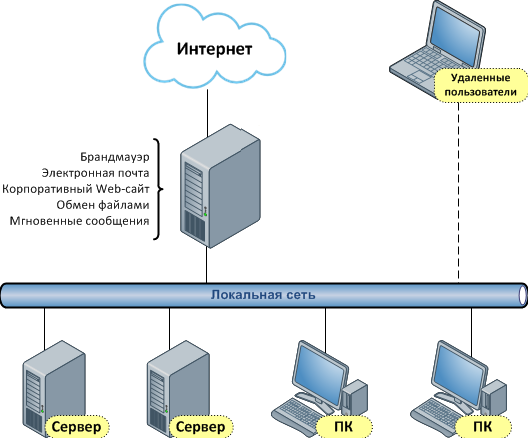
When starting the «simplified client», the user enters their OKTMO code as the LOGIN and gets access only to their own municipality reports.

The "Additional summaries and selections" menu item contains no reports

You need to unpack the QueryAdd.zip file from the query\Additional folder into the same folder.
Data for December of last year (as of January 1 of the current year) is not loading.

You need to load the license for the current year into the program for the previous year.

When loading data for December of last year (as of January 1 of the current year), data for January of the current year (as of February 1 of the current year) is loaded.

The Federal Tax Service sent the files not in January but in February, so the files have the month February instead of January in the date. In the program, in the Information resource data loading window, set the required values in the As of and Reporting month fields.

Did not find an answer to your question?

Leave a request — our specialists will contact you and help you solve any task in the field of information security and automation.

Guaranteed result
Fit to your budget
Comprehensive approach
Certified experts