Tax Revenue Monitoring
Detailed answers on the tax revenue monitoring program: data import and export, report generation, system administration, configuration and updates.
Tax Revenue Monitoring
6 questionsDelivery contents for 2023
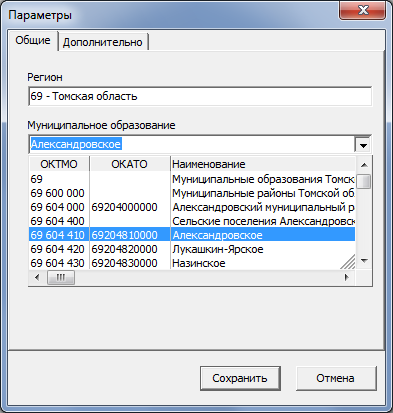
When accepting files, no files are visible in the "File selection" window
You have selected the wrong municipality. The selected municipality is indicated in the bottom left corner of the screen. To set the required municipality, select the menu item Service => Settings, tab General, and choose your municipality from the corresponding list.
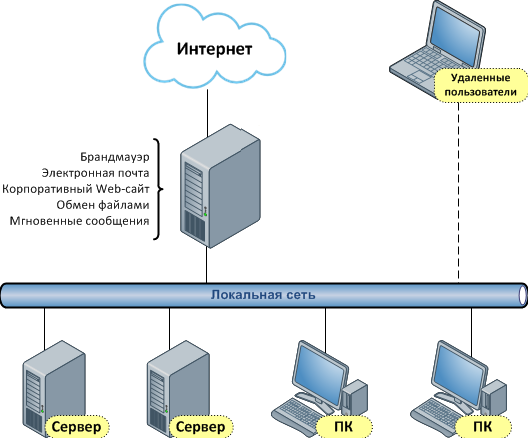
Purpose of the "Simplified client" program
The «Simplified client» is designed to provide users with access to the central database from remote workstations connected to the main local network via dedicated channels.
When starting the «simplified client», the user enters their OKTMO code as the LOGIN and gets access only to their own municipality reports.
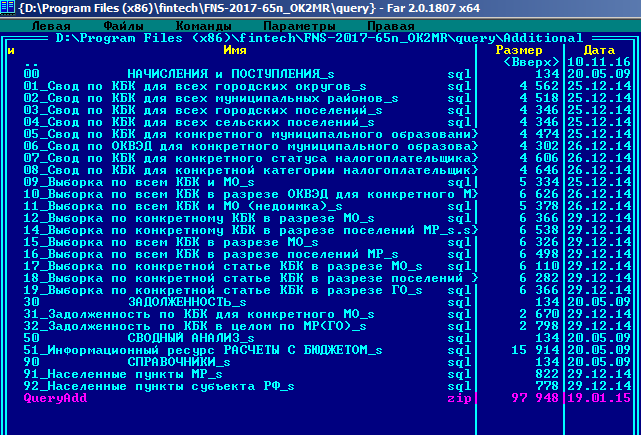
The "Additional summaries and selections" menu item contains no reports
You need to unpack the QueryAdd.zip file from the query\Additional folder into the same folder.
Data for December of last year (as of January 1 of the current year) is not loading.
You need to load the license for the current year into the program for the previous year.
When loading data for December of last year (as of January 1 of the current year), data for January of the current year (as of February 1 of the current year) is loaded.
The Federal Tax Service sent the files not in January but in February, so the files have the month February instead of January in the date. In the program, in the Information resource data loading window, set the required values in the As of and Reporting month fields.
Did not find an answer to your question?
Leave a request — our specialists will contact you and help you solve any task in the field of information security and automation.